Teams & permissions
Give every person exactly the access they need.
Help desk roles and permissions built on your WordPress users. Six ready roles and a permission for every action cover most teams from day one. As you grow, add your own roles, limit who sees which conversations, require single sign-on and keep an audit log of every sensitive change.
Default roles
Six roles, ready on day one
Everyone who works in Cliedesk is a WordPress user with a Cliedesk role. There is no limit on people or teams, and you can compare the roles side by side in Settings → Team → Roles.
| Action | Owner | Admin | Supervisor | Agent | Collaborator | Viewer |
|---|---|---|---|---|---|---|
| See conversations | All | All | All | All | Ones they take part in | All |
| Add internal notes | Yes | Yes | Yes | Yes | Yes | No |
| Reply, assign and change status | Yes | Yes | Yes | Yes | No | No |
| See personal data unmasked | Yes | Yes | Yes | Yes | No | No |
| Reopen, redact, trash and export conversations | Yes | Yes | Yes | No | No | No |
| Manage people and teams | Yes | Yes | Yes | No | No | No |
| Delete conversations permanently | Yes | Yes | No | No | No | No |
| Settings, roles and the audit log | Yes | Yes | No | No | No | No |
| Security settings | Yes | No | No | No | No | No |
-
See conversations
- Owner
- All
- Admin
- All
- Supervisor
- All
- Agent
- All
- Collaborator
- Ones they take part in
- Viewer
- All
-
Add internal notes
- Owner
- Yes
- Admin
- Yes
- Supervisor
- Yes
- Agent
- Yes
- Collaborator
- Yes
- Viewer
- No
-
Reply, assign and change status
- Owner
- Yes
- Admin
- Yes
- Supervisor
- Yes
- Agent
- Yes
- Collaborator
- No
- Viewer
- No
-
See personal data unmasked
- Owner
- Yes
- Admin
- Yes
- Supervisor
- Yes
- Agent
- Yes
- Collaborator
- No
- Viewer
- No
-
Reopen, redact, trash and export conversations
- Owner
- Yes
- Admin
- Yes
- Supervisor
- Yes
- Agent
- No
- Collaborator
- No
- Viewer
- No
-
Manage people and teams
- Owner
- Yes
- Admin
- Yes
- Supervisor
- Yes
- Agent
- No
- Collaborator
- No
- Viewer
- No
-
Delete conversations permanently
- Owner
- Yes
- Admin
- Yes
- Supervisor
- No
- Agent
- No
- Collaborator
- No
- Viewer
- No
-
Settings, roles and the audit log
- Owner
- Yes
- Admin
- Yes
- Supervisor
- No
- Agent
- No
- Collaborator
- No
- Viewer
- No
-
Security settings
- Owner
- Yes
- Admin
- No
- Supervisor
- No
- Agent
- No
- Collaborator
- No
- Viewer
- No
Owners are WordPress administrators and always keep every permission. Supervisors can deactivate only Agents and Collaborators in teams they lead.
Run the team
Everything a growing team needs to stay organised
-
Invite and auto-join
Invite people by email, or let anyone who registers with your company email domain join with a set role once you approve them.
-
Teams
Group people for routing, views and mentions. Each team has a supervisor, members, a team signature and a default send action.
-
A permission for every action
Replying, assigning, merging, redacting and deleting each have their own permission. Without it, the server refuses the action.
-
A permission for every area
Reports, the help center, channels, email, fields and automation each have their own permission. Without it, the area is hidden.
-
Levels for views, replies and tags
Each role has a level: use them, create their own, manage their team’s or manage everyone’s.
-
When someone leaves
Deactivate the person and choose where their open conversations, views and saved replies go. Their WordPress account and history stay.
Fine-grained access
Shape access around how your team really works
-
Custom roles
Start from a copy of a role or a template such as Advisor, Finance, Read-only auditor or Knowledge editor, then tick the permissions.
-
Which conversations they see
All conversations, their teams’ conversations, their own and unassigned, only those assigned to them, or only those they take part in — per role or per person.
-
One permission for one person
Grant or revoke a single permission for one person without making a new role. You can only give permissions you have yourself.
-
View as
Admins and Owners use the help desk as another person for 30 minutes, read-only, to check what they can see. Every preview is in the audit log.
-
Product limits
Limit a person, a team or a role to some products, or set the products new agents see. The person page shows where each limit comes from.
-
Hidden and read-only fields
Hide a conversation field from some roles or teams, or let them see it without changing it.
-
Private teams
Give a team a queue and views that only its members see.
-
Temporary support access
Let the Cliedesk support team sign in as a Viewer or Agent for a set time, 72 hours by default. Access ends by itself, and everything they do is logged.
Agencies
Let a client’s people in, without showing them other clients
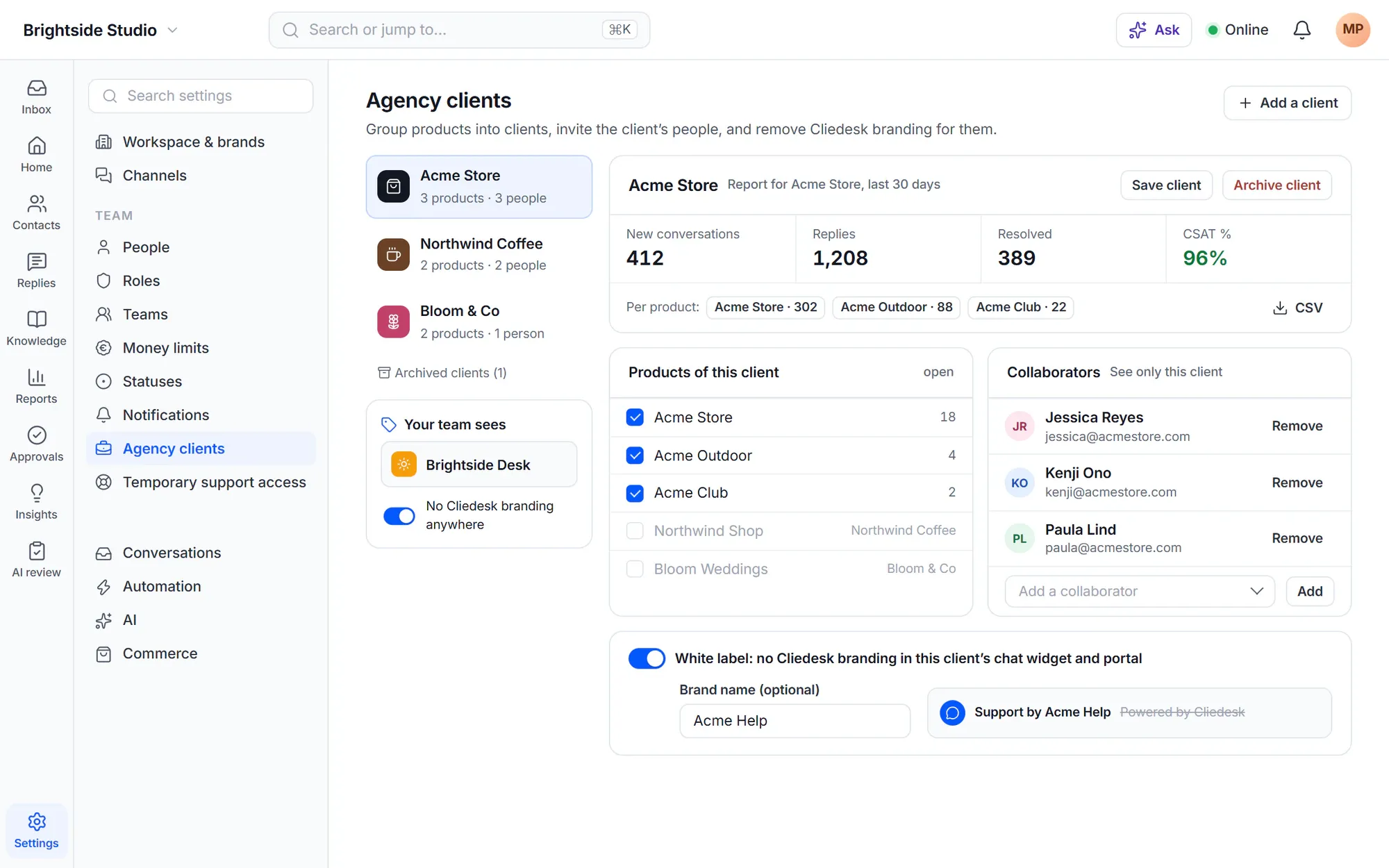
Client collaborators see only their client’s products
With agency mode, group products into clients and invite the client’s own people as collaborators. They see only that client’s conversations, contacts, search and reports, and their access follows when you change the client’s products.
- A product belongs to one client only
- Owners and Admins always see every product
- Removing a collaborator also removes their help desk role
- Archive a client and their collaborators lose access; conversations stay
Sign-in rules
Decide how your team signs in, and from where
Agents sign in through WordPress, so the single sign-on or social sign-in plugin you already use works for the help desk too.
-
Required single sign-on
Connect your identity provider over SAML 2.0 or OpenID Connect, then require single sign-on for the roles you choose. Others get a 24-hour warning before their password stops working.
-
Roles from identity-provider groups
Map a group in your identity provider to a role and teams. Cliedesk applies the rules at every single sign-on; Owners keep their role.
-
IP allowlist
Let staff open Cliedesk only from your own addresses or ranges. The website, the chat widget, webhooks and API keys keep working from anywhere.
-
Required two-factor sign-in
Require two-factor for everyone with help desk access, or for administrators only, through your site’s two-factor plugin. People get 14 days to set it up.
-
Session rules
Set the longest sign-in (12 hours by default) and an idle sign-out. Everyone can see their signed-in devices and sign out the others.
-
Emergency lockdown
One switch ends every session except Owners’ and Admins’ and keeps everyone else out until you turn it off.
Safeguards
Changes to access are hard to get wrong, and easy to trace
- The audit log lists every sensitive change, export and sign-in. Entries cannot be changed or deleted.
- Role changes, deactivations, conversation moves, View as previews and temporary support access are all written to the audit log.
- Changing roles or security settings asks for the person’s password again.
- Nobody can change their own roles, and Owners always keep every permission.
- A new single sign-on or IP allowlist setting turns back by itself after 10 minutes unless you confirm it from a second sign-in.
- Before single sign-on is required, Cliedesk checks that an administrator with two-factor can still sign in with a password if the identity provider is down.
In the free plugin: unlimited people and teams, the six default roles with a permission for every action, deactivation with handover, required two-factor, session rules, emergency lockdown and the audit log. Cliedesk Pro adds: custom roles, access scopes, single permissions per person, View as, product limits, hidden and read-only fields, private teams, temporary support access, required single sign-on with group-to-role mapping and the IP allowlist.
Compare plansFrequently asked questions
Can’t find your answer? Search the docs or ask us.
Search the docs →Get support →Is there a limit on agents or seats?
No. Every person is a WordPress user with a Cliedesk role, and there is no limit on people or teams in any edition.
Can I create my own roles?
Yes, with Cliedesk Pro: copy a role or start from a template, then choose its permissions, which conversations it sees, its products and its levels. In the free plugin you can read each default role and reset it.
Does our existing single sign-on plugin work?
Yes. The help desk uses the normal WordPress sign-in, so any SSO or social sign-in plugin for WordPress also signs agents in. Requiring single sign-on for some roles, with SAML 2.0 or OpenID Connect, comes with Cliedesk Pro.
What happens when someone leaves the team?
Deactivate them in Settings → Team → People and choose where their open conversations go: a person, a queue or unassigned. They lose access to Cliedesk; their WordPress account, messages and history stay, and the move is in the audit log.
What happens to roles and sign-in rules if Pro is turned off?
Custom roles are WordPress roles and keep their permissions, but access scopes and hidden-field rules stop applying until Pro runs again. Required single sign-on and the IP allowlist stay on when the licence ends, and are removed after a warning only if you deactivate Cliedesk Pro.
Grow the team without losing track of who can do what.
Start free with unlimited people, six ready roles and the audit log, then add custom roles and single sign-on with Cliedesk Pro.