For membership and course sites
Help members and students with their account in view.
Customer support for membership sites and online courses. Cliedesk reads memberships, subscriptions and course progress from the plugins you already run. Your team sees who is asking and what they have access to — and can change it from the conversation.
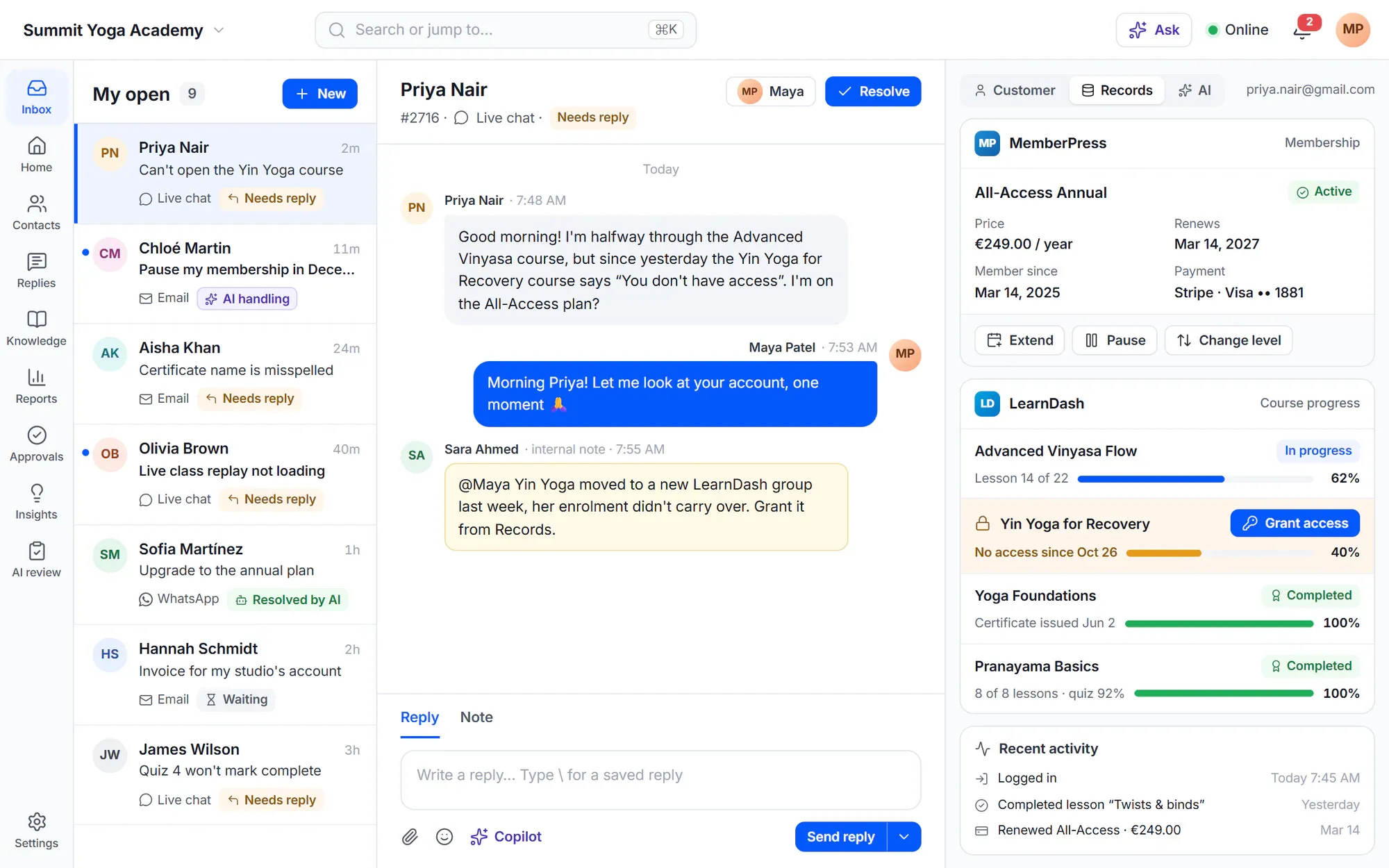
Member support is account support.
- ““I paid but I can’t open the course” — and we have to log into three plugins to check.”
- “Cancellations go through without anyone offering a pause first.”
- “We can’t tell members from free sign-ups when a question comes in.”
- “Students ask the same login and progress questions every term.”
A day with Cliedesk
From “I can’t access my course” to back in class
- 1
They ask while signed in
The member writes from the chat widget or the customer portal with their WordPress account, so you know who they are.
- 2
You see their account
Their membership, subscription and courses — with status, progress and enrolled dates — show beside the conversation.
- 3
You fix it there
Extend the membership, resume a paused subscription or send a payment link for a failed renewal. Each change shows what will happen before you confirm.
- 4
It is recorded
The change is saved in the plugin itself, with a note on the order and an entry in the conversation timeline.
Built for members and students
Your membership and course plugins, inside the help desk
-
Memberships
MemberPress, Paid Memberships Pro and WooCommerce Memberships. Extend by some days, pause where the plugin can, or cancel.
-
Courses
LearnDash, LifterLMS and Tutor LMS: status, progress, enrolled and completed dates. Reset progress where the plugin can, or remove access.
-
Subscriptions
WooCommerce Subscriptions: skip the next renewal, pause for a month, resume, or email a payment link for a failed renewal.
-
Save cancellations
Before a subscription is cancelled, Cliedesk offers a skip, a pause and then a retention discount — one at a time.
-
Support by plan
Decide who may ask for support: everyone, customers only, or by plan — and give your top plan a faster reply target.
-
Self-service first
A help center and a customer portal where members see their requests and records, and sign in with their WordPress account.
✦ The AI angle
An AI agent that answers the routine — and saves the cancellation
The AI agent answers login, access and course questions from your help center. It can skip or pause a subscription within the rules you set, and when someone wants to cancel, it offers the same steps your team would: skip the next renewal, pause, then a discount.
Meet the AI agent- Members confirm every cancellation themselves
- A signed-out member gets an email code before seeing account details
- Hands off to your team with a summary when it should
In the free plugin: membership, subscription and course records beside each conversation, the customer portal and the help center. Cliedesk Pro adds: the actions to change memberships, subscriptions and courses, cancellation offers, support by plan and the AI agent.
Compare plansFrequently asked questions
Can’t find your answer? Search the docs or ask us.
Search the docs →Get support →Which membership and LMS plugins work with Cliedesk?
MemberPress, Paid Memberships Pro, WooCommerce Memberships, WooCommerce Subscriptions, LearnDash, LifterLMS and Tutor LMS. Each part shows only while its plugin is active.
Is the member data copied into Cliedesk?
No. Records are read live from the plugins, found by the customer’s WordPress account and email. Changes you make are saved in the plugin itself, so you see them in its own admin too.
Can a membership be paused?
Where the plugin supports it. Paid Memberships Pro cannot pause a membership, and cancelling there also stops its recurring payments.
Can only members start a chat?
Yes. You can let everyone start a conversation in the widget, only signed-in customers, or nobody (help articles only).
Answer members with their account in view.
Install Cliedesk on your membership site and the records appear on their own — there is nothing to set up.