Reports
Know what’s happening — and why.
Help desk reporting and CSAT, done honestly. Every number says how it is counted and opens the conversations behind it. CSAT is on from day one, and every report follows each person’s access.
Support numbers nobody trusts are worse than no numbers.
- “Our “resolution rate” counts conversations the customer reopened the next day.”
- “I export to a spreadsheet every Monday just to see first response times.”
- “We have CSAT, but no idea which agent or topic is behind a bad week.”
- “The report says 40 — the inbox shows 37.”
✦ Definition
Episode
Cliedesk counts episodes. An episode runs from the first message until the conversation is resolved, so a reopened conversation counts as two. “Came back within 7 days” shows how often customers had to write again — the number that keeps a resolution rate honest.
How it works
Dashboards that match your inbox, down to the conversation
Dashboards
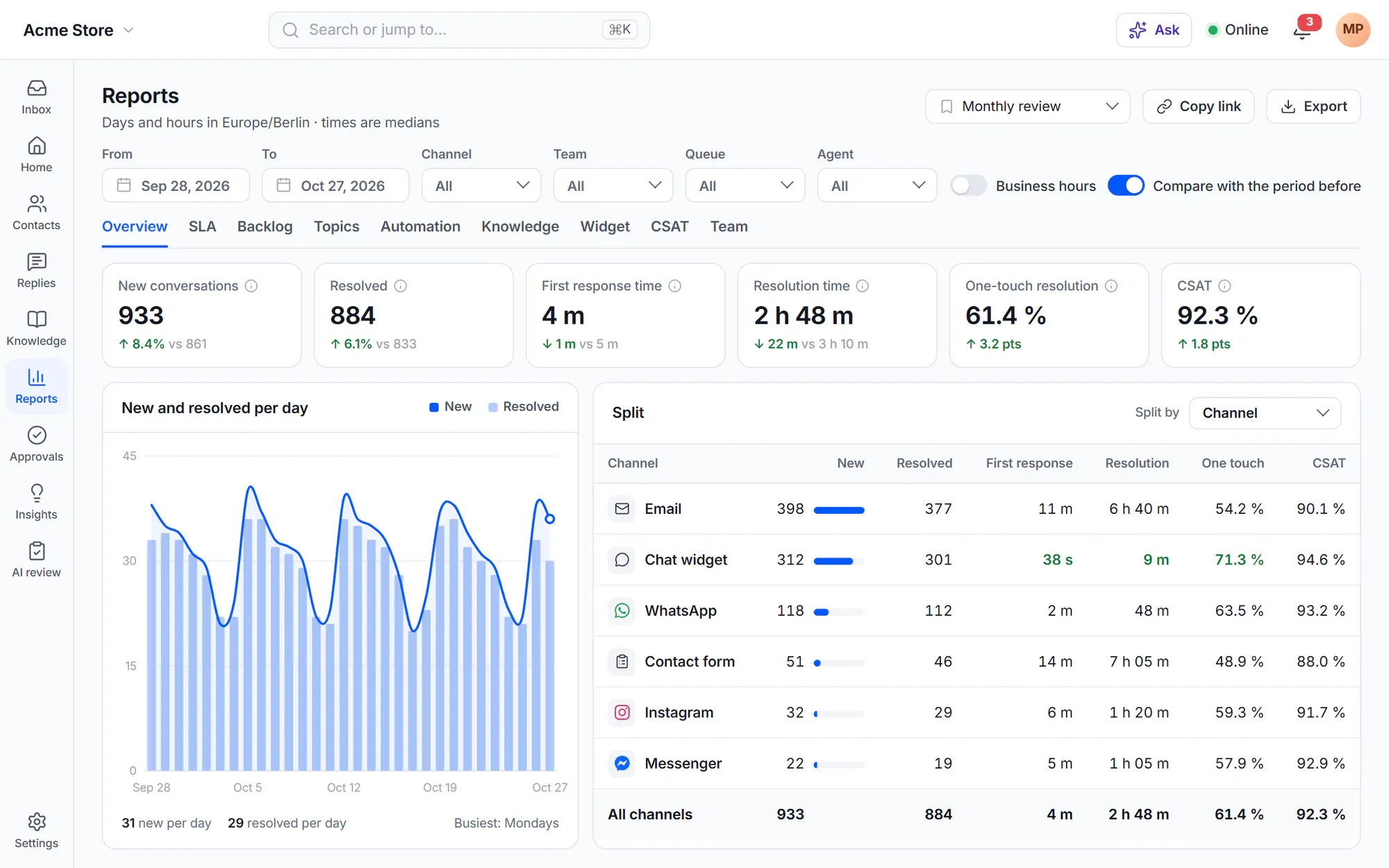
Overview, backlog, automation, knowledge, widget and CSAT
Reports use the same conditions as the conversation list, so the counts equal the list with the same filters. Times are medians by default, can count business hours only, and every number explains how it is counted when you hover over it.
- Filter by channel, team, queue and agent; split by channel, status, priority, type, product, language and more
- Backlog by status, age and queue, and open at the end of each day
- Articles that avoided conversations, and searches without results
- Widget loads, opens and chats per page — with no third-party analytics script
Team, topics and SLA
See who, what and when — not just how many
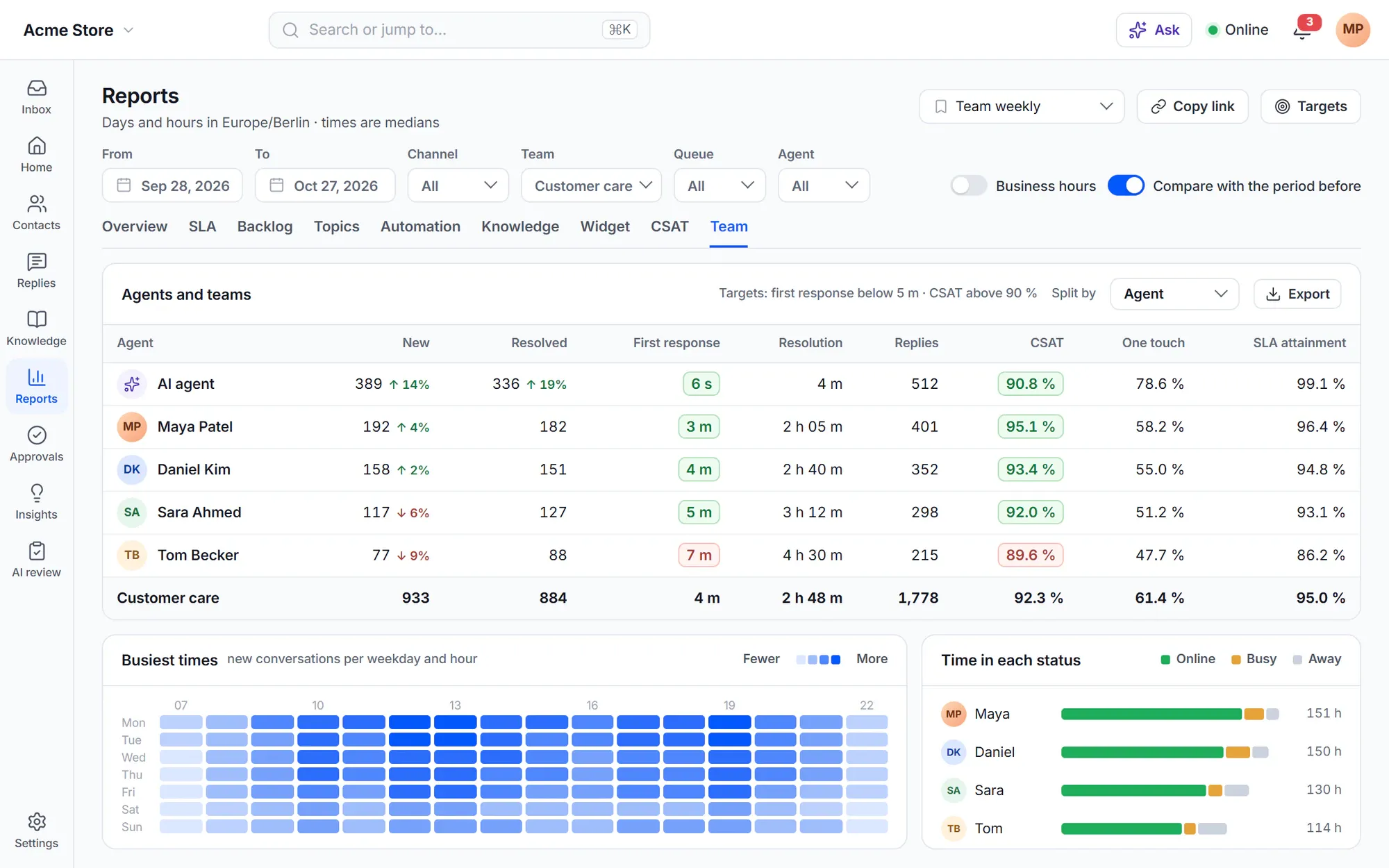
Compare every number with the period before, set targets that turn key numbers green or red, and find your busiest hours on a weekday grid. The Team tab shows each agent, team and queue; the Topics tab shows what customers write about and how it changes.
- Click any number to list the conversations behind it, and export them
- Time in each status per agent
- SLA attainment per policy, team, agent and topic
- Saved views and share links for your team
CSAT and surveys
CSAT on by default — plus NPS, CES and microsurveys
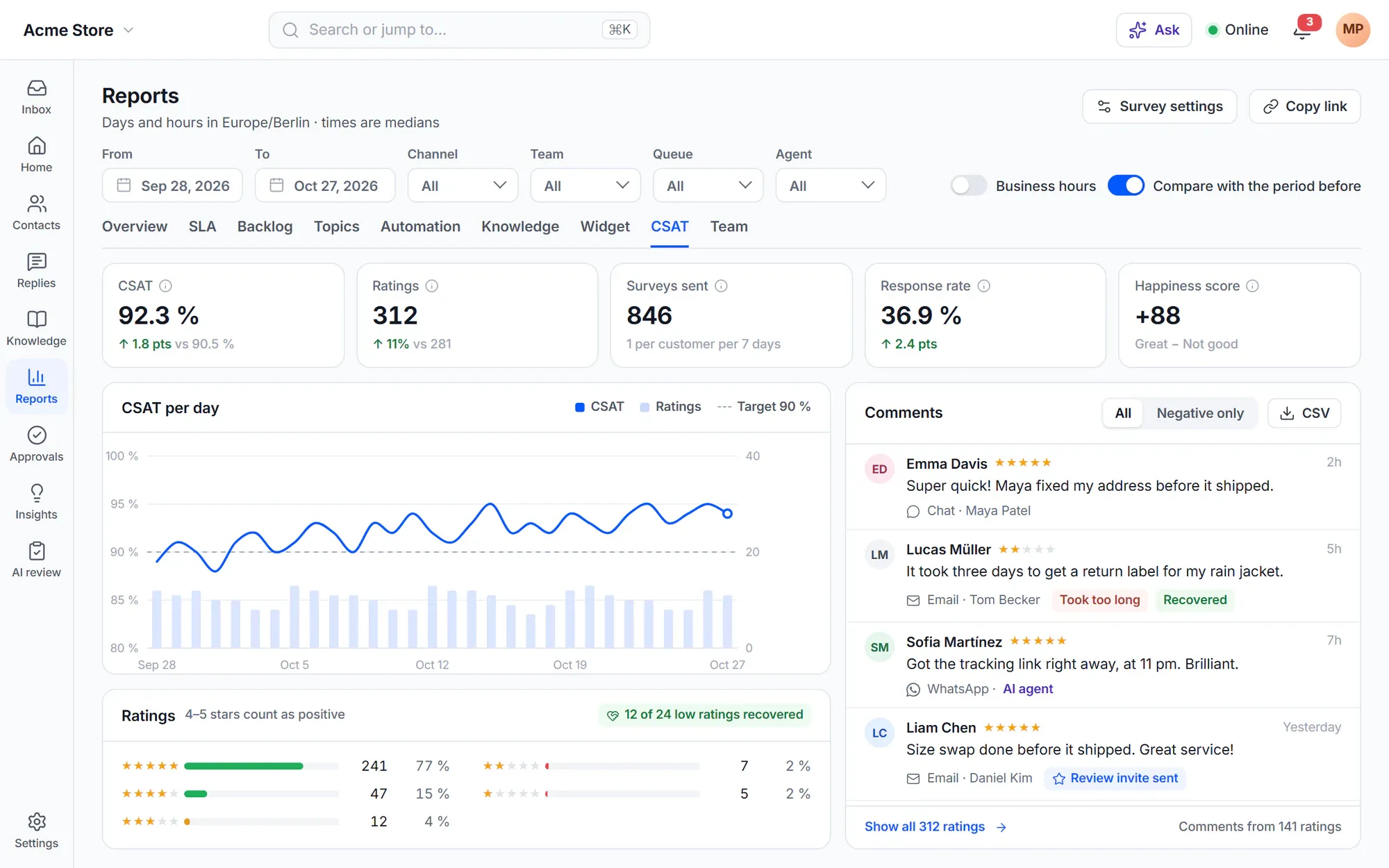
Customers rate the conversation after it is resolved: by email, in the chat widget or in the portal, on faces, stars, numbers or thumbs. A low rating asks for a reason and a comment. Customers get at most one survey in 7 days, and no survey for spam, tasks or internal conversations.
- Great / Okay / Not good under each email reply, and a Happiness score
- NPS by email on a schedule, CES with or instead of CSAT
- Recover unhappy ratings with a ready rule
- Invite customers with a 5 of 5 rating and a delivered order to leave a review
Your own dashboards
Ask your data in plain words
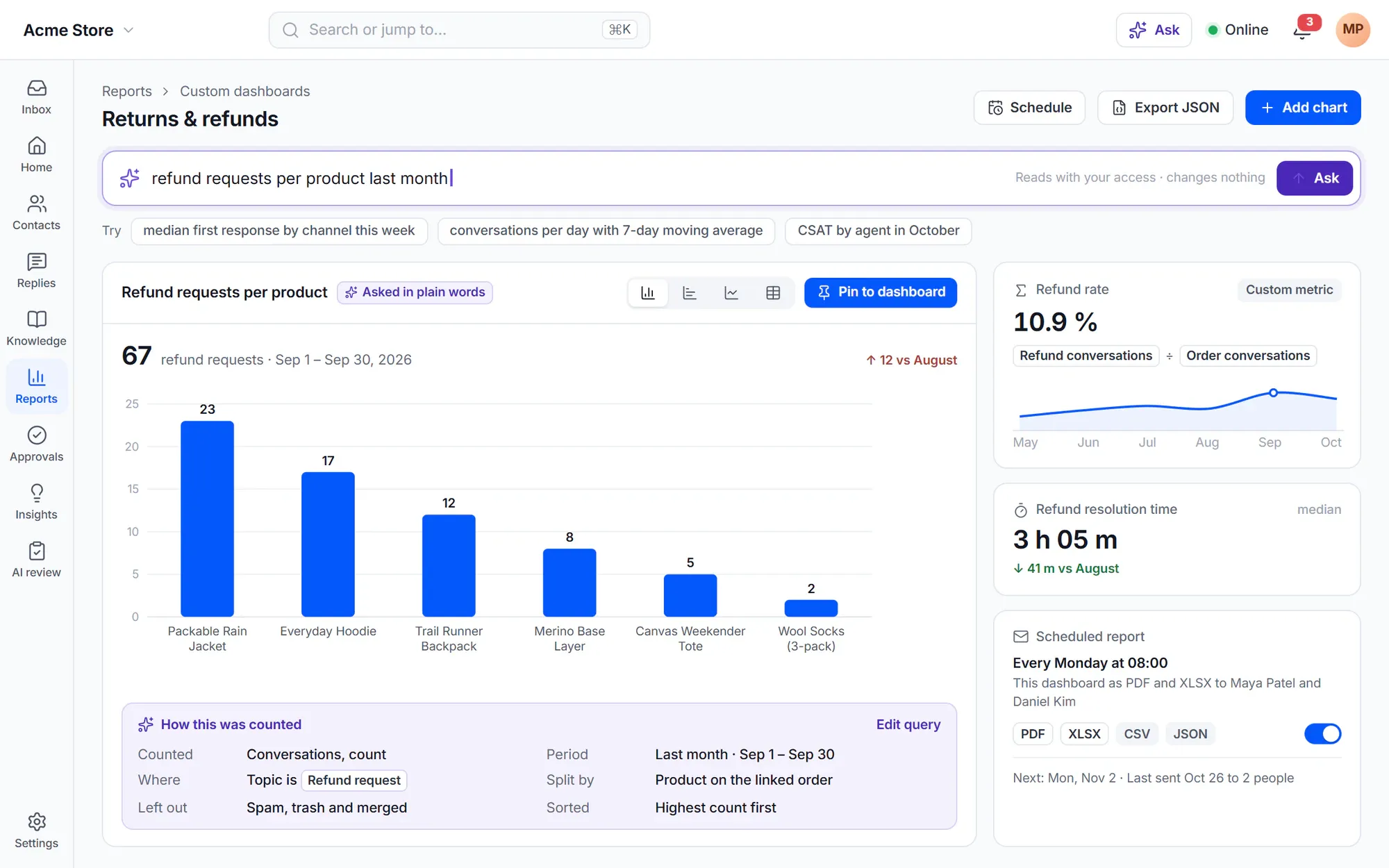
Type a question like “refund requests per product last month” and the AI turns it into a chart, with the query in plain words below it. Pin it to a custom dashboard next to your own charts and metrics. The data is read with your access, and nothing is changed.
- Charts with count, sum, average, median, percentiles and moving averages
- Custom metrics such as refund conversations ÷ order conversations
- Scheduled reports by email as PDF, CSV, XLSX or JSON
- Dashboards export and import as JSON between sites
AI you can measure
Numbers for the AI — and from the AI
-
AI resolutions
Resolved episodes as AI confirmed, contained or assisted. A customer who comes back about the same issue within 7 days moves the result down a step.
-
AI agent report
Coverage, success rate, CSAT, cost per resolution and time saved per topic, playbook and channel — and where improving would help most.
-
AI CX score
Every resolved conversation gets a score from 1 to 5 with a short reason, shown next to CSAT.
-
AutoQA
Your scorecard applied to people and the AI agent alike, with reasons and quotes, and low scores sent to review.
-
Alerts and trends
Spikes by topic, product or channel compared with the same hour in past weeks, and weekly trends that are too big to be chance.
-
Weekly digest
Top changes, new topics, AI resolution rate, AI cost, CSAT and CX score against the week before, each line linked to its evidence.
Commerce numbers
Support numbers your shop understands
With WooCommerce, the Overview shows contacts per 100 orders. Revenue shows orders placed within days after a chat or an email reply, net of refunds, and the refunds, credits and coupons support gave. Set a monthly support cost to see the cost per conversation.
WooCommerce support- Revenue credited to the person or the AI who replied last
- Every money action in one ledger
- Exports as documented datasets, also with WP-CLI
In the free plugin: the Home, Overview, Backlog, Automation, Knowledge, Widget and CSAT dashboards with filters and splits, and CSAT surveys by email, chat and the portal. Cliedesk Pro adds: team, topic and SLA reports, comparisons, targets, custom dashboards, scheduled reports, NPS and CES surveys, and the AI and revenue reports.
Compare plansFrequently asked questions
Can’t find your answer? Search the docs or ask us.
Search the docs →Get support →How do you count a resolved conversation?
Per episode: from the first message until it is resolved. A reopened conversation counts as two resolved episodes, and “Came back within 7 days” shows how often customers wrote again after a resolution.
Why medians instead of averages?
One conversation that waited a week can make an average look terrible. Medians show the typical experience. You can switch to averages with one option.
Can agents see each other’s ratings?
Only if you want. With “Hide individual ratings and comments from agents” on, agents see no single ratings or comments, and only their own row in the agent table. Supervisors and administrators still see everything.
Do reports send data to a third-party analytics service?
No. Reports are counted in your WordPress site. The widget report keeps only the page path, and no third-party analytics script runs.
Can I get the data into my BI tool?
Yes, with Cliedesk Pro. Export conversations, episodes, messages and CSAT ratings as documented datasets, use WP-CLI, or send them as JSONL files to S3-compatible storage — after the first run, only what changed.
Can reports be emailed to me?
Yes, with Cliedesk Pro. Scheduled reports send a dashboard as PDF or CSV, or an export of conversations, on the day and hour you choose.
Numbers your team will actually believe.
Install the free plugin for dashboards and CSAT from day one, then add team, SLA and AI reports with Cliedesk Pro.