Live chat
Live chat that knows your customer — and loads in about 35 KB.
A WordPress live chat plugin for support teams. Turn on the chat widget and it appears on your site with no code. It knows who is signed in and what is in their cart, tells visitors honestly when you will answer, and takes text, files and voice notes. The chat widget loads in about 35 KB (gzipped), after the page is idle.

Most chat widgets are built to sell. Yours should help.
- “Our chat plugin slows down every page, even for visitors who never open it.”
- “Visitors write at night and leave thinking nobody will ever answer.”
- “The agent asks for the order number the customer is looking at.”
- “Customers want to explain the problem out loud, not type three paragraphs.”
How it works
A widget for support, not for pop-ups
Set up in minutes
On your site with no code — only where you want it
Switch the widget on and it shows on your site by itself. Choose the pages, post types, roles, customer segments and devices it shows for; where it is hidden, nothing loads. Spaces for Home, Messages and Help, plus Home cards, decide what visitors see first.
- Search first or Form first, set per page address
- Every text editable per language; WPML and Polylang switch the widget language
- Live preview on desktop and mobile, as a guest or signed-in visitor
- An embed code for your other websites, limited to the sites you list

Honest expectations
Visitors always know when you will answer
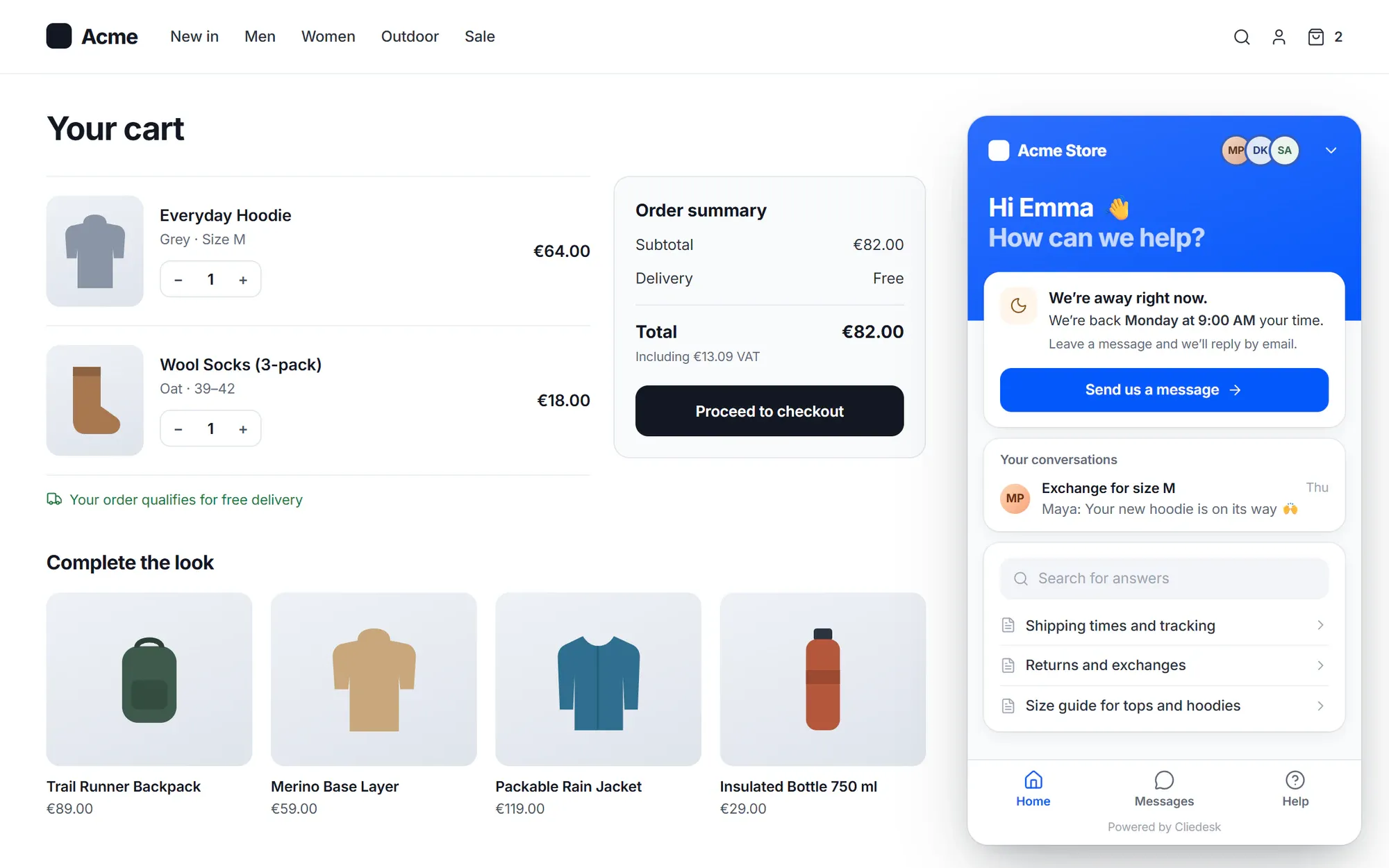
Choose when live chat is on: always, while an agent is online, or during business hours. While you are away the widget shows the next opening time in the visitor’s time zone and takes a message with a topic. During business hours, your reply promise shows.
- Place in line: “You are number N in line. About M min.”, with Email me instead
- Asks for an email only when nobody has answered for 2 minutes, by default
- Replies the visitor has not seen go out as one email after 3 minutes, with a link back to the conversation
- Visitors can email themselves the chat with Email me this chat
Voice messages and files
Let customers say it — and answer the same way
In browsers with a microphone, visitors record a voice note in the widget (up to 120 seconds by default) and send it with their message. Agents play it back in the conversation and can answer with a voice note of their own, which the customer plays in the widget.
- Up to 5 files per message, 20 MB each, with the real file type checked
- Images, PDFs, audio and video preview in the conversation
- Files are stored privately and open through links that expire after 15 minutes
- Agents can edit a sent chat reply; earlier versions are kept

Request forms
A request form for questions that are not a chat
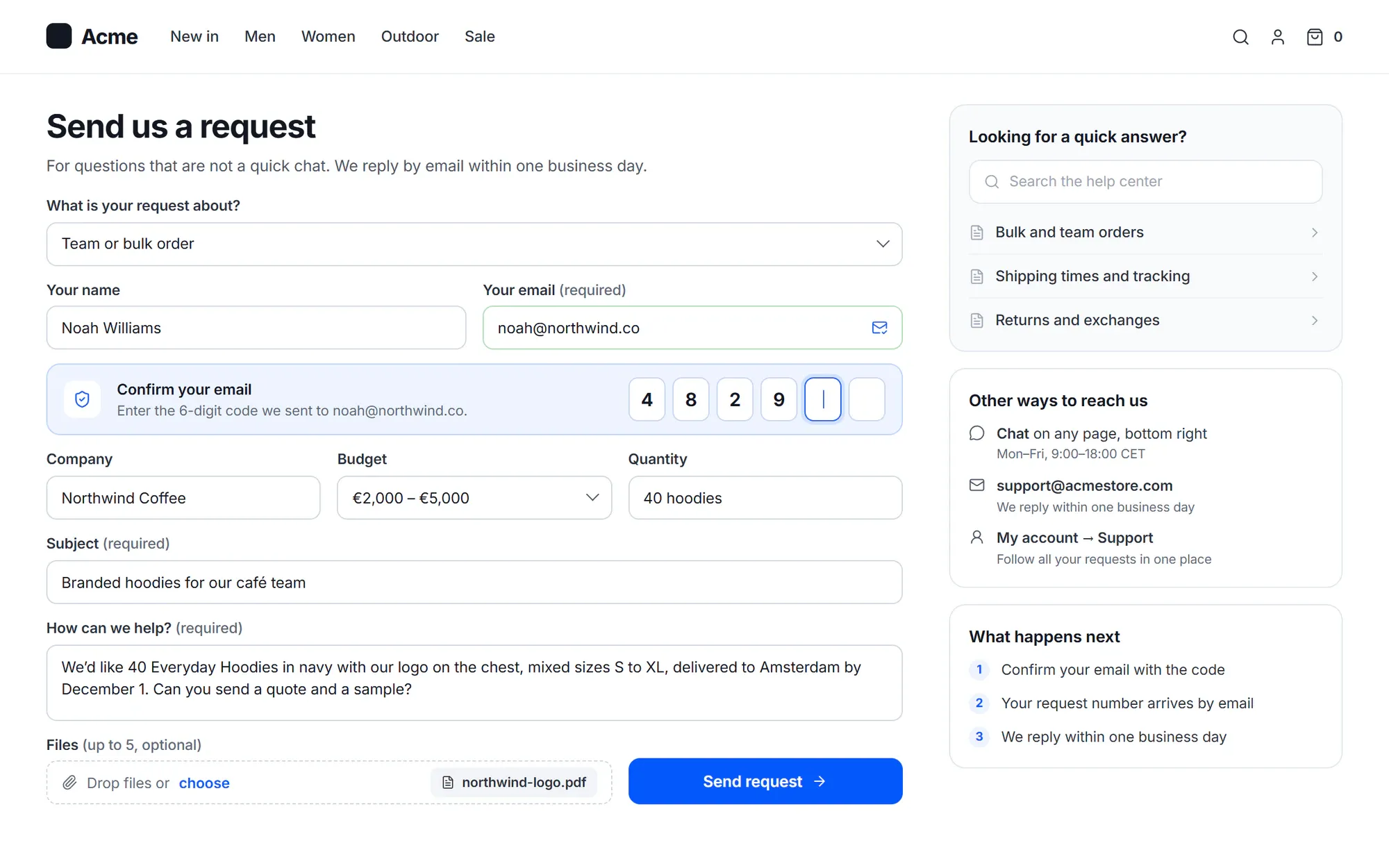
The request form works at /support/request/ without setup, as a block and as a shortcode, and in the widget with Form first. Each submission becomes a conversation in the same inbox. Submissions from Contact Form 7, WPForms, Gravity Forms, Fluent Forms and Formidable can become conversations too.
- Fields of the conversation type, mapped to the conversation
- Guests confirm their email with a 6-digit code
- Mapped contact fields, such as company and budget, are saved on the contact
Proactive messages
Help at the moment it is needed — never spam
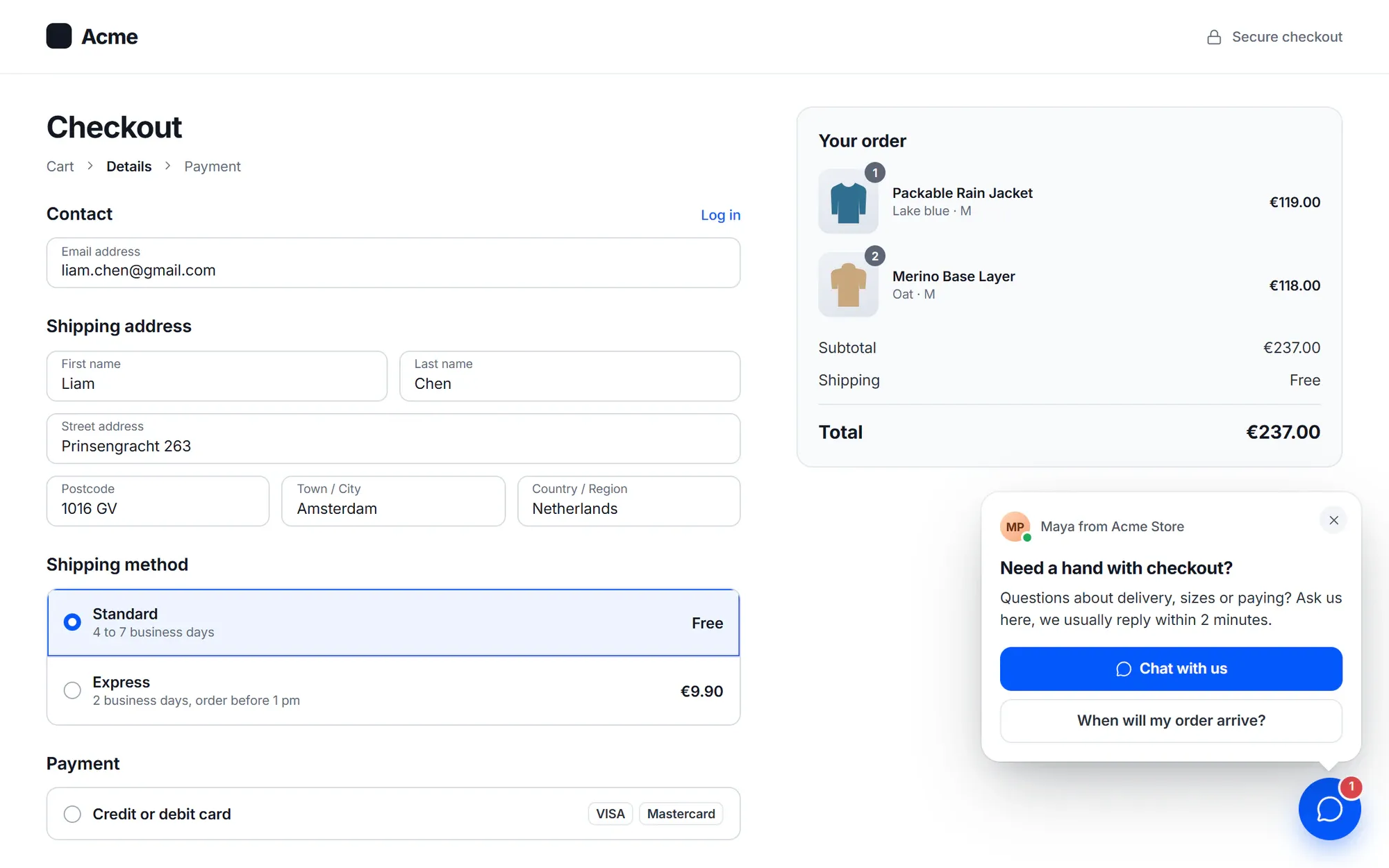
Start with a recipe such as “Checkout help after 60 seconds”, or set your own triggers, including cart value, a failed payment and exit intent on cart and checkout pages. Show a bubble, a card or a banner, with buttons.
- Default limits: 2 a day, 5 a week, 3 minutes apart and none for 24 hours after a closed chat
- See live visitors, and send notices to affected customers after an approval
Built in
Everything a support chat needs
-
Checkout help
A message sent from checkout stores the checkout step and the payment error the page showed.
-
Shop context
Agents see the product page the visitor is on and their cart total next to the chat.
-
Privacy modes
Store nothing until the visitor opens the chat, or wait for consent through the WP Consent API. The widget never uses cookies.
-
Protected
Only your sites can start a session, with 60 calls a minute per IP address and a bot check.
-
Seen markers
Optionally show visitors when their message was seen.
-
Accessible
Built to WCAG 2.2 AA: automated axe checks, keyboard and reflow tests on every screen.
✦ AI in live chat
An AI agent that answers first — and acts in the widget
Let the AI answer before a person, with replies that stream in as they are written and status lines like “Looking up your order…”. It can open a page or checkout, prefill a form, add a product to the cart or apply a coupon it gave in the chat. You choose for each tool: runs on its own, a person approves, suggest only, or off.
Meet the AI agent- Voice notes are transcribed, so the AI and your team can read them
- Typing shows instantly through a push service
- Hands off to your team with a summary
WordPress-native
Made for WordPress and WooCommerce
- No code: the widget appears once you switch it on
- Knows signed-in customers from their WordPress login
- Follows the page language set by WPML or Polylang
- Searches your help center articles inside the widget
- Works with WooCommerce cart, checkout and order received pages
- Cliedesk never stores the visitor’s IP address
In the free plugin: the chat widget with voice notes and files, live chat hours and away messages, place in line, checkout help, privacy modes and the request form. Cliedesk Pro adds: proactive messages, AI answers first with widget tools, voice note transcripts, instant typing, and conversations from Contact Form 7, WPForms, Gravity Forms, Fluent Forms and Formidable.
Compare plansFrequently asked questions
Can’t find your answer? Search the docs or ask us.
Search the docs →Get support →Will the chat widget slow down my site?
The chat widget loads in about 35 KB (gzipped), after the page is idle. On pages where you hide it, nothing loads at all.
Do I need to add code?
No. Switch the widget on and it appears on your WordPress site. For a site that does not run Cliedesk, copy the embed code and list that site in the settings.
Can customers send voice messages?
Yes. In browsers with a microphone, customers record a voice note in the widget — up to 120 seconds by default — and agents play it back and can answer with a voice note. With Cliedesk Pro, voice notes are also transcribed.
What happens when nobody is online?
The widget says you are away and shows the next opening time in the visitor’s time zone. The visitor leaves a message with a topic and an email address, and gets your answer by email with a link to the conversation.
Does the widget use cookies?
No. You can also have it store nothing until the visitor opens the chat, or start only after the visitor agrees in a cookie banner that uses the WP Consent API.
Put a support chat on your site in one click.
Install the free plugin, switch on the widget and answer your first chat from /desk.