Email support that threads, routes and replies like it should.
Email ticketing for WordPress: customer emails become conversations in your shared inbox, and your replies go out from your own address with a delivery log that never pretends. Connect support mailboxes, Gmail, Microsoft 365 or the email provider you already use.
WordPress email was never built for support.
- “Our replies land in spam and we only hear about it weeks later.”
- “The plugin says “sent” — the customer never got anything.”
- “Every reply drags along five screens of quoted history and signatures.”
- “We forward emails to each other just to get a second opinion.”
How it works
From the first email to a delivered reply
Support mailboxes
Every support address in one inbox
Connect mailboxes over IMAP, checked every 2 minutes, or connect Gmail, Google Workspace and Microsoft 365 with their own sign-in, checked every minute. Your replies also appear in the mailbox’s Sent folder. Forwarded addresses and wildcard addresses work too.
- Import old mail from the last 12 months when you connect a mailbox
- A plus address (support+billing@) can fill a conversation field
- Incoming email through the inbound routes of Brevo, SendGrid, Mailgun, Resend, Amazon SES and Postmark
- Forward a customer’s email to support to create a conversation for the original sender

Clean, safe threads
Read the message, not the noise
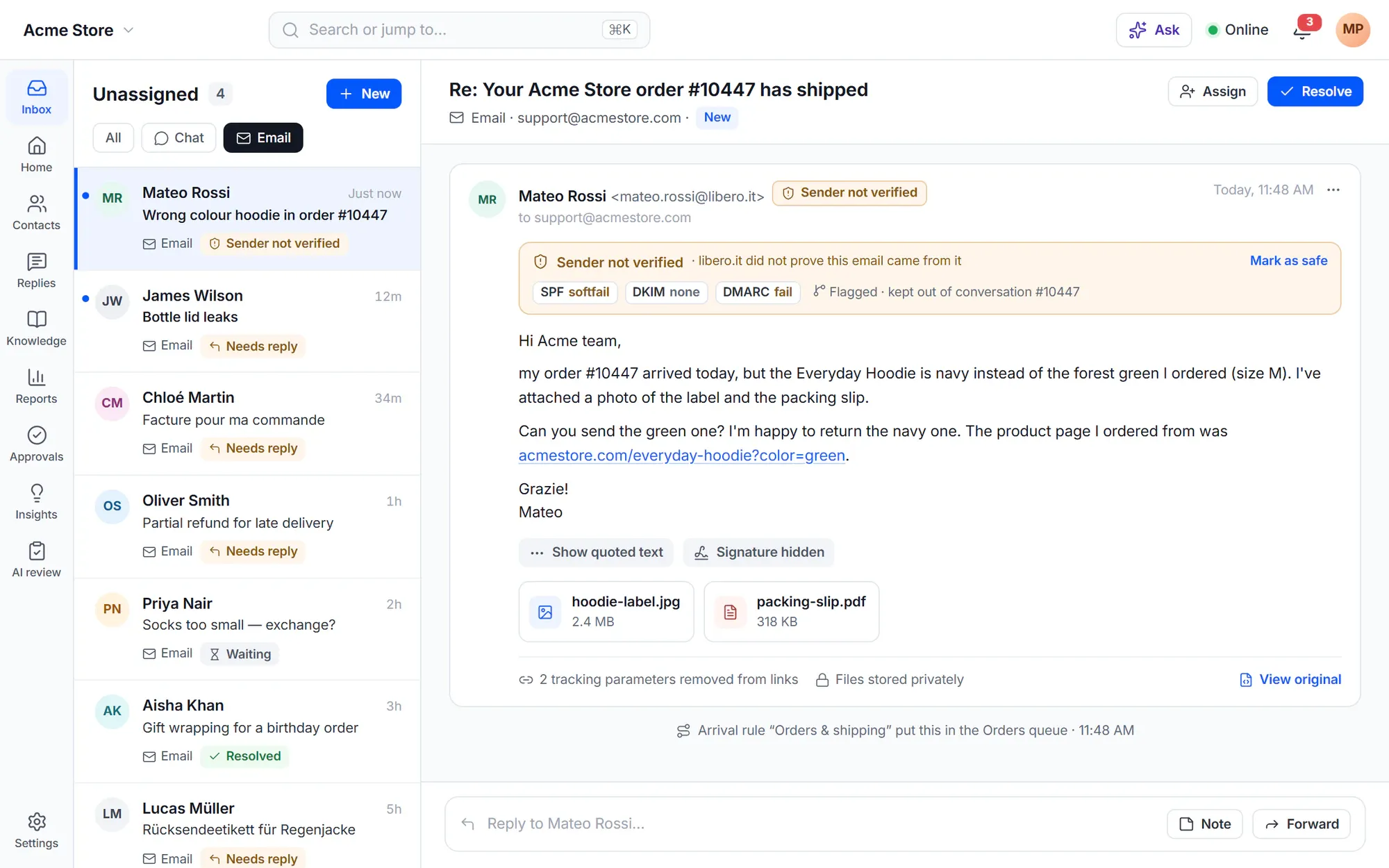
Quotes and signatures are folded away. Show quoted text opens the history when you need it, and View original shows the email exactly as it arrived for 30 days. Customers answer by email and the answer joins the right conversation.
- SPF, DKIM and DMARC results on every incoming email: flag it, put it in Spam or do nothing
- A forged reply never joins the real conversation
- Tracking parameters such as utm_* and fbclid are removed from links
- Incoming files up to 25 MB each and 40 MB per email, stored privately
Sending you can trust
A delivery log that tells the truth
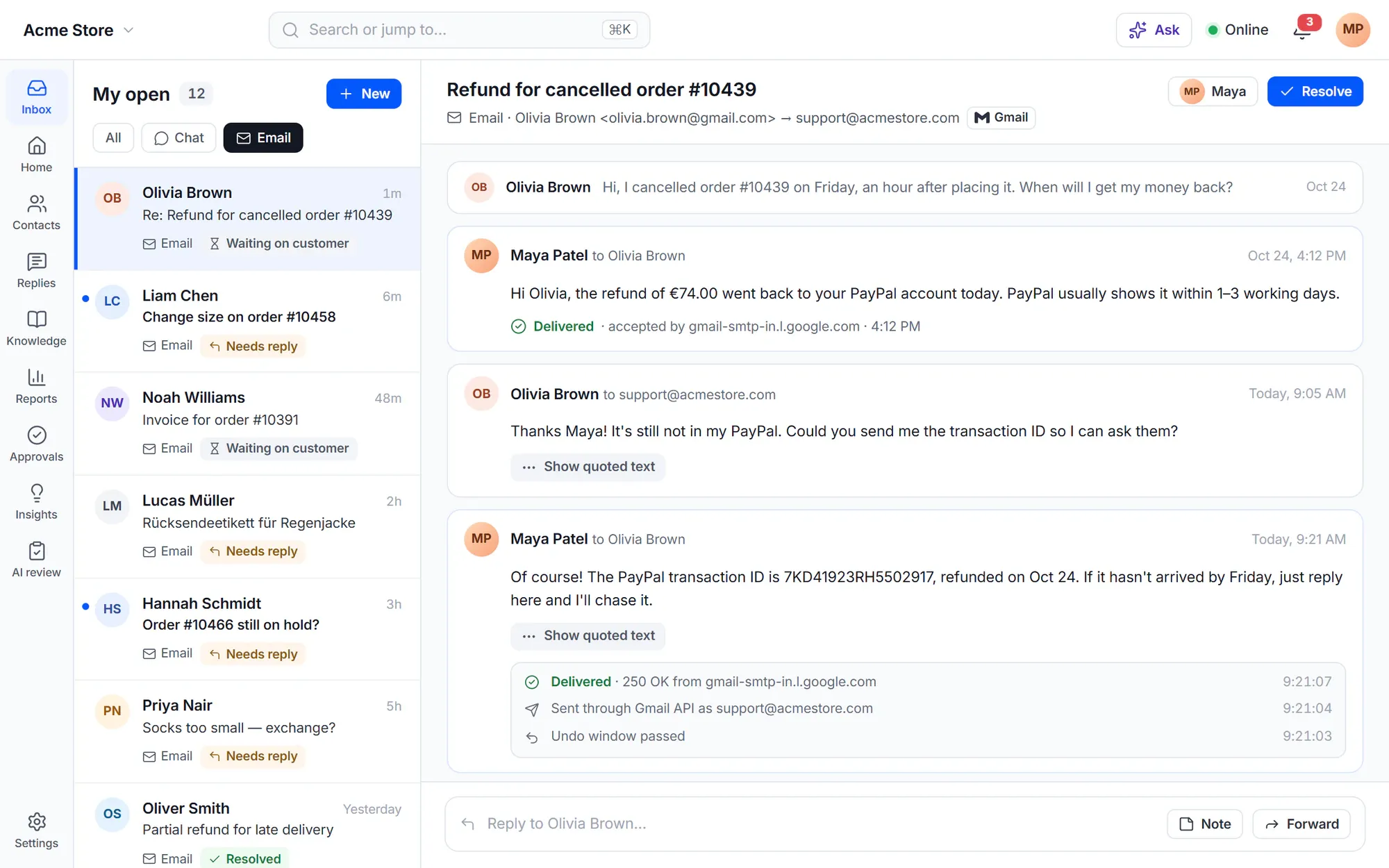
Send through WordPress mail or your SMTP connection, with a test email to check it. Every email shows Queued, Sent, Not sent or Delivery uncertain, and a reply that failed stays visible in the conversation with Retry, Edit and resend, or Discard.
- Sending modes On, Paused and Test — for setup and staging
- Blocked addresses, with the reason
- Hard bounces block an address; 3 soft bounces in 7 days block it for 30 days
- Attachments up to 10 MB are attached; larger files go as links for 30 days

Deliverability check
Land in the inbox, not in spam
The deliverability check looks at SPF, DKIM, DMARC and MX for your sender domain and shows the exact record to add when something is missing. It checks again every week and sends an alert when a domain starts or stops failing.
- Sender as “Agent at brand”, from an address on your own domain
- HTML and plain-text email layouts with tokens
- System emails you can edit

Email providers
Works with the email service you already use
Send through a provider’s API and receive its delivery events. Cliedesk never sends an email twice and never shows a failed email as sent.
Email providers
- MailBridge
- Brevo
- SendGrid
- Mailgun
- SendLayer
- Resend
- Amazon SES
- Postmark
- Emailit



Mailboxes and sending
- Gmail and Google Workspace
- Microsoft 365
- Any IMAP mailbox
- SMTP
Built in
The email details support teams ask for
-
Reply to everyone
People the customer copied in get your reply; your own addresses are left out.
-
Acknowledgements
“We got your email”, at most once per customer and product in 24 hours, never to auto-replies or no-reply senders.
-
Archive copy
Every email to customers can also go to an archive address as a hidden copy.
-
Side threads
Email a supplier or courier about a conversation. The customer never sees it.
-
Answer notifications by email
Reply to a notification email and it becomes your reply; write #note to add a note instead.
-
WooCommerce order emails
Replies to WooCommerce order emails land in the order’s conversation.
✦ AI in email
The AI answers email, too
The AI agent answers email from your help center with the source links inline, and the copilot drafts, summarises and translates long threads for your team. When a new email may be the same issue as another recent conversation of the customer, the AI offers Merge or Split off — nothing moves until you choose.
Meet the AI agentWordPress-native
Email that starts with WordPress
- Works with WordPress mail out of the box; add SMTP when you are ready
- Customers answer in the customer portal on your site from a link in every email
- Credentials are kept encrypted in your WordPress database
- Safe mode holds outbound email on a copy of your site
- Setup Health shows mailbox and sending problems with the fix
In the free plugin: sending email through WordPress mail or SMTP, the delivery log, the deliverability check, email layouts and system emails — customers answer in the portal. Cliedesk Pro adds: support mailboxes (IMAP, forwarding, Gmail, Microsoft 365), answers by email, bounce handling, the clean message view, side threads and email providers.
Compare plansFrequently asked questions
Can’t find your answer? Search the docs or ask us.
Search the docs →Get support →Can customers reply by email with the free plugin?
The free plugin sends email, and every email has a “View and reply in the portal” link where the customer answers. Receiving email — support mailboxes and answers by email — is part of Cliedesk Pro.
Does it work with Gmail and Microsoft 365?
Yes. Connect Gmail, Google Workspace or Microsoft 365 with their own sign-in. Cliedesk checks the mailbox every minute, and your replies appear in its Sent folder.
Do I need an email provider?
No. Cliedesk sends through WordPress mail or an SMTP connection. For high volume or delivery events, connect a provider such as Brevo, SendGrid, Mailgun, Amazon SES or Postmark.
How do I know my replies are delivered?
The delivery log shows each email as Queued, Sent, Not sent or Delivery uncertain. A failed reply stays visible in the conversation with Retry, Edit and resend, or Discard, and the deliverability check tells you which DNS record is missing.
Can I bring my old email over?
Yes. When you connect a mailbox, Cliedesk can import mail from the last month up to the last 12 months. Imported conversations arrive resolved, no rules run and nobody is notified.
Make email the easy channel again.
Install the free plugin, run the deliverability check and send your first reply from the shared inbox.