Multi-brand
Every product, brand and store — one help desk.
A multi-brand help desk: support every plugin, shop or service you run from one inbox. Each product can have its own brand, widget, help center and business hours, and Cliedesk knows which customer owns which product and plan.
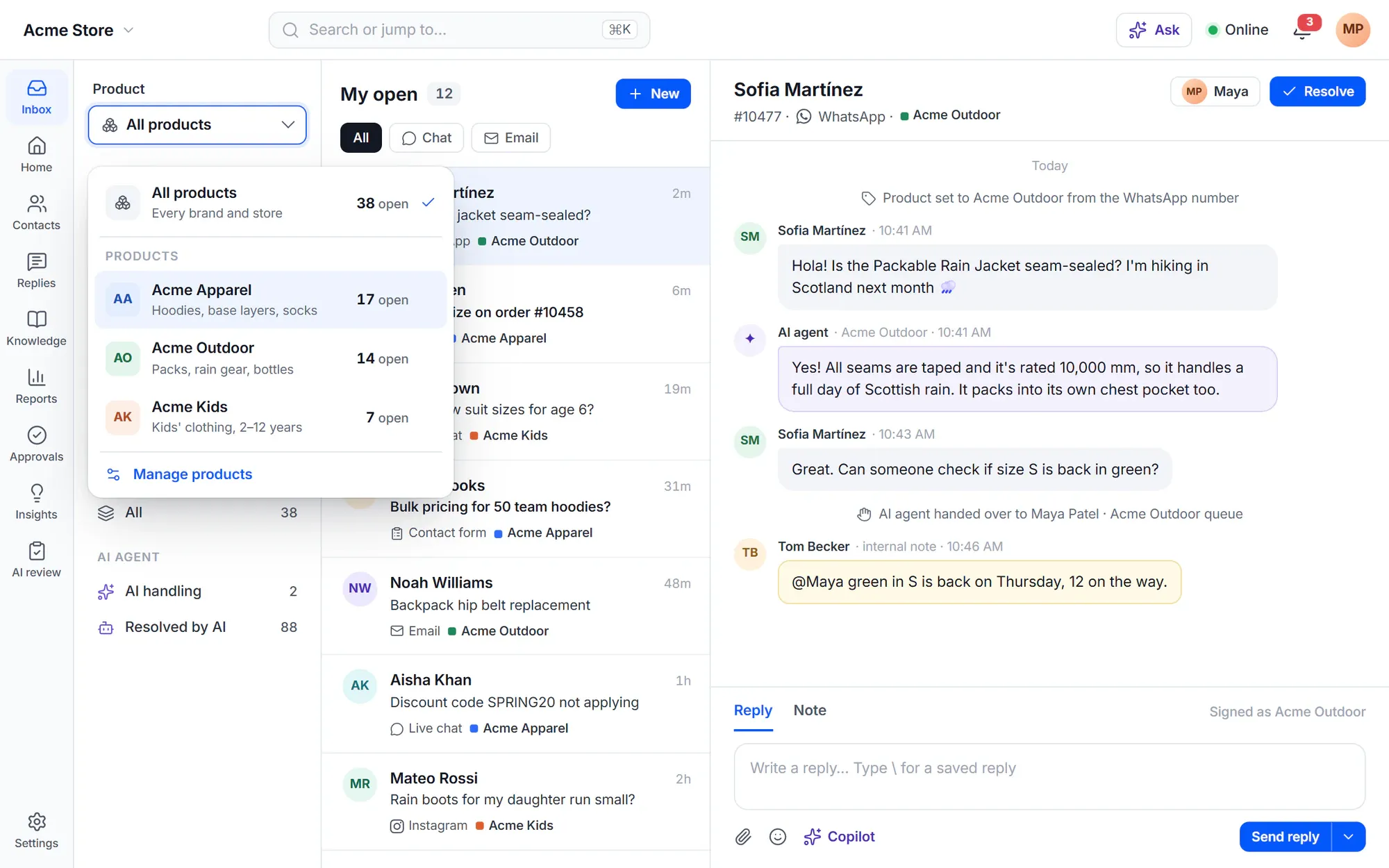
One help desk per product doesn’t scale.
- “We log in to four help desks to answer four products.”
- “Customers of our second brand get emails signed with the first one’s name.”
- “We answer people who never bought anything as if they were customers.”
- “Our clients want to see their own tickets — and nobody else’s.”
How it works
Many products, one place to work
Products
Unlimited products in one inbox
Every conversation belongs to a product, and there is no limit on products. The product switcher gives each one its own Open, Unassigned, Mine and Waiting, or shows all products together. Cliedesk finds the product from the widget code, the address the customer wrote to or the form they used.
- Detection rules by website domain, page address or support email address
- Move a conversation to another product; routing runs again
- Product as a condition in views, rules, routing and reports
- Merge two products, with undo for 30 days

Brands
A brand — and settings — per product
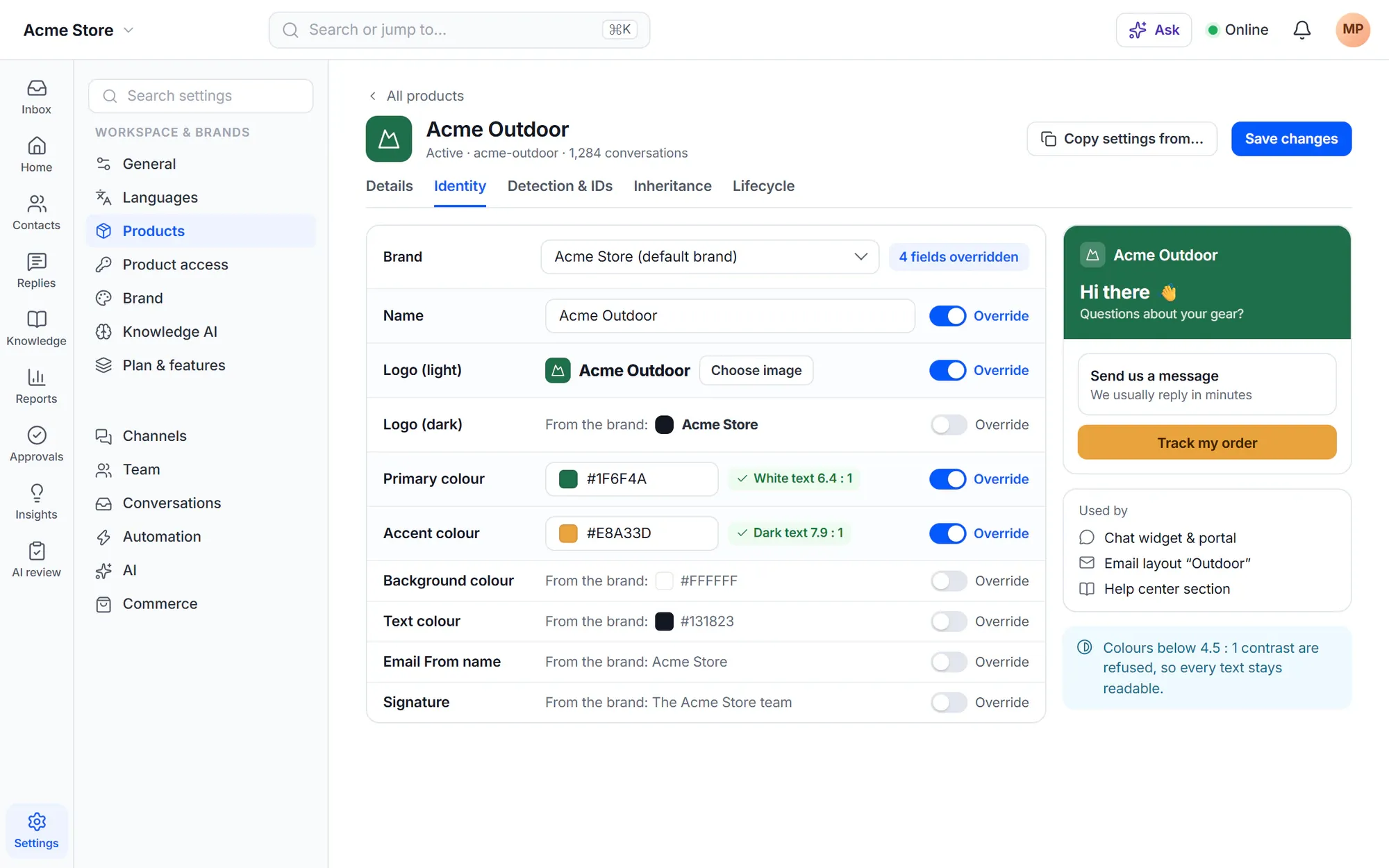
Add brands with their own logos, colours, favicon, email sender name and signature, and give each product a brand. A product can override any brand field and many settings: the widget, email options, surveys, auto-close and more. The Inheritance tab shows each value and where it comes from.
- An email layout per brand
- Agents can show a different name and picture per brand
- “Copy settings from” sets up a new product like an existing one
- Colours below 4.5:1 contrast are refused
Product access
Know who owns what — and who may ask for support
Product access records which customer owns which product and plan, for example “Pro plan, active until March 2027”. It fills itself from WooCommerce orders, other WordPress sites and billing webhooks. Per product, choose who may ask for support: anyone, customers only, or customers on plans with support.
- Sources: WooCommerce, the Cliedesk Connector, Stripe, Paddle, Lemon Squeezy and custom JSON webhooks
- Without access: reply with a buy link, or send to a pre-sales queue
- A welcome email with a portal link on a customer’s first grant
- Rules, queues and SLA policies can use the customer’s plan

Agencies
Agency mode with white label
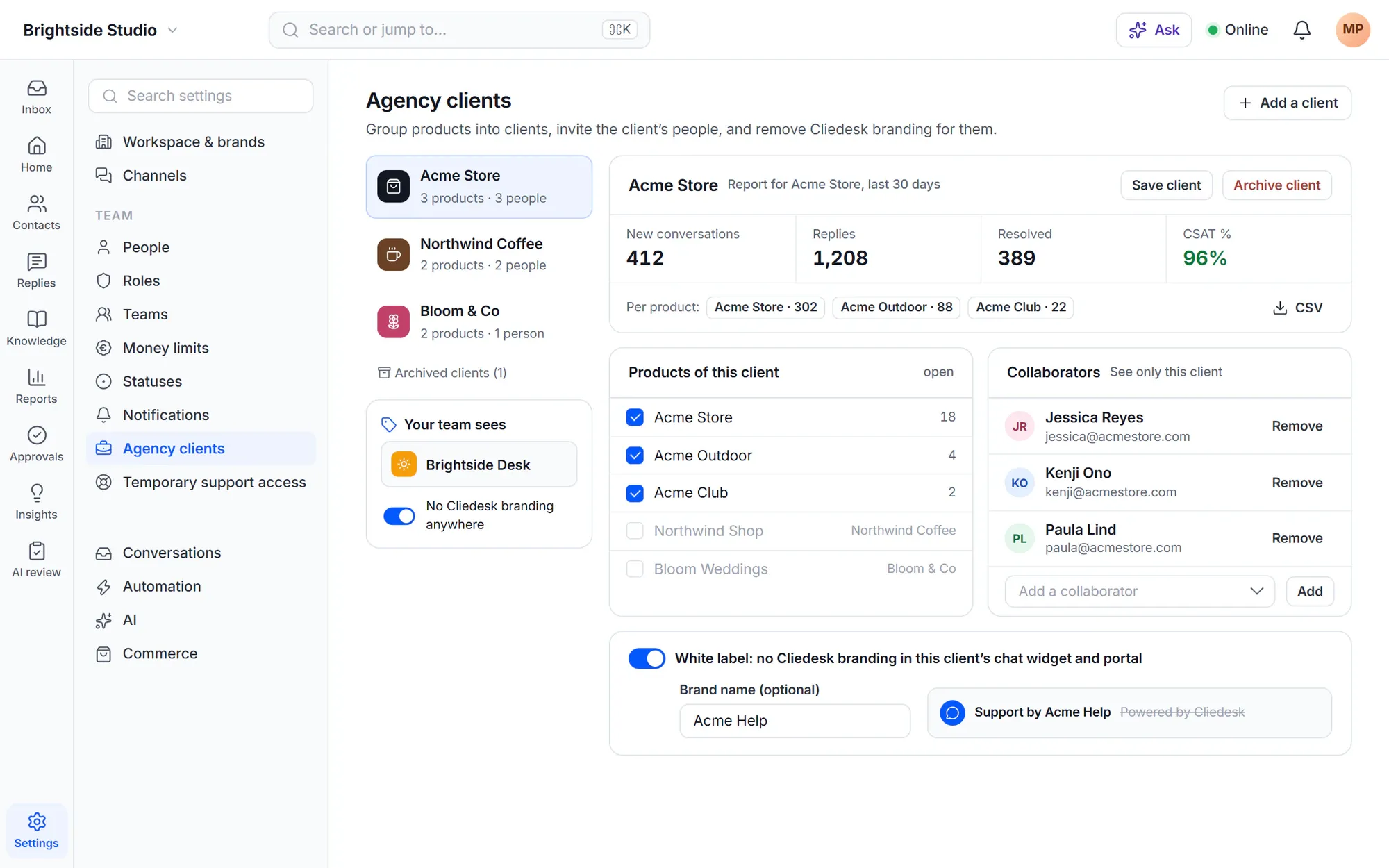
Group products into clients. Client collaborators work in the help desk but see only their client’s conversations, contacts, search and reports. Remove Cliedesk branding from a client’s widget and portal, or everywhere, and show your own help desk name and logo to your team.
- A 30-day report per client, in total and per product
- Archive a client: collaborators lose access, conversations stay
- A product belongs to one client only
Per product
Everything customers see can follow the product
-
A widget per website
One widget code works everywhere: it picks the product whose website domain matches the site it runs on, with that product’s brand and settings.
-
A help center per product
Each product can have its own help center at /help/product-slug/, with its own categories and search.
-
Business hours per product
Outside a product’s hours, its widget shows the offline message and its help pages hide the chat.
-
Products people see
Limit a person, a team or a role to some products. They see only those conversations, customers, reports and saved replies.
-
Connected sites
Connect another WordPress or WooCommerce site with the Cliedesk Connector: its orders show next to the customer, and its purchases update product access.
-
WordPress multisite
Each site of a network gets its own workspace. Or make one site the hub, and every other site becomes a product in one inbox.
✦ AI that knows the product
The AI agent answers only about products the customer owns
With product access on, the AI agent answers about products the customer owns and about products that are open to anyone. When it can’t tell which product a new conversation is about, it asks the customer.
Meet the AI agent- The agent’s name and avatar per brand
- Connected-site pages treated as less reliable than your own articles
In the free plugin: unlimited products in one inbox with the product switcher, detection rules, product merge and one shared workspace brand. Cliedesk Pro adds: several brands, settings, widget, help center and business hours per product, product access, connected sites and agency mode with white label.
Compare plansFrequently asked questions
Can’t find your answer? Search the docs or ask us.
Search the docs →Get support →Is there a limit on products?
No. Every edition has unlimited products in one workspace, each with its own support email address and its own Open, Unassigned, Mine and Waiting counts.
Can each product have its own look and sender name?
Yes, with Cliedesk Pro. Each product uses a brand — logos, colours, favicon, email sender name and signature — and can override any of them. The widget, portal, emails and survey page follow the product’s identity.
Can I offer support only to paying customers?
Yes, with product access in Cliedesk Pro. Per product, choose anyone, customers only, or customers on plans with support. Others get a reply with your buy link or go to a pre-sales queue.
Can a client’s team work in the help desk without seeing other clients?
Yes, with agency mode in Cliedesk Pro. Client collaborators see only their client’s conversations, contacts, search and reports. Owners and admins always see every product.
Does it work on WordPress multisite?
Yes. Each site of a network has its own Cliedesk workspace with its own data, and new sites are set up when they are created. With Cliedesk Pro, a network admin can also make one site the hub, so all sites’ conversations come into one inbox.
Run every product from one help desk.
Start free with unlimited products, then add brands, product access and agency mode with Cliedesk Pro.