Order self-service
Cancel, return, reschedule — without writing to you.
WooCommerce self-service returns and cancellations, inside your own support portal. Shoppers track an order, cancel it, change the address before it ships, return items and skip or pause a subscription themselves. You choose which buttons show in each order status, and anything outside your rules waits for your team.
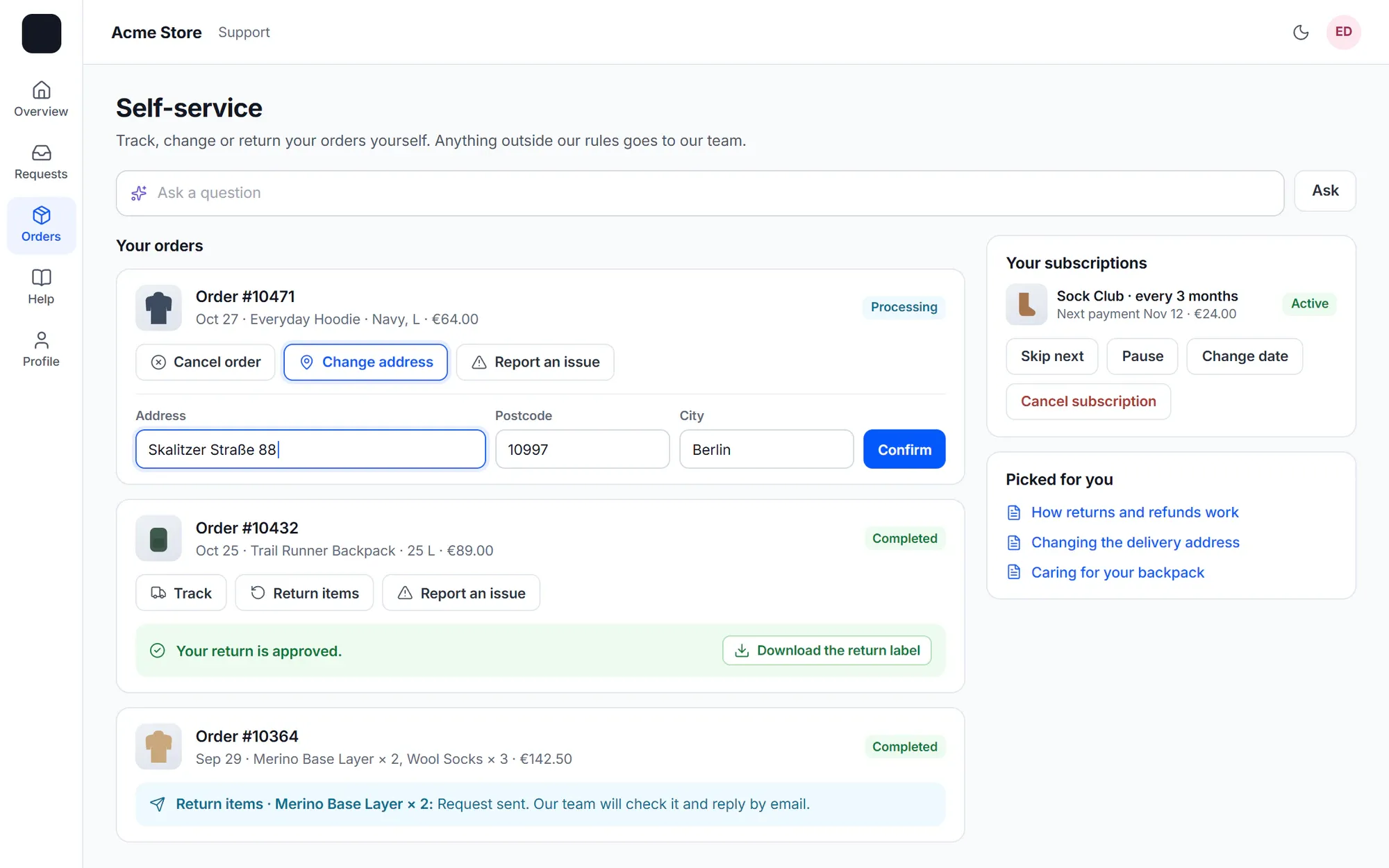
Simple order changes shouldn’t wait in the inbox.
- ““Can I still cancel?” sits in the queue until the order has already shipped.”
- “Half our tickets are “wrong address”, “where is it” and “I want to return this”.”
- “A customer cancels a subscription by email when a pause would have kept them.”
- “We’d let customers do more themselves — if we could be sure they can’t refund themselves too much.”
How it works
The buttons you allow, for the orders that fit
Your rules per status
Decide what customers may do in every order status
A grid lists every WooCommerce order status, custom ones too, against the actions Track, Cancel, Change address, Return, Report an issue and Reset downloads. Clear a box and the button disappears for that status — and Cliedesk refuses the action even if someone tries it another way.
- The preset: cancel and address changes before shipping, returns after the order is completed
- For example, clear Cancel for Processing when your orders ship fast
- Customers must be signed in, or verify their email with a code
- Customers only ever see and change their own orders, subscriptions and bookings
Cancellations and returns
Cancel or return in a few clicks — or a request your team approves
To cancel, the customer gives a reason and confirms. Within your commerce rules the order cancels at once; otherwise your team gets an approval request and the customer reads “Request sent”. For a return, Cliedesk first checks your return window and the products that cannot be returned, then the customer picks the items, how many and why.
- Address changes only before the order ships, with a clear error on a wrong postcode
- Approve returns inside your policy without a person — off until you turn it on
- Approved returns show a prepaid Shippo label or your return instructions
- When the return arrives: refund, store credit or nothing, as you choose
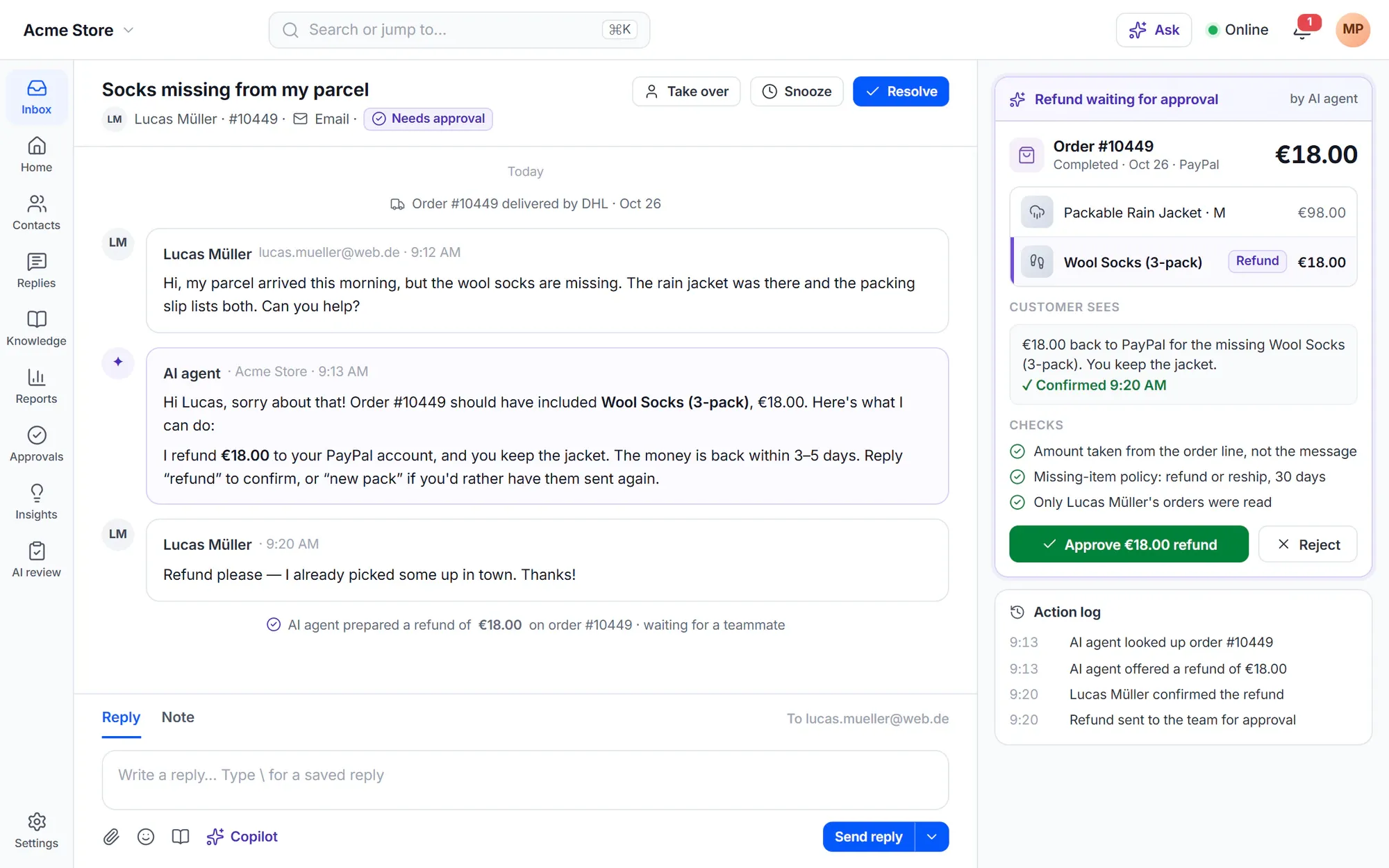
Damaged, wrong or missing
Report a problem and get an answer first
Customers report problems such as “An item arrived damaged”, shown only for orders they fit. Each one shows an answer and asks “Did this help?”; if not, a request with the order linked and the photos attached goes to your team. Customers can also let the AI check their photos: when it is sure, it offers to send the items again or refund them.
- The refund amount always comes from the order, never from the customer
- By default a refund from the portal needs approval, so the customer reads “Request sent”
- “No thanks, contact the team” sends the order and the photos to a person
- Switch the photo check off, or remove reship or refund from what it may offer

Subscriptions, bookings and downloads
Recurring orders, appointments and files — handled by the customer
Shown when WooCommerce Subscriptions or WooCommerce Bookings runs on your site. Every change is saved in that plugin, so you see it in its own admin too.
-
Skip the next renewal
The next payment moves one billing period later, and the subscription stays active.
-
Pause and resume
Customers pause a subscription for as long as you allow, 1 to 3 months, and resume it when they want.
-
A new payment date
Customers choose a new date for their next payment without asking your team.
-
Update payment details
After a failed or on-hold renewal, customers get a link to pay and update their payment method.
-
Reschedule a booking
Customers see only free times. You set how many hours before the start a booking can no longer be moved.
-
Fresh download links
Reset downloads gives new links for orders with downloads and sends them by email.
Before a subscription ends
Offer a pause before you lose the customer
When a customer cancels a subscription, Cliedesk shows other options first: skip the next renewal, pause, or a discount. If they take one, the subscription stays. If they select “No thanks, cancel”, it is cancelled. The offers are on by default, and you set them yourself.
- Choose which offers show and how long a pause lasts
- Set the retention discount and how many renewals it lasts
- A margin floor lowers the discount when it would take a product below it
- Choose whether a cancellation takes effect at the end of the paid period or now
Guardrails
Customers move fast. Your money limits don’t move.
Same rules as your team
One set of guardrails for the portal, agents and the AI
Every commerce action has its own guardrails, and they apply the same way to people, the AI agent, the customer portal, rules and API keys. When a portal request breaks a rule it does not fail: supervisors and admins get an approval request with the reasons, and when they approve, it runs once.
- Only within a number of days of the order, and only for chosen order statuses
- At most a number of times per customer in a number of days
- Only for customers with fewer claims than a limit in 12 months
- A share of the order total that must remain, a monthly budget, products that always need approval
- Suggest only: the portal never runs the action alone, a person decides

Included without Pro
The basics every shopper can use
The order hub works with the free plugin and WooCommerce.
- The 10 most recent orders, each with its latest shipment
- Items, totals, addresses, payment and the tracking timeline of each order
- A message for orders not shipped yet, and a delay notice once the expected date has passed
- Report a problem: an answer first, then a request with the order and photos
- Get help with this order, from the portal or from My Account → Orders
- Email me the invoice and Email me the download links, once every 10 minutes
- Guests verify with an order number, the order’s email and a 6-digit code
In the free plugin: the order hub with tracking, delay notices, issue reports that become requests, “Get help with this order” and invoice and download-link emails. Cliedesk Pro adds: self-service cancellations, address changes, returns, download resets, subscription and booking changes, the AI photo check, the status rules and the commerce guardrails.
Compare plansFrequently asked questions
Can’t find your answer? Search the docs or ask us.
Search the docs →Get support →Can customers refund themselves?
Not without your rules. A refund offered after an issue report always takes its amount from the order, and by default every refund, credit, coupon and reship from the portal needs a person’s approval. You can loosen that per action in the guardrails, with limits per customer, per order and per month.
What happens when a request is outside my rules?
It does not fail. Your supervisors and admins get an approval request with the reasons, and the customer reads “Request sent”. When a person approves, the action runs once.
Do guests need an account?
No. A guest enters the order number and the order’s email address, and Cliedesk emails a 6-digit code to the billing email. The code works for 10 minutes and opens their orders for 30 minutes. Without it, guests see no order data.
Does it work with my returns plugin?
If a WooCommerce returns plugin is active and Use an active returns plugin is on, Cliedesk makes the return request in that plugin. Otherwise Cliedesk handles the return itself, with your return window, excluded products and reasons.
Which subscription and booking plugins does it support?
WooCommerce Subscriptions for skips, pauses, payment dates, payment links and cancellations, and WooCommerce Bookings for rescheduling. Each part shows only while its plugin runs.
Is this the same as the customer portal?
Self-service is a page of the customer portal. The portal also holds the customer’s requests, replies and the order hub; this page is about the order actions customers run there.
Let customers fix their own orders — safely.
Install the free plugin for the order hub and tracking, then add Cliedesk Pro for cancellations, returns and subscription changes within your rules.