Shared inbox
One fast inbox for every customer conversation.
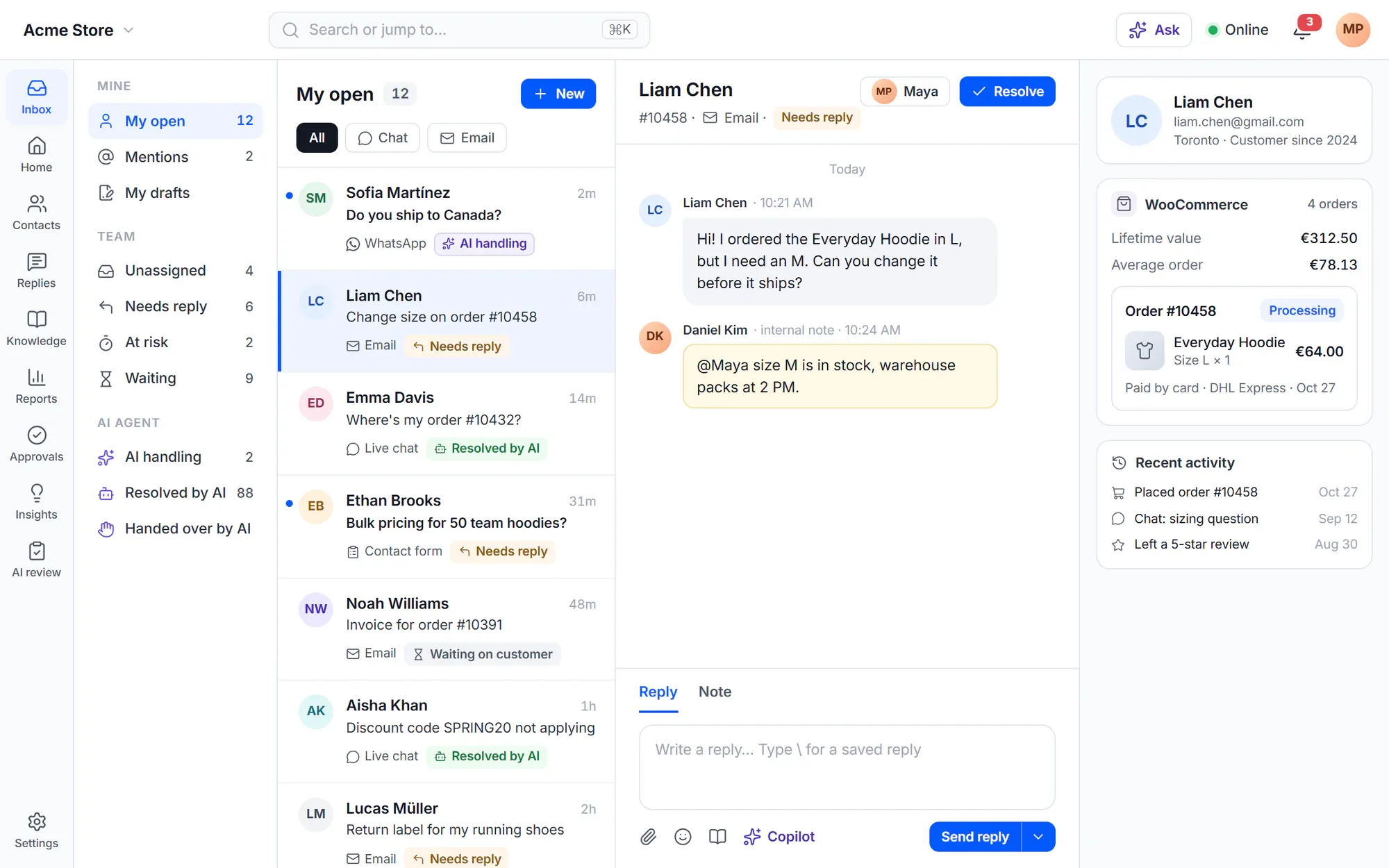
A WordPress support ticket system built on one shared inbox. Support tickets (we call them conversations) from chat, email, forms and every other channel land in one shared inbox. Your team works them in a full-screen app at /desk on your own site — with views, search, saved replies and the customer’s orders one glance away.
Support in a shared mailbox breaks as soon as you are two.
- “Two of us answered the same customer — with different answers.”
- “I have to open WooCommerce in another tab to see what they ordered.”
- “We paste the same reply twenty times a day and still fix typos in it.”
- “Nobody knows which conversations are waiting on us and which on the customer.”
How it works
Built for the way support teams actually work
Views and search
See exactly the work that is yours
Built-in views cover My open, Unassigned, Needs attention, Mentions, Waiting, Later and more. Build your own views with All or Any conditions and share them with the team or keep them private.
- Search all history with operators such as status:open tag:refund assignee:none created>7d
- Jump straight to #1234, an email address or a phone number
- Up to 10 tabs with split view, folders and table columns you can edit inline
- Ready view templates: Urgent, Chats, Refund requests, Unhappy customers, VIP customers

Composer and saved replies
Reply fast — and never twice
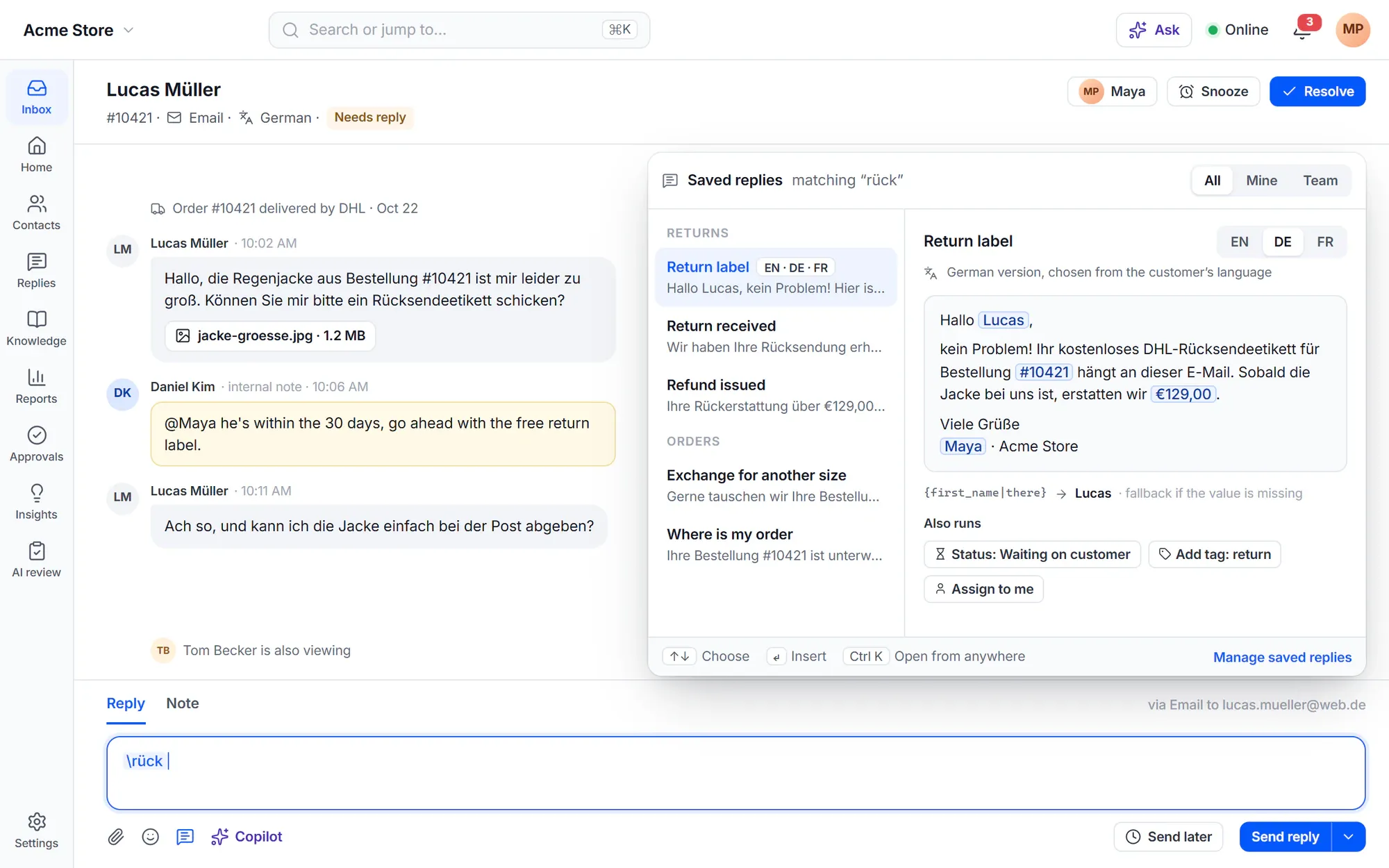
Type \ or press Ctrl+K to insert a saved reply. Tokens fill in the customer’s name and details, with a fallback when a value is missing, and a saved reply can run actions like a macro: set the status, add a tag, assign.
- Internal notes with @mentions, next to the reply
- Send later, with “Only send if the customer has not replied”, and undo send
- Collision detection: “Your reply is on hold” when a teammate answered first
- Language versions of each saved reply, chosen by the customer’s language
Customer profile
Know who you are talking to before you reply
The side panel shows the customer’s local time, WordPress login and roles, organization, past conversations from every channel and recent activity. With WooCommerce, their orders, lifetime value and last order sit right next to the conversation.
- Cards for fields, tags, checklists, tasks, reminders and a contact notepad
- Recent activity such as sign-ups, logins, paid orders and refunds
- Customize the panel for yourself, or set a layout for each team

Anywhere
The same inbox on your phone
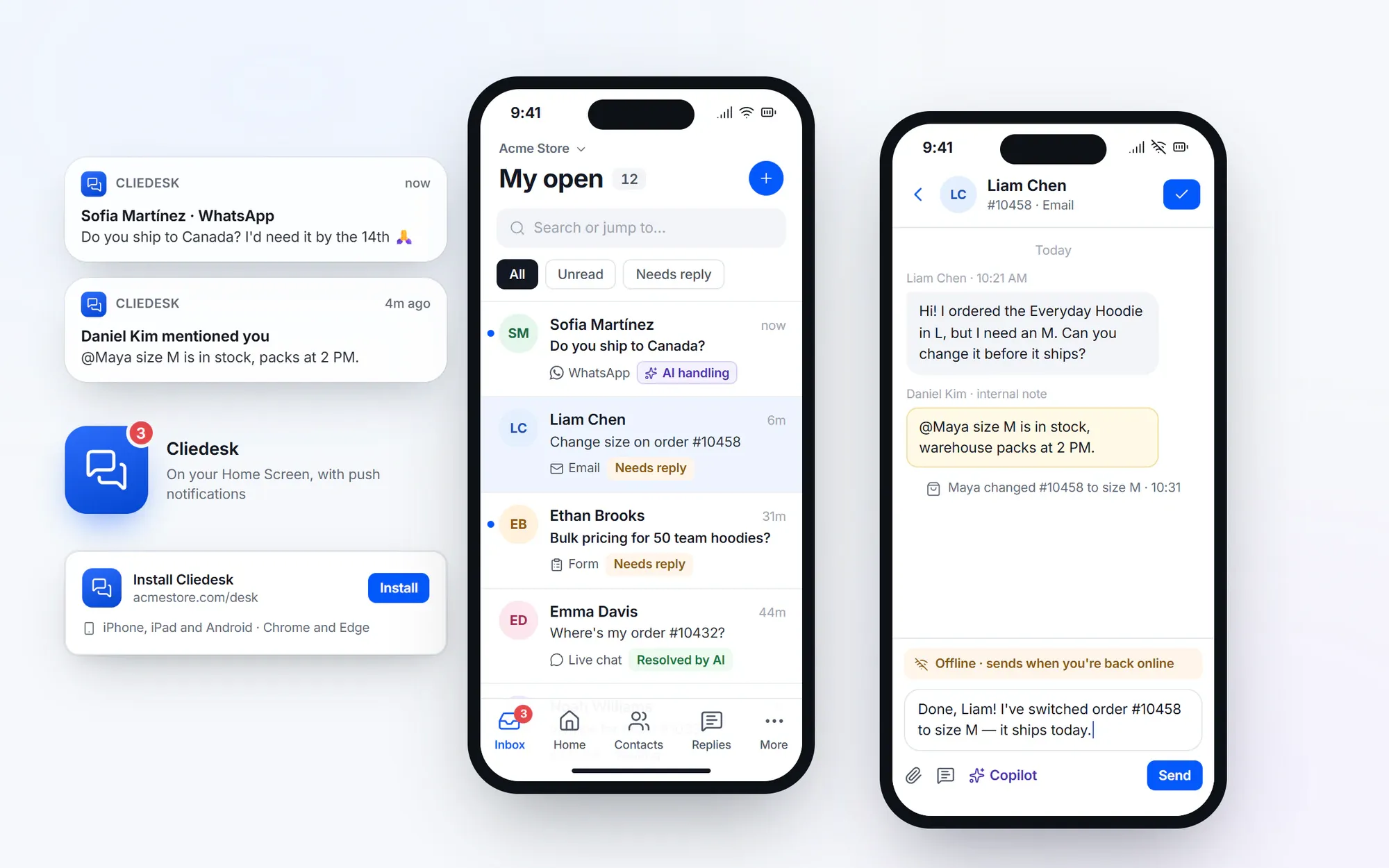
The agent app at /desk installs on phones and computers as a web app — from Chrome or Edge, or with Add to Home Screen on iPhone and iPad. Every action works on a phone as on a computer, and drafts written offline are sent when you are back online.
- Push notifications, also on iPhone with the Home Screen app (iOS 16.4 or later)
- An unread counter in the WordPress admin bar
- A command palette and keyboard shortcuts each person can change
Everything in the inbox
The details that save hours every week
-
Statuses, priority and types
Open, Waiting, Resolved and your own statuses, with priority, queue and type on every conversation. Snoozed conversations wake early when the customer writes.
-
Merge, split and link
Merge duplicates with a preview and undo for 30 days, split off a new question, and link related conversations.
-
Bulk actions with undo
Change, assign or apply a saved reply to many conversations at once, with a report of what your permissions allowed.
-
Follow and remind
Follow a conversation, set “Remind me”, or type /remind in the composer.
-
Files and voice notes
Attach files up to 20 MB, preview images, PDFs, audio and video, and record a voice note as your reply.
-
Transcripts and history
Print or save a conversation as PDF, HTML or text, and see every change in its history.
-
Spam and trash
Review spam in one pass, and restore conversations from the trash during the trash period.
-
Failed replies stay visible
A reply that could not be delivered shows Retry, Edit and resend, or Discard.
-
Fast with big histories
Benchmarked with 1,000,000 conversations: the inbox list loads in under 5 ms of server time (single user).
✦ AI in the inbox
An inbox that briefs you before you start
The AI summarises long conversations in the side panel, suggests the next status, fills form fields from the customer’s messages and builds views from a sentence you type.
Meet the AI copilot- “Describe a view” in plain words and get the conditions
- An AI briefing of what needs attention first
- Summary card on every conversation
- Next-status suggestions after you reply
WordPress-native
It lives in your WordPress site
- The agent app runs at /desk on your own domain, outside wp-admin
- Agents are WordPress users with Cliedesk roles
- The side panel shows each customer’s WordPress login and roles
- Conversations and contacts are stored in your WordPress database
- An unread counter in the WordPress admin bar
- Real WooCommerce order numbers in messages are highlighted
In the free plugin: the whole inbox: views, search, saved replies and macros, collision detection, merge and split, customer profiles and the installable app — for unlimited agents. Cliedesk Pro adds: instant updates through a push service, AI views, summaries and briefings, external search engines, and linked issues in Jira, Linear, GitHub, Trello and Asana.
Compare plansFrequently asked questions
Can’t find your answer? Search the docs or ask us.
Search the docs →Get support →Is Cliedesk a support ticket system?
Yes. Every request becomes a conversation with a number, status, priority, assignee and history — what other tools call a ticket. Customers see them as requests in the customer portal.
How many agents can use the inbox?
As many as you need. The free plugin has no limits on agents, conversations or contacts, and there are no paid seats.
What happens when two agents answer the same customer?
Cliedesk holds the second reply and shows “Your reply is on hold”. You can send it anyway, edit it or discard it.
Can I use it on my phone?
Yes. Install the agent app at /desk from your browser — Chrome or Edge, or Add to Home Screen on iPhone and iPad. Every action works on a phone, and drafts written offline are sent later.
Do I have to work inside wp-admin?
No. The inbox is a full-screen app at /desk on your site. A developer can change the address.
Give your team one inbox it actually enjoys.
Install the free plugin and answer your first conversation from /desk in minutes.