AI in Cliedesk
AI that runs your customer support — with you in control.
AI customer service for WordPress, built into your help desk. An AI agent answers customers and prepares actions. A copilot drafts replies for your team. AI triage sorts every message and AI scores every resolved conversation. All of it runs on your own AI provider key, and nothing reaches a customer or changes an order until your rules allow it.
AI features are part of Cliedesk Pro and run on your own AI provider key.
✦ Definition
What is an AI-native help desk?
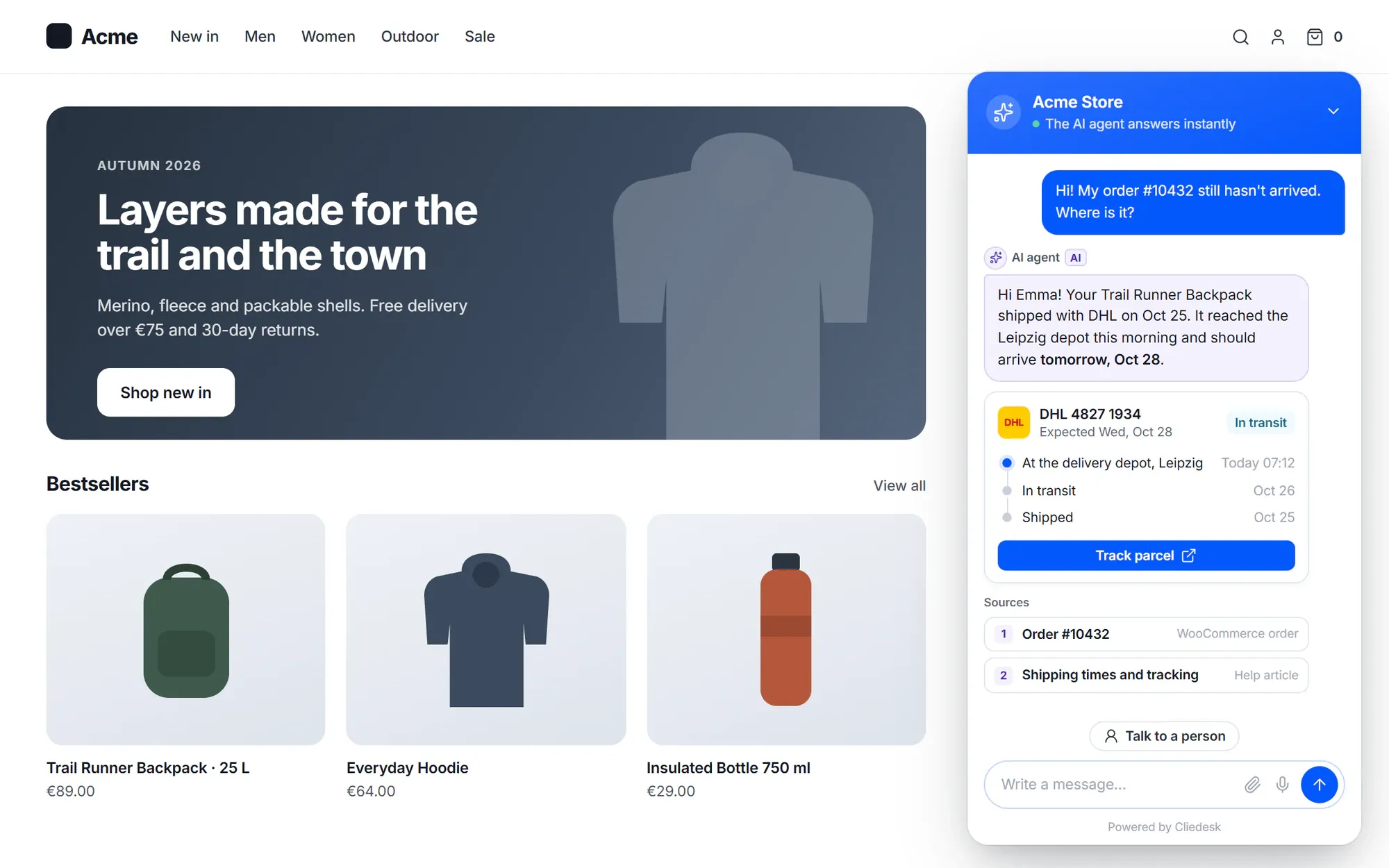
An AI-native help desk uses AI in every step of support: it reads and sorts every message, answers customers from your own knowledge, prepares actions, drafts replies for your team and scores every conversation — while people approve, coach and handle the exceptions.
Four layers
One AI, four jobs
Each layer works on its own, and they share the same knowledge, policies and actions.
-
AI agent — for customers
Answers on every channel from your help center and the customer’s orders, prepares refunds and order changes for approval, and hands off to a person when it should.
Learn more -
Copilot — for your team
Drafts replies, rewrites, answers questions with sources, summarises and translates. It never sends anything: your agent checks the text and clicks Send.
Learn more -
Triage and quality — for team leads
Topic, intent, sentiment and urgency on every message before your rules run, plus an AI CX score and AutoQA on every resolved conversation.
Learn more -
Controls — for owners
Your own provider key or a local model, budgets and caps, shadow mode, a test lab, traces and an admin copilot that only proposes changes.
Learn more
One brain, everywhere
The same knowledge and rules behind every AI answer
Shared knowledge and policies
Write a policy once. The agent and the copilot both follow it.
Help articles, internal knowledge, policies and saved replies feed the AI agent and the copilot alike. A policy can apply to the customer AI agent, the copilot or both, and every AI answer lists the policies it used.
- Mark articles “AI only” to give the AI knowledge customers never see
- Answer verbatim: prices, legal text and warranty answers are sent word for word
- Guardrails such as money caps and time windows are checked in code before every action

Shared actions
The same actions, with the same limits, for people and the AI
Looking up an order, adding a note or preparing a refund is one action, whether an agent clicks it, the copilot suggests it or the AI agent prepares it. For each action you decide how much the AI may do alone, and money actions ask a person first.
WooCommerce actions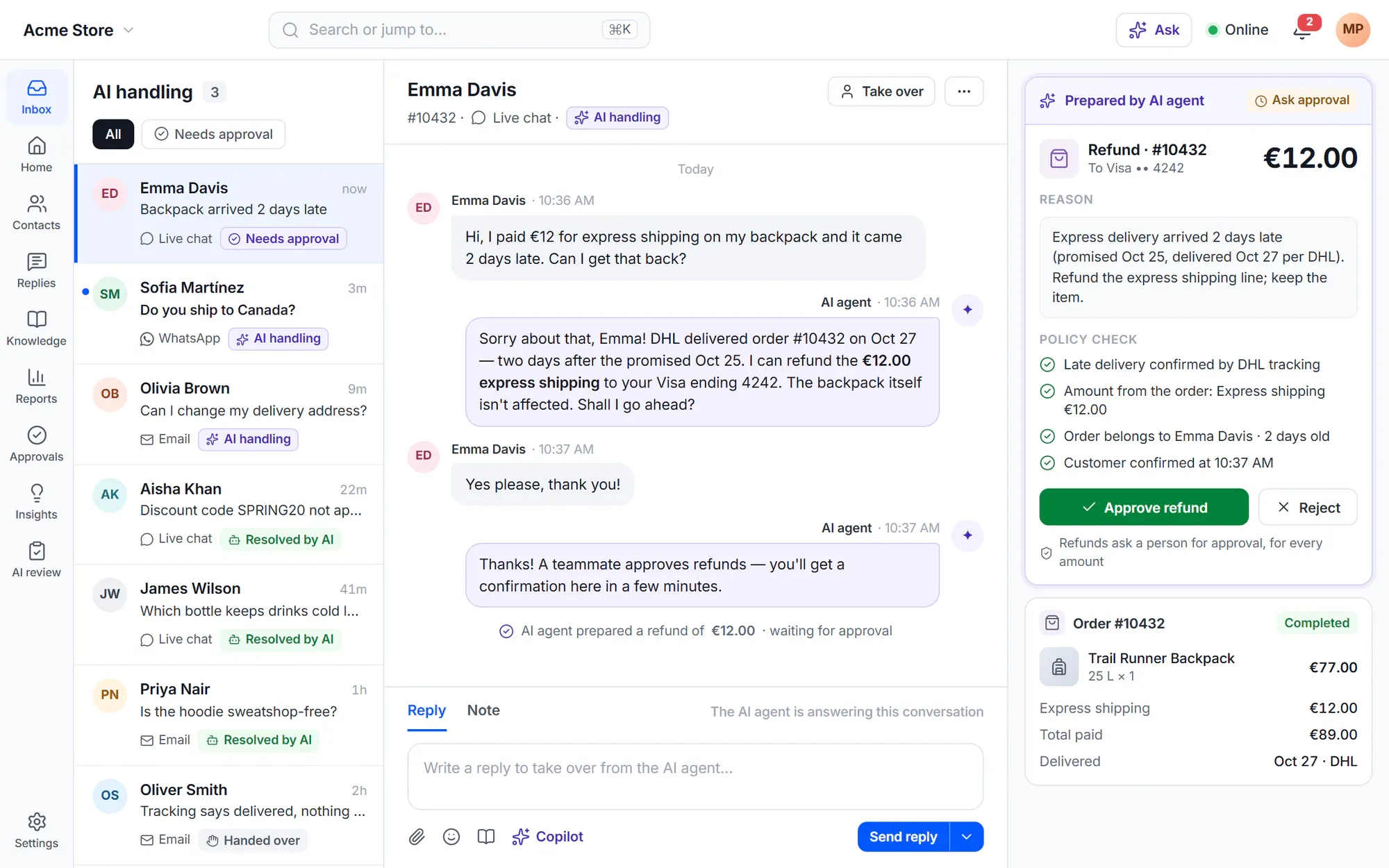
Go live safely
How the AI agent goes live
The guided setup reads your site and drafts a business profile and starter policies for you to check. It never takes the agent live by itself.
- 1
Knowledge
Connect your help center, pages, products and policies.
- 2
Behaviour
Choose a profile, tone and answer length, and check the starter policies.
- 3
Actions
Decide which actions the AI may use and how much it may do alone.
- 4
Test
Try questions in the test lab. Actions there are dry runs.
- 5
Shadow, then live
New sites start in shadow mode on every channel. Go live channel by channel.
✦ Honest results
AI results you can audit — not a bill
Every AI conversation is counted as Assisted, Contained or Confirmed, and a customer who comes back within 7 days downgrades the result. The numbers are for you, not for invoicing: you pay your AI provider for what you use, and Cliedesk charges no fee per resolution or per seat.
See budgets and traces- Traces show the sources, policies, tools and cost behind each answer
- Budgets with alerts at 50, 80 and 100 % of the month
- One switch turns every AI feature off
AI across the product
AI wherever your team works
-
Inbox
Semantic search finds resolved conversations that mean the same thing, and summaries keep every thread short.
Learn more -
Help center
AI drafts articles and summaries for review — nothing is published without a person — and decides what the AI may cite.
Learn more -
Automation
Describe a workflow in plain words and AI builds it as a paused draft. AI steps classify, extract and write inside workflows.
Learn more -
Translation
Customer messages appear in your language and your reply goes out in theirs, marked “Translated by AI”.
Learn more -
Insights
Spike alerts, weekly trends and a Monday digest, with a short AI-written cause and summary.
Learn more -
WooCommerce
The AI agent reads orders live and prepares refunds, cancellations and reships for your approval.
Learn more
Explore AI in Cliedesk
In the free plugin: a complete help desk without AI — inbox, live chat, help center, portal and rules. Cliedesk Pro adds: every AI feature: the AI agent, copilot, triage, insights, quality scoring and the admin copilot, on your own AI provider key.
Compare plansFrequently asked questions
Can’t find your answer? Search the docs or ask us.
Search the docs →Get support →Do I need a paid AI subscription?
You need an API key from an AI provider, and you pay that provider for what you use. Cliedesk sells no AI credits and charges no AI fee per resolution or per seat. You can also run a local model on your own server.
Which AI models work with Cliedesk?
OpenAI, Anthropic Claude, Google Gemini, Mistral, OpenRouter, Azure OpenAI, AWS Bedrock, Google Vertex, or a local model (Ollama, LM Studio, vLLM). You can choose a different model for each task.
Does the AI learn from other customers’ conversations?
No. The AI agent never reads other customers’ conversations when it answers. Past answers only help after you turn them into reviewed articles or saved replies, and triage corrections are stored as examples you can delete — nothing trains a model.
Can I turn AI off?
Yes. Switch single features off on the AI switchboard, or turn every AI feature off at once. The inbox keeps working with your keyword rules. A developer can also turn AI off with WP-CLI or a wp-config.php constant.
Is AI use disclosed to customers?
Yes, by default. The first AI chat reply carries an AI label and AI emails have a footer that says so. Removing the disclosure needs an acknowledgement and a reason, and is recorded in the audit log.
Put AI to work on your support — on your terms.
Start with the free help desk, then add the AI agent and copilot with Cliedesk Pro and your own AI key.