Automation
Automations that run themselves — and can’t silently break.
Help desk automation for WordPress, in two layers. Rules tag, route, reply and act on orders the moment something happens. Workflows talk with the customer, wait, branch and ask a person for approval. And every automation shows what it did, what it skipped and why.
Automation should save time, not create a new kind of mess.
- “Somebody built a rule two years ago and nobody knows what it does.”
- “A rule emailed the same customer three times before anyone noticed.”
- “We can’t test a change without trying it on real customers.”
- ““Why didn’t this conversation get tagged?” — and nobody can answer.”
How it works
From one-step rules to complete workflows
Rules
When something happens, if it matches, then do this
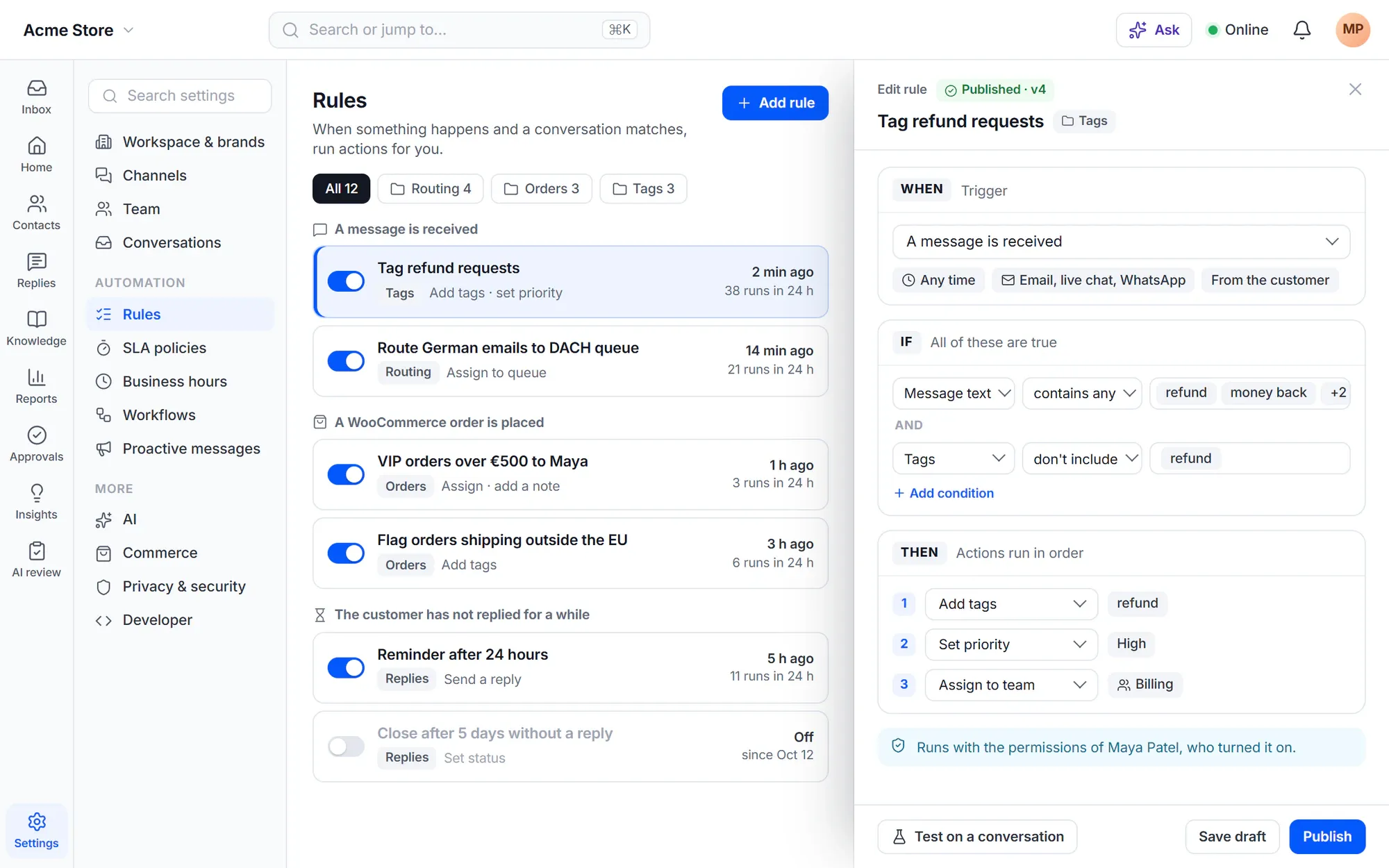
Every rule has a trigger, conditions and actions that run in order. Triggers cover messages, replies and notes, status, priority, type and field changes, merges and splits, contacts and segments, your own customer events and WooCommerce orders.
- Set fields, assign, tag, reply, add notes and followers, and act on orders
- Start only during or only outside business hours, or only on some channels or products
- Rules run with the permissions of the person who turned them on — never more
- Export and import rules as JSON, also with WP-CLI
Workflows
Multi-step workflows that talk, wait, branch and ask for approval
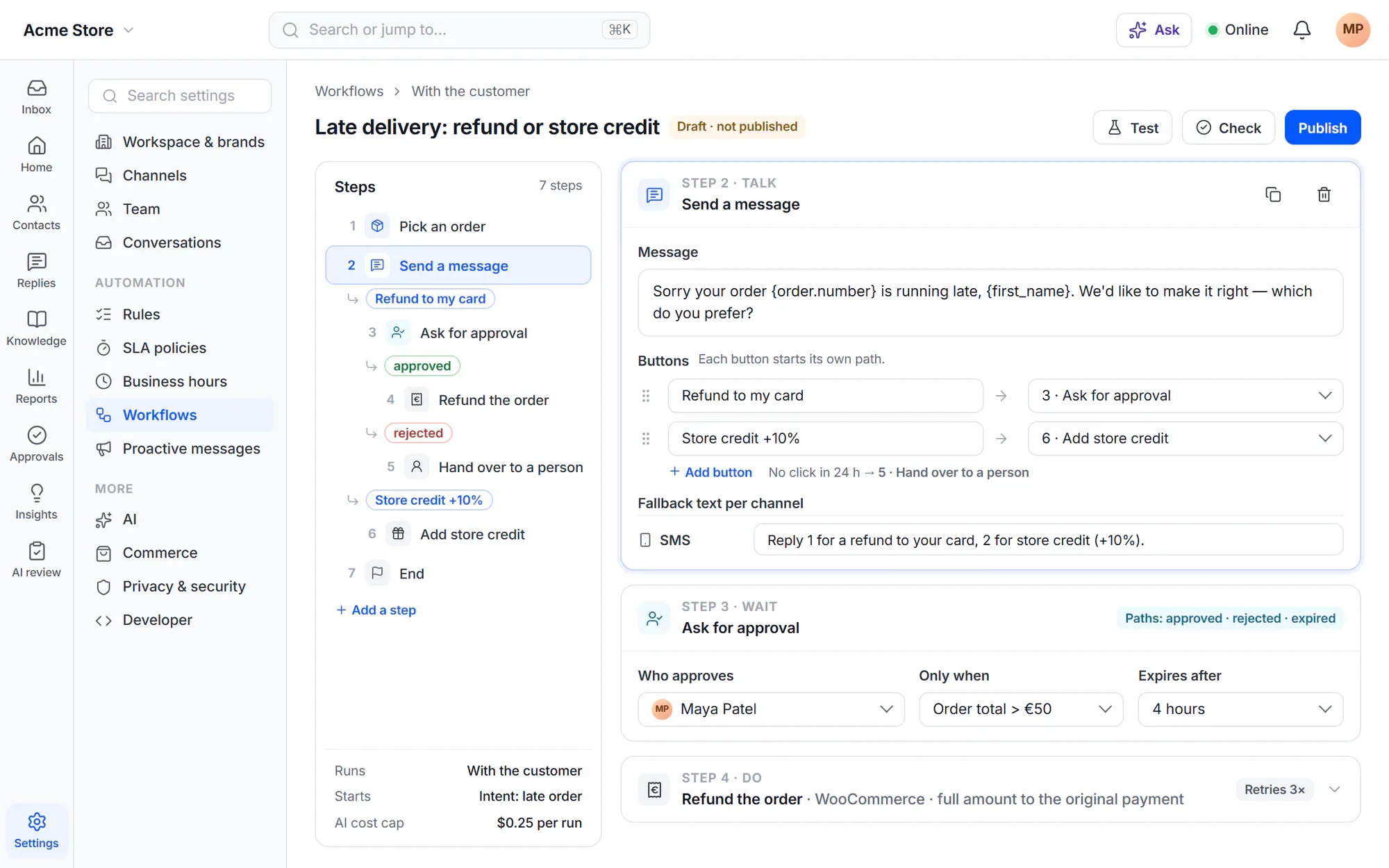
A workflow is a rule with many steps. It can send messages with buttons, collect answers, let the customer pick an order, verify their identity, wait for a reply, a time or a webhook, choose a path, and ask a person to approve before it continues.
- Loops, retries and error paths for actions that can fail
- Called workflows with inputs and outputs, to reuse steps
- Runs in the background or with the customer, one customer-facing workflow at a time
- Fallback text per channel — SMS shows buttons as a numbered list
Change safely
Test it, publish it, and see every run
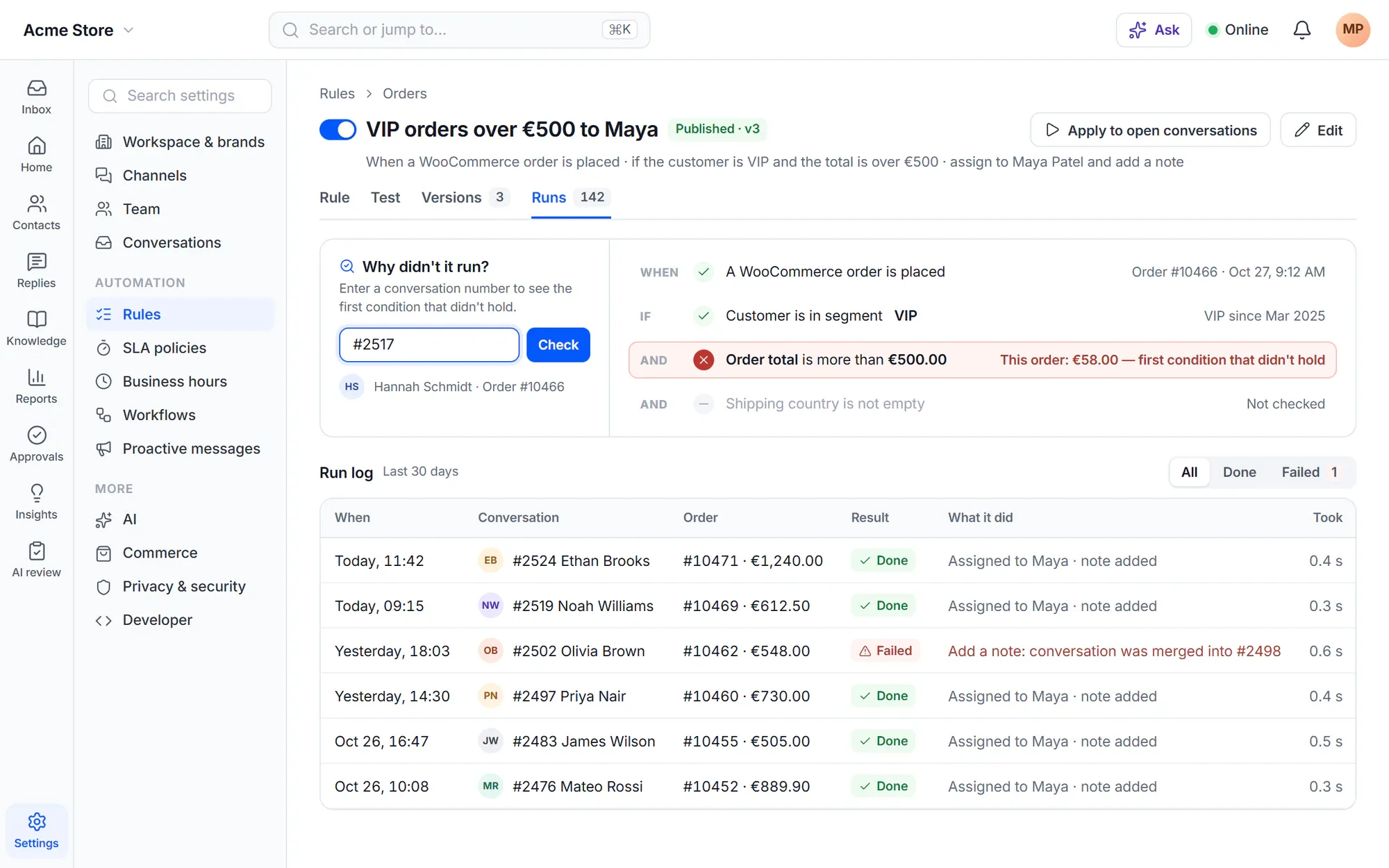
Save changes as a draft, test a rule on a real conversation without changing anything, then publish. Every version is kept, so you can bring an earlier one back. When a rule didn’t run, enter the conversation number and Cliedesk shows the first condition that didn’t hold.
- The run log lists when, where, done or failed, and the error
- “Apply to open conversations” shows how many match and how many emails would go out first
- A second admin confirms when more than 200 customer messages would be sent
- Deleted rules wait in the trash for 30 days
Timers and schedules
Automation that keeps time for you
-
The customer went quiet
Start when the customer hasn’t replied for a while — 30 minutes, 4 hours or 2 days — and stop as soon as they write.
-
The team hasn’t replied
Start when a customer has waited too long for your team, counted in business hours if you like.
-
Stuck in a status
Start when a conversation stays in a status for a while; the clock restarts at every change.
-
On a schedule
Run every 15 minutes or more, every hour, day or week, over the open conversations that match — nobody has to be logged in.
-
Nudge and close
Remind quiet customers after 24 and 72 hours, then resolve after 5 quiet days. A customer reply cancels the steps still waiting.
-
Hooks and page scripts
Start a rule from a WordPress action hook, or from a page with the chat widget through the JavaScript API.
Recipes
Start from a recipe, not a blank page
Recipes create ready rules and workflows that start off, so you can check and change them first.
- Acknowledge new email conversations
- Acknowledge outside business hours
- Recover unhappy ratings
- Nudge and close when the customer is quiet
- Close resolved conversations after 4 days
- Answer “where is my order?”
- Answer after hours with AI
- Reassign when the agent is away
- Alert Slack about urgent conversations
- Follow up on low reviews
- Reach out after a failed payment
Guardrails
Safety that is on before you need it
-
No runaway loops
When rules start each other, Cliedesk stops after 5 levels, and a rule never starts itself again with its own change.
-
Checks before you save
Warnings for rules that trigger each other, two rules changing the same thing back and forth, impossible conditions and large recipient lists.
-
No double acknowledgments
Each customer gets at most one acknowledgment in 24 hours, and it never holds back an agent’s first reply.
-
Pause all rules
One switch stops every rule. When you resume, held events run — except customer messages that waited more than 24 hours.
-
Safe mode on copies
On a copy of your site, outbound email and other outbound work wait until you confirm the live site.
-
System emails stay put
Request received, transcripts and survey emails are sent by Cliedesk itself, so deleting or reordering rules never breaks them.
✦ AI in automation
Describe the workflow — the AI drafts it, you publish it
Say in plain words what a workflow should do and the AI builds the steps as a paused draft, marked “Drafted by AI”. It never goes live by itself. Inside workflows, AI steps classify, decide, extract or write text, with a cost cap per run and per day.
Your models, your rules- Insights find work people repeat by hand and draft a rule that starts off
- A drafted rule shows how many of those conversations it would match
- The workflow report shows how many runs reached each step and where they stopped
In the free plugin: one-step rules on conversation, contact, customer and WooCommerce events, rules that agents run, recipes, rule checks, export and import, and the pause switch. Cliedesk Pro adds: multi-step workflows, time triggers and schedules, drafts and versions, loop and conflict checks, test runs, applying rules to open conversations and the run log with “Why didn’t it run?”.
Compare plansFrequently asked questions
Can’t find your answer? Search the docs or ask us.
Search the docs →Get support →Do I need to write code?
No. Rules and workflows are built in a visual editor with triggers, conditions and actions you pick from lists. Developers can also start rules from WordPress hooks or a page script, and export and import them with WP-CLI.
Can a rule do more than the person who set it up?
No. A rule runs with the permissions of the person who turned it on. A rule that agents run uses the permissions of the agent who runs it.
What stops two rules from fighting each other?
Rules run once per event, top to bottom, and chains stop after 5 levels. The rule checks warn about loops, rules that change the same thing back and forth and conditions that can never all be true.
Can I test a change before customers see it?
Yes, with Cliedesk Pro. Save a draft, test the rule on a real conversation — the test shows each step with its tokens filled in and changes nothing — then publish. Workflows have a Test that sends nothing to customers.
What happens on my staging site?
When the site address changes or the site is not a production site, Cliedesk turns on safe mode: outbound email and other outbound work wait, and a banner says so. You confirm production on the live site only.
Can rules act on WooCommerce orders?
Yes. Rules start on orders placed, status changes, refunds, failed payments, reviews and delayed orders, and can send order notices. With Cliedesk Pro, rules can also refund, cancel, reship and add coupons — and a rule’s money action always waits for approval.
Automate the routine. Keep the receipts.
Start with the recipes in the free plugin, then add workflows, timers and the run log with Cliedesk Pro.