Developers
A help desk you can build on.
A documented help desk REST API, signed webhooks and an MCP server for AI assistants — plus WordPress hooks, WP-CLI and a JavaScript API for the chat widget. Everything runs on your own site, under your own permissions.
The platform
Three ways in, one set of permissions
REST API
A versioned API with keys you can trust
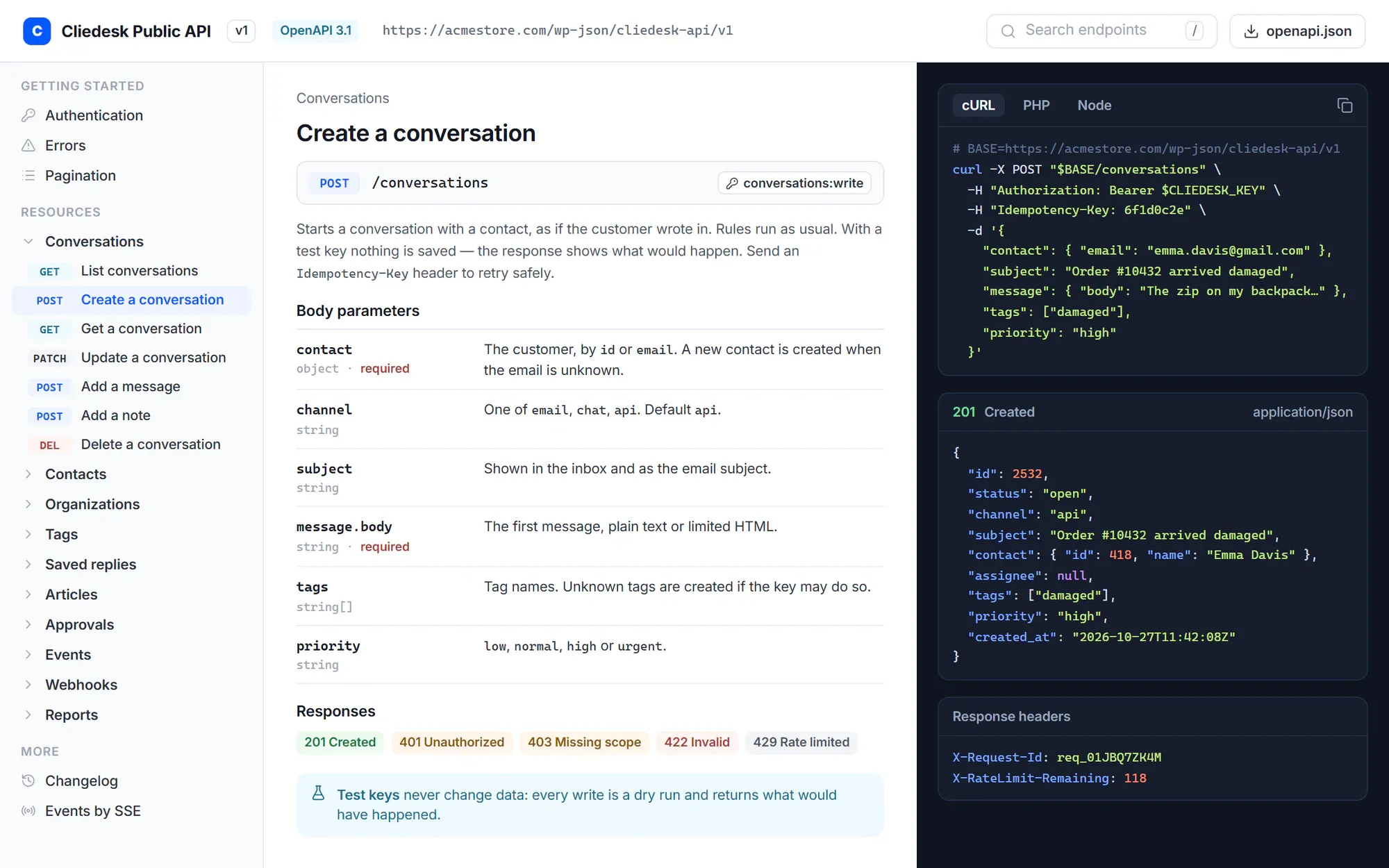
The public API lives at /wp-json/cliedesk-api/v1 and is described in OpenAPI 3.1. It covers conversations, messages, notes, contacts, organizations, tags, saved replies, articles, approvals, events, reports and webhooks.
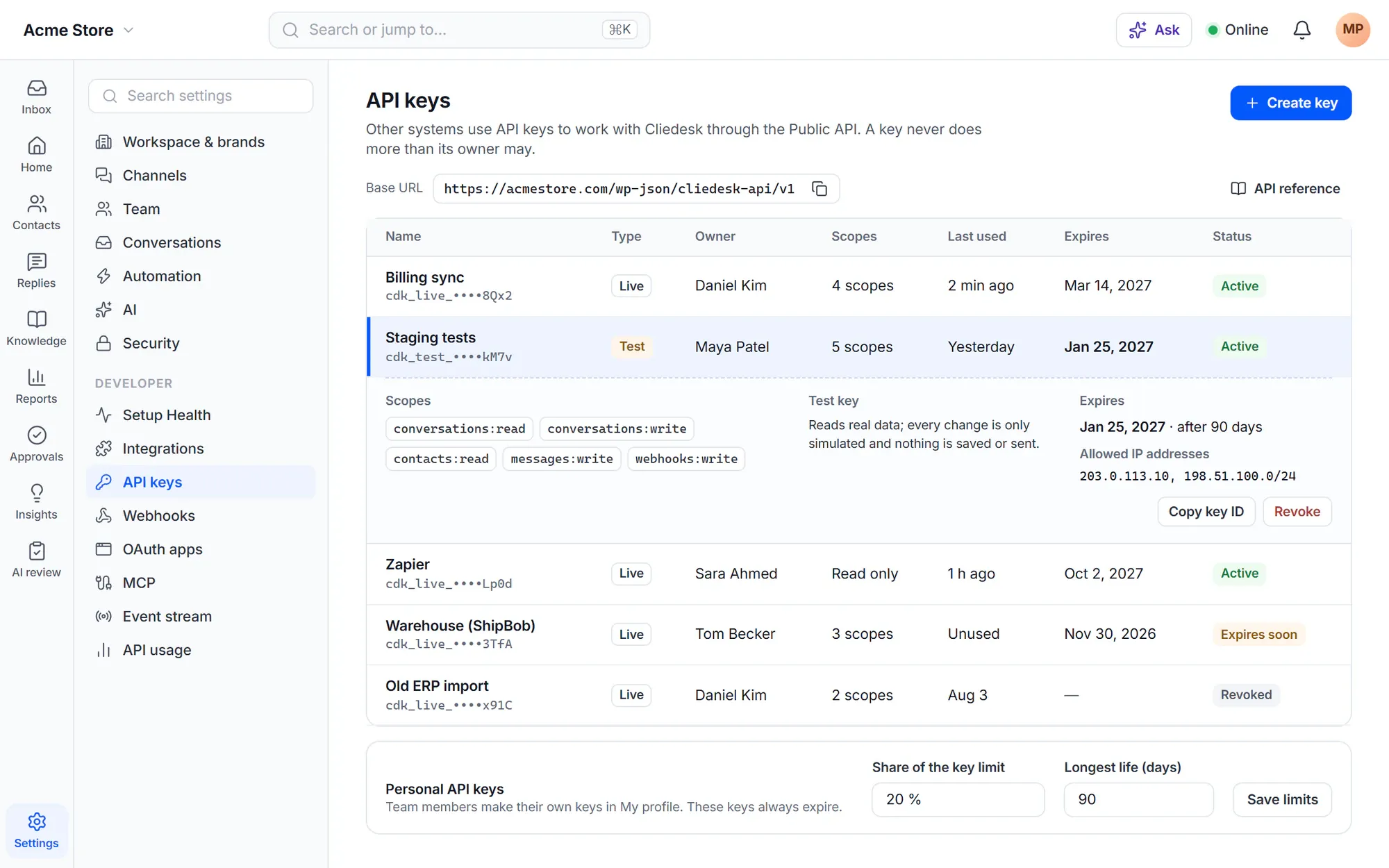
- Scoped keys: a key can do only what its owner may do, within its scopes and products
- Test keys never change data — every write is a dry run
- Only a hash of the key is stored; keys in the URL are refused
- IP allowlist, expiry dates and OAuth 2.1 tokens
- v1 only grows; anything deprecated keeps working for at least 12 months
Webhooks and events
Signed events, delivered — or held until you’re back
Webhooks are signed with HMAC-SHA256 and carry an id for de-duplication. A failed delivery is tried 8 times over a day. If your endpoint keeps failing, the webhook pauses and holds its deliveries so you can replay them.
- A delivery log for every webhook
- Replay single deliveries or everything that was held
- The same events by polling or Server-Sent Events
- Inbound webhooks to start rules from other systems

MCP server
Let Claude, ChatGPT or Copilot work with your help desk
Connect an AI assistant to Cliedesk as a remote MCP server. It acts as the person who connected it — never with more rights — and personal data stays masked where that person cannot see it.
- Read-only by default
- Changes customers would see wait for approval; money always does
- Every tool call in a call log and the audit log
- One switch turns MCP off at once

Inside WordPress
Extend it the WordPress way
-
Hooks and filters
Actions and filters across the help desk, documented one by one, with PHP functions to register your own actions, fields and more.
-
WP-CLI
wp cliedesk commands with JSON output and exit codes for CI. Run as a person with --user, and every change is validated and audited.
-
Chat widget JS API
Open the widget, start a conversation, identify a signed-in visitor, pass context to agents and listen to events.
-
Custom channels
Connect any outside system — another chat tool, a gateway or a bot. Its messages become normal conversations with routing, SLA and rules.
-
Machine-readable docs
The OpenAPI description, an llms.txt for AI coding tools and a changelog for the API.
-
Same rules everywhere
The API, CLI and MCP go through the same actions as the app: the same checks, permissions and audit log.
✦ MCP both ways
Your AI assistant in Cliedesk — and your tools in Cliedesk’s AI
Besides being an MCP server, Cliedesk can use tools from other services’ MCP servers. Once you switch them on, they appear in the AI agent’s tool list with the same autonomy settings as built-in actions.
Your rules for the AI- Off, Suggest, Ask approval or Auto per tool
- Rate limits per client
- Keys can be limited to read or write over MCP
In the free plugin: WordPress hooks and functions, WP-CLI, the chat widget JS API and full data export. Cliedesk Pro adds: the public REST API, webhooks and the event stream, custom channels and the MCP server.
Compare plansFrequently asked questions
Can’t find your answer? Search the docs or ask us.
Search the docs →Get support →Is there an API sandbox?
Yes. Test keys (cdk_test_…) run every request as a dry run: they return what would happen and never change data. Live keys start with cdk_live_.
How do API permissions work?
A key can do what its owner may do, limited by the key’s scopes and, if set, its products. Keys expire after 365 days by default and can be limited to up to 50 IP addresses.
Will the API change under me?
v1 only gets additions. Anything deprecated keeps working for at least 12 months and announces itself with Deprecation and Sunset headers.
Which AI assistants can connect over MCP?
Assistants that support remote MCP servers, such as Claude, ChatGPT and Copilot. Each person connects with their own account and approves the connection on a consent page.
Build on a help desk that lives on your server.
Install Cliedesk, create a test key and try the API without touching real data.