AI copilot
A copilot for every agent. No seats, no monthly caps.
An AI copilot for customer support that drafts replies grounded in the conversation, the order and your help articles. Rewrites in one click. Answers with sources, summaries, handoff notes and translation. The copilot never sends anything — your agent checks the text and clicks Send.
AI features are part of Cliedesk Pro and run on your own AI provider key.

Good agents shouldn’t spend the day retyping the same answer.
- “Half my day is copying order details into replies.”
- “Every handover means reading the whole thread again.”
- “We get messages in languages nobody on the team speaks.”
- “Our AI tools charge per agent, so only some of the team gets them.”
Write faster
From blank composer to a reply worth sending
Drafts
A draft built from the conversation, the order and your knowledge
Click Draft and the reply appears in the composer, marked as an AI draft. It uses the conversation, linked orders and records, your help articles and your house style. Ask for changes in plain words — “shorter”, “in German”, “also ask for the order photo” — and keep every version.
- See the sources a draft used, with a warning when it used internal content
- Save useful instructions as team prompts
- Admins can have a draft waiting when an agent opens an assigned conversation
Rewrite and tone
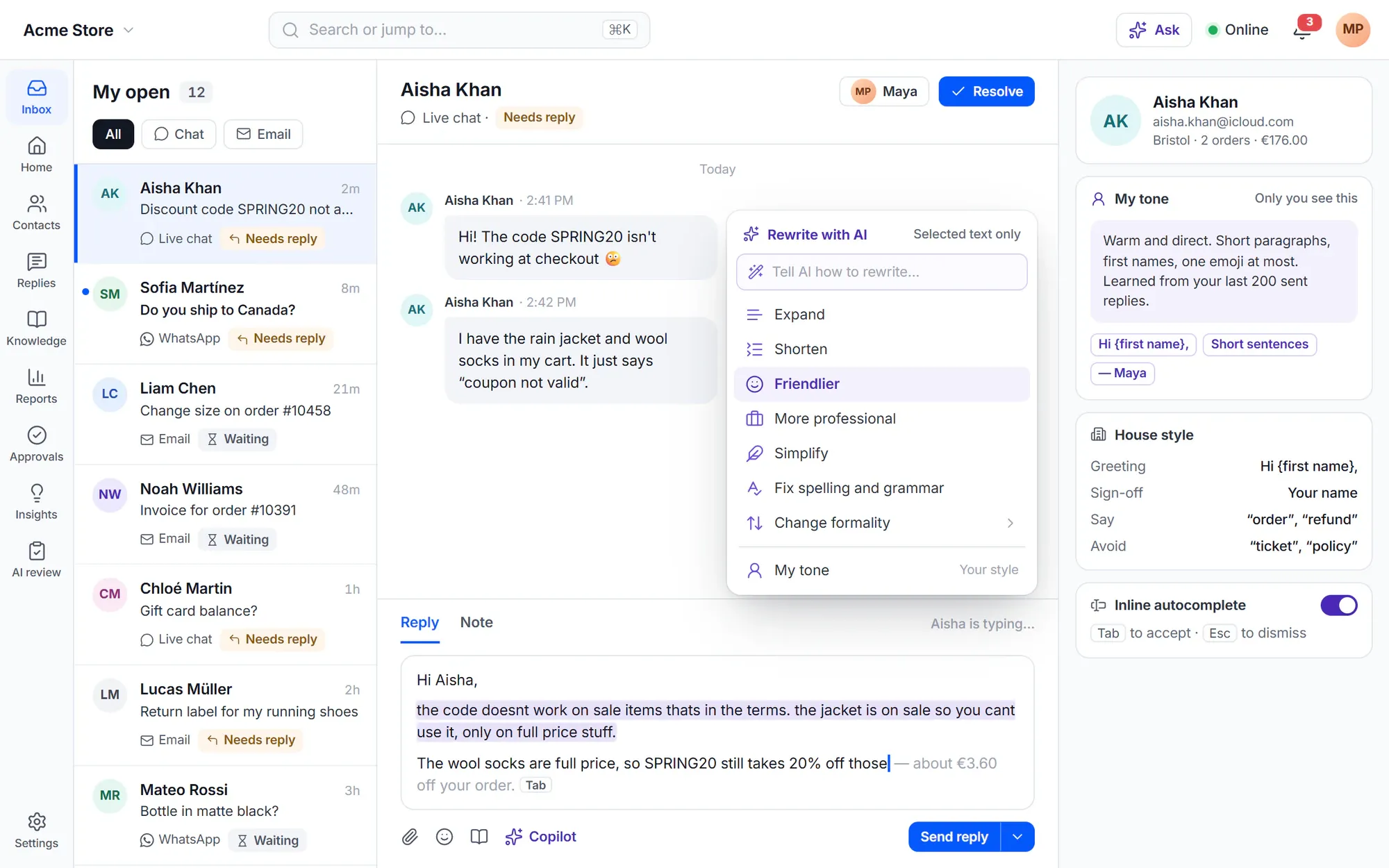
Rewrite any text in one click
Expand, shorten, make it friendlier or more professional, simplify, fix spelling and grammar, or change formality. It works in replies, notes, saved replies and outbound messages, and only the selected text changes.
- “My tone” learns from your last 200 sent replies — only you see your style card
- House style sets greetings, sign-offs and words to use or avoid for everyone
- Inline autocomplete: press Tab to accept, Esc to dismiss
Ask
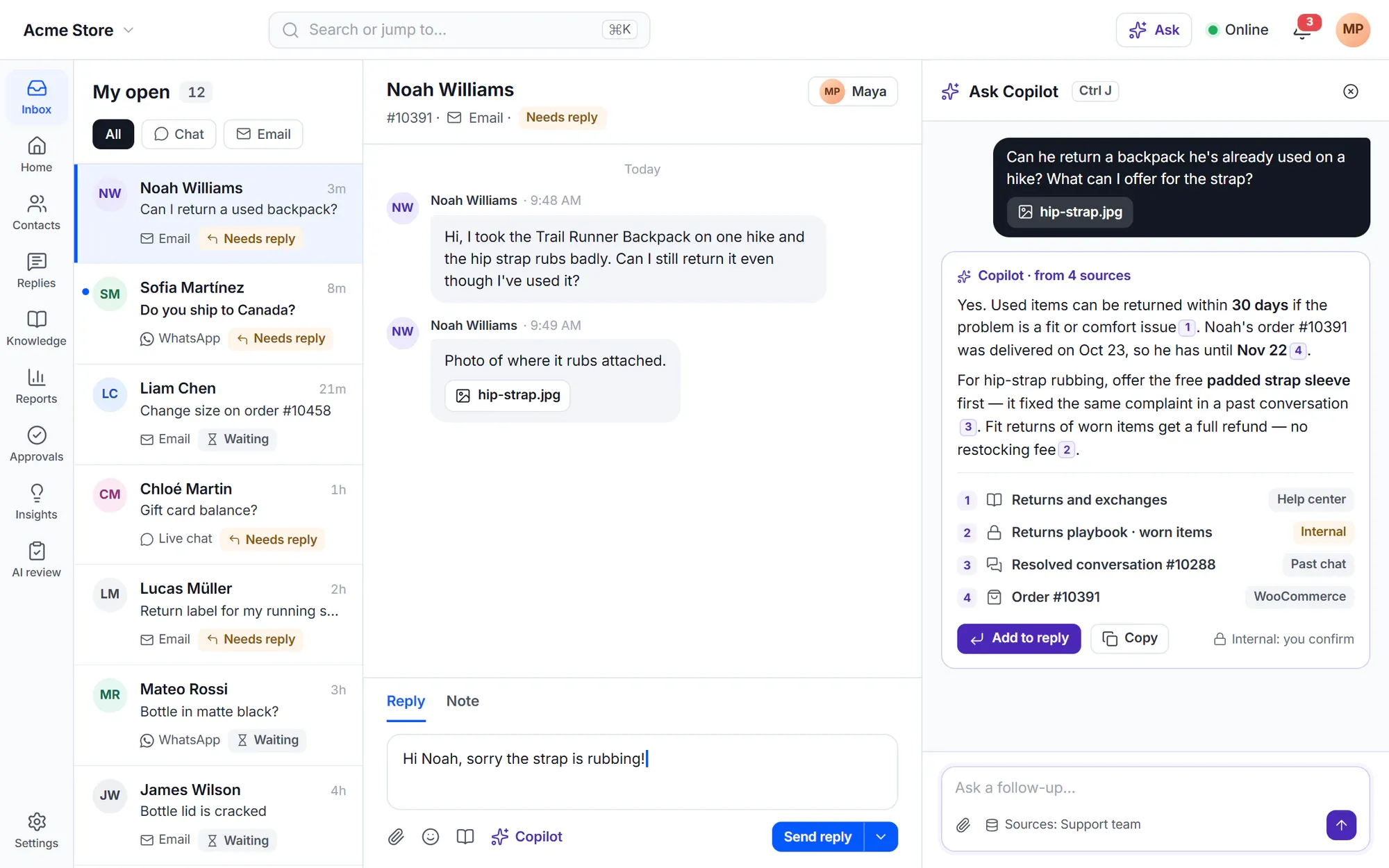
Answers with sources, right where you work
Press Ctrl+J (⌘J on a Mac) and ask. The copilot answers from your help articles, internal knowledge, site pages, products, saved replies, past resolved conversations and orders, with numbered sources. Add the answer to your reply in one click.
- Internal sources are marked, and you confirm before internal content goes into a reply
- Attach a screenshot, PDF or log file to a question
- Admins choose which sources each role or team may use
Stay in context
Everything the agent needs, next to the conversation
-
Rolling summary
A summary in your language that updates after new messages, plus an AI title and issue description you can edit.
-
Handoff notes
When a conversation moves to another agent or team, a pinned note lists the problem, what was tried, the next step and a draft reply.
-
Next step and actions
One suggested next step with its reason, and action buttons such as a refund or tracking link — each with a preview and your own limits.
-
Explain this policy
The policy that applies, the customer’s order values, your limits and whether the customer is eligible.
-
Similar resolved conversations
How the same issue was solved in the last 6 months, with “Use reply as a draft”.
-
Details found for you
SKUs, tracking numbers, amounts and dates found in customer messages, one click to track, open or copy.
Every language
Read and reply in any language
Customer messages in your language, your reply in theirs
Messages you can’t read show a translation marked “Translated by AI”; the original never changes. Write your reply in your language, check the exact text the customer will get, and send. Corrections from your team become glossary proposals.
- Languages you list as understood are never translated for you
- Voice messages get a searchable transcript in their language
- Personal data rules apply to translations and summaries too

✦ For every agent
No copilot seats. No monthly limit per agent.
Everyone with the Use AI permission gets the whole copilot. Only your site’s AI budget limits use, and you pay your AI provider directly. Supervisors see how many suggestions agents accepted or edited and the time saved.
Budgets and controls- The copilot never sends anything on its own
- Admins choose which AI features each role may use
- If no AI provider is connected, the copilot simply doesn’t show
In the free plugin: the shared inbox with saved replies, notes, mentions and keyword article suggestions. Cliedesk Pro adds: the whole copilot — drafts, rewrites, Ask, summaries, handoff notes and translation — for every agent, on your own AI key.
Compare plansFrequently asked questions
Can’t find your answer? Search the docs or ask us.
Search the docs →Get support →Does the copilot send replies by itself?
No. The copilot never sends anything. Drafts and rewrites appear in the composer, and your agent checks the text and clicks Send.
Is there a per-agent fee or a monthly limit?
No. There are no copilot seats and no monthly limit per agent. Only your site’s AI budget limits use, and you pay your AI provider for what you use.
What does the copilot use to write a draft?
The conversation, linked orders and records, your help articles and your house style. The draft options show the sources it used and warn you when it used internal content.
Can I limit what some agents can do with AI?
Yes. Admins untick AI features per role — for example Copilot draft or Ask — and choose which knowledge sources each role or team may use in Ask.
Which languages does translation support?
Translation uses your connected AI provider, so it covers the languages that model handles. Each agent picks the language customer messages are shown in, and the languages they read without translation.
Give every agent a copilot.
Add Cliedesk Pro, connect your AI provider key, and the copilot appears in every conversation.