WordPress help desk features
Everything your support team needs, with AI in every layer.
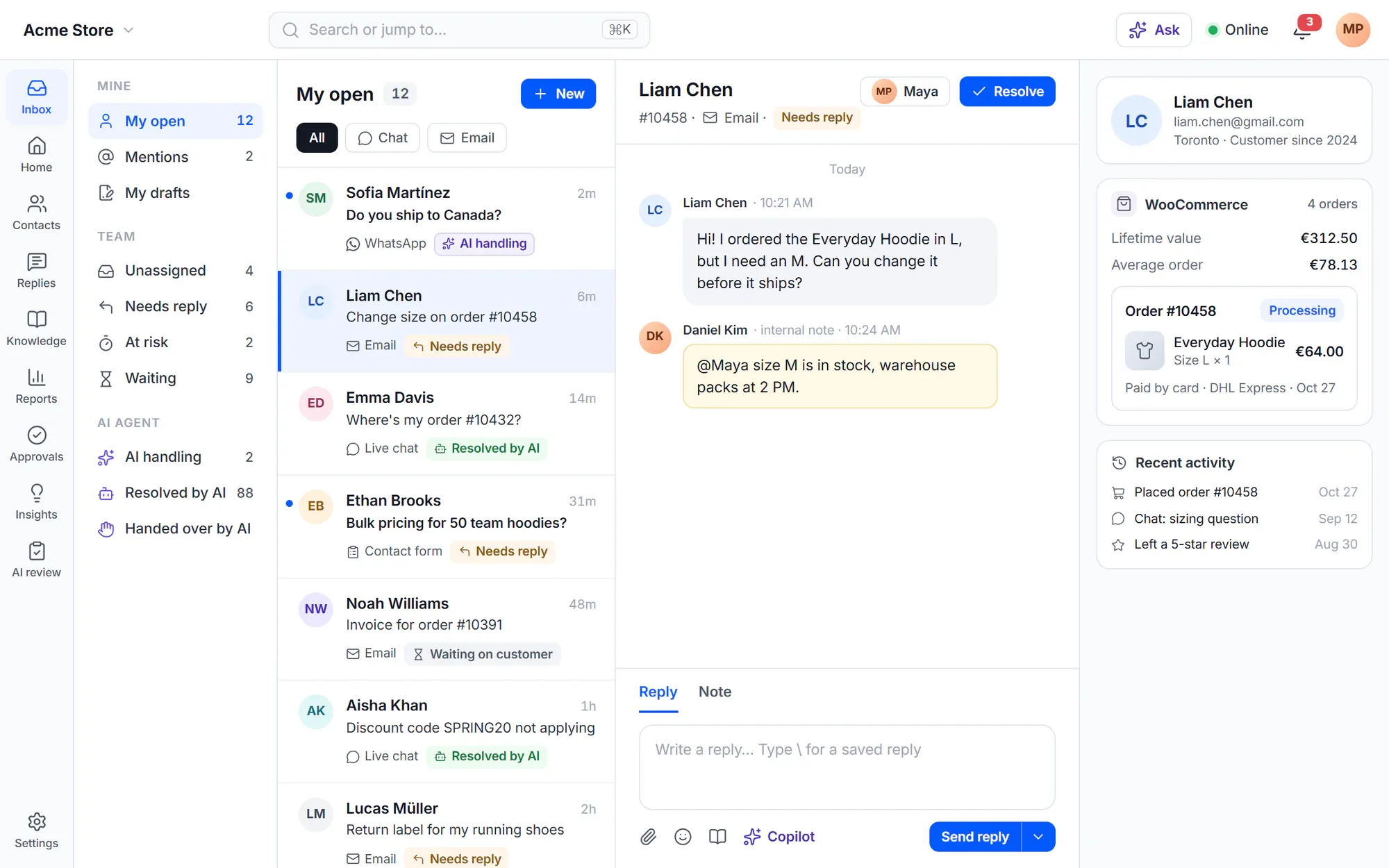
Cliedesk is a complete help desk that runs inside your WordPress site: one inbox for every channel, a help center and customer portal on your own domain, and automation that keeps the desk moving. The free plugin has no limits on agents, conversations or contacts.
The AI layer
AI that answers, assists, sorts — under your rules
The AI runs on your own provider key and works inside the same inbox, rules and permissions as your team.
-
AI agent
Answers customers on every channel from your help center and their orders, and prepares actions for approval.
Learn more -
AI copilot
Drafts, summaries and translation for every agent, inside the conversation.
Learn more -
AI triage
Sorts, tags and prioritises incoming conversations and shows what customers write about.
Learn more -
AI control
Your models, budgets, approvals and a test lab. Nothing reaches customers until you say so.
Learn more
Conversations
Every customer conversation in one place
-
Shared inbox
Views, search, saved replies, collision detection and customer profiles in a full-screen app.
Learn more -
Live chat
A chat widget that loads after the page is idle, with voice notes, files and request forms.
Learn more -
Email
Sending with a delivery log and deliverability check, plus support mailboxes and email providers.
Learn more -
Channels
WhatsApp, Messenger, Instagram, SMS, Telegram, Slack, Discord, Teams and reviews.
Learn more
Self-service
Help customers help themselves
-
Help center
Articles in the block editor, on your domain and in your theme, with search that tolerates typos.
Learn more -
Customer portal
Customers see their requests and answer at /support or in WooCommerce My Account.
Learn more -
WooCommerce
Orders next to every conversation, and order actions that run within your guardrails.
Learn more
Run the desk
Keep the work moving without watching it
-
Automation
Rules, recipes and multi-step workflows with test runs and a run log.
Learn more -
Routing & SLA
Round robin, queues, business hours, holidays, an honest reply promise and SLA policies.
Learn more -
Reports & CSAT
Overview, channels, backlog, knowledge and widget reports, plus satisfaction surveys.
Learn more -
Multi-brand
Unlimited products in one workspace, with brands and a setup per product.
Learn more
Platform
Built like a WordPress plugin should be
Cliedesk uses your site’s users, database and plugins, and gives admins the tools to run it safely.
-
Agents are WordPress users
Invite your team with six ready roles, from Owner to Viewer, and group them in teams.
-
Two-factor, required
Require two-factor for everyone with helpdesk access. Works with Two Factor, Wordfence and WP 2FA.
-
Audit log
Every sensitive change, export and sign-in is listed, and entries cannot be changed.
-
Undo any settings change
Every settings change is saved as a version. Compare it with now and restore it.
-
Staging to live
Move your configuration between sites with a check of what changes. Safe mode holds email on a copy of your site.
-
Multisite
On a multisite network, each site gets its own workspace, tables and data.
-
Installable app
The agent app at /desk installs on phones and computers. No app store needed.
-
Command palette
Do anything from the keyboard, with shortcuts each person can change.
-
Accessible
Built to WCAG 2.2 AA: automated axe checks, keyboard and reflow tests on every screen.
-
English + 12 languages
German, French, Spanish, Japanese, Arabic, Hebrew and more, with right-to-left layouts. Customer-facing pages follow WPML or Polylang.
Learn more -
WP-CLI and hooks
Export and import configuration, run jobs and track events from WP-CLI, and extend Cliedesk with actions and filters.
-
Your data, your database
Conversations, contacts and articles stay in your WordPress database, on your hosting.
Multilingual
Speaks English and 12 more languages
Your team works in its own language, and your customers get the widget, the portal and the help center in theirs.
- English Source language, plus the 12 below
- Deutsch German
- Français French
- Español Spanish
- Italiano Italian
- Nederlands Dutch
- Português (Brasil) Portuguese (Brazil)
- Polski Polish
- Türkçe Turkish
- 日本語 Japanese
- 简体中文 Chinese (Simplified)
- العربية Arabic Right to left
- עברית Hebrew Right to left
- Each agent works in the language of their own WordPress profile
- The chat widget, portal and help center follow the page language
- Saved replies and help articles in every language you support
Security
Security that comes with the help desk
IP allowlists, single sign-on, strict mode, encrypted credentials and a Setup Health check that explains how to fix each problem.
Security and privacyIn the free plugin: the shared inbox, live chat, request forms, sending email, the customer portal, the help center, one-step rules, business hours and core reports — for unlimited agents. Cliedesk Pro adds: the AI agent and copilot, incoming email, messaging channels, workflows, SLA policies, advanced routing and reports, custom roles and a setup per product.
Compare plansFrequently asked questions
Can’t find your answer? Search the docs or ask us.
Search the docs →Get support →Is the free plugin limited?
No. Cliedesk Free has no limits on agents, conversations, contacts or products, and no paid seats. Cliedesk Pro adds features; it does not unlock limits.
Where does Cliedesk run?
Inside your WordPress site. Agents work in a full-screen app at /desk on your own domain, and your data stays in your WordPress database.
Do I need WooCommerce?
No. The inbox, chat widget, help center and customer portal work on any WordPress site. With WooCommerce, conversations also show the customer’s orders.
Is there a mobile app?
The agent app at /desk is an installable web app. Install it from Chrome or Edge, or add it to the Home Screen on iPhone and iPad. There is no separate app in an app store.
Which features need Cliedesk Pro?
The AI tools, incoming email, messaging channels such as WhatsApp and SMS, multi-step workflows, SLA policies, advanced routing and reports, custom roles and setups per product. Each feature page lists what the free plugin includes.
Start with the free plugin. Add Pro when you need it.
Install Cliedesk from WordPress.org and answer your first conversation in minutes.