Customer profiles
Know who you’re talking to — before you reply.
Every conversation opens next to the customer’s profile: who they are, their WooCommerce orders, past conversations from every channel, recent activity and the pages they looked at. Cliedesk reads it live from your WordPress site, so nothing is synced and nothing goes stale.

Good answers start with knowing the customer.
- ““Can I have your order number?” — when the customer is already signed in.”
- “We check WooCommerce, the membership plugin and old emails in three tabs before we reply.”
- “Nobody remembers that this customer wrote about the same problem last month.”
- “The same person shows up as three contacts, with half the history on each.”
Beside every conversation
Everything you need, in the side panel
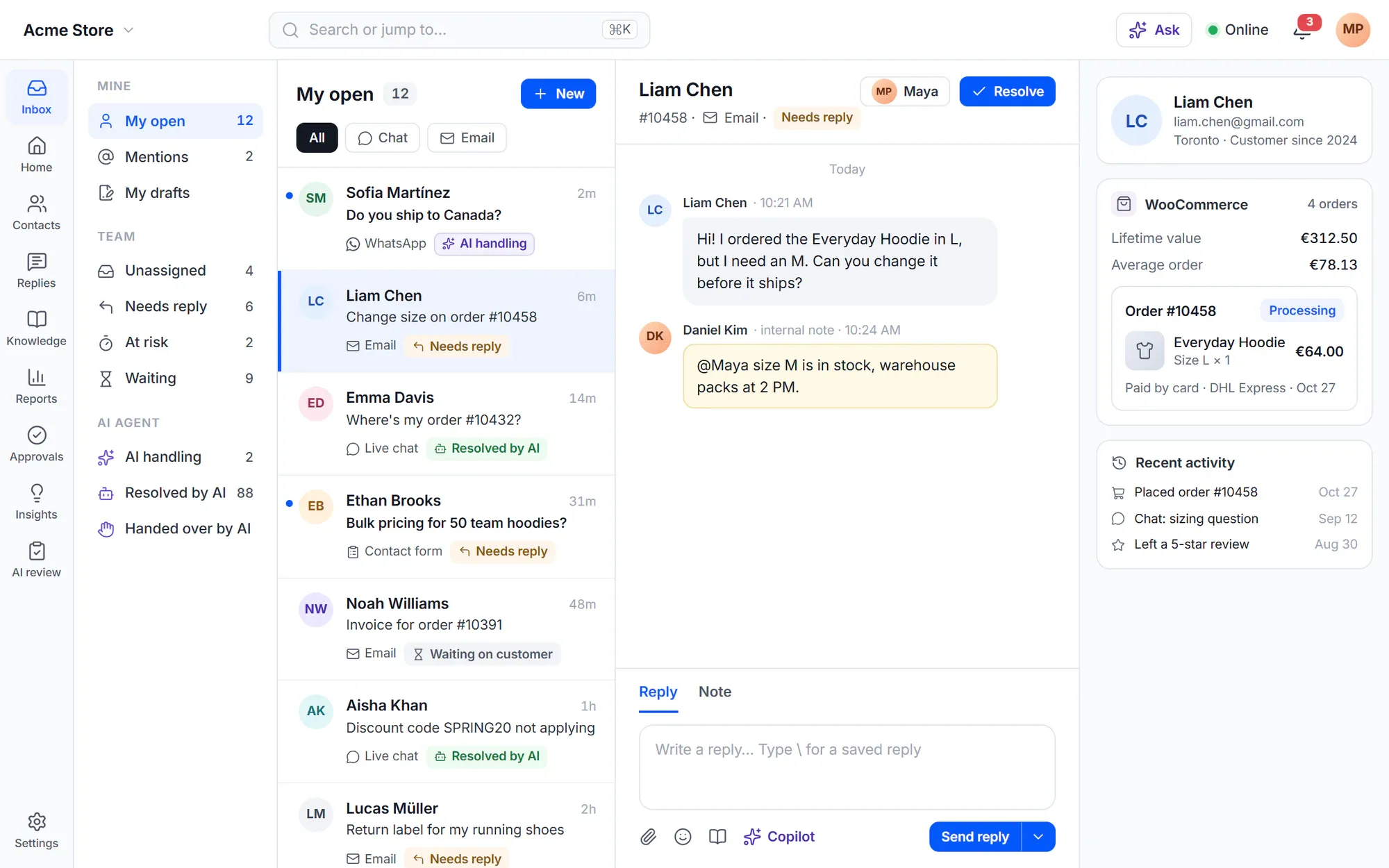
Orders
WooCommerce orders without leaving the conversation
With WooCommerce, the profile shows the customer’s lifetime value, order count, average order and last order. The numbers come straight from WooCommerce, so they match. The Orders card lists totals and order notes, with the order linked to the conversation pinned first.
- Read live from WooCommerce, with or without HPOS
- More pages of orders when the customer has many
- A VIP segment from spend or paid orders, ready on install

Records from your plugins
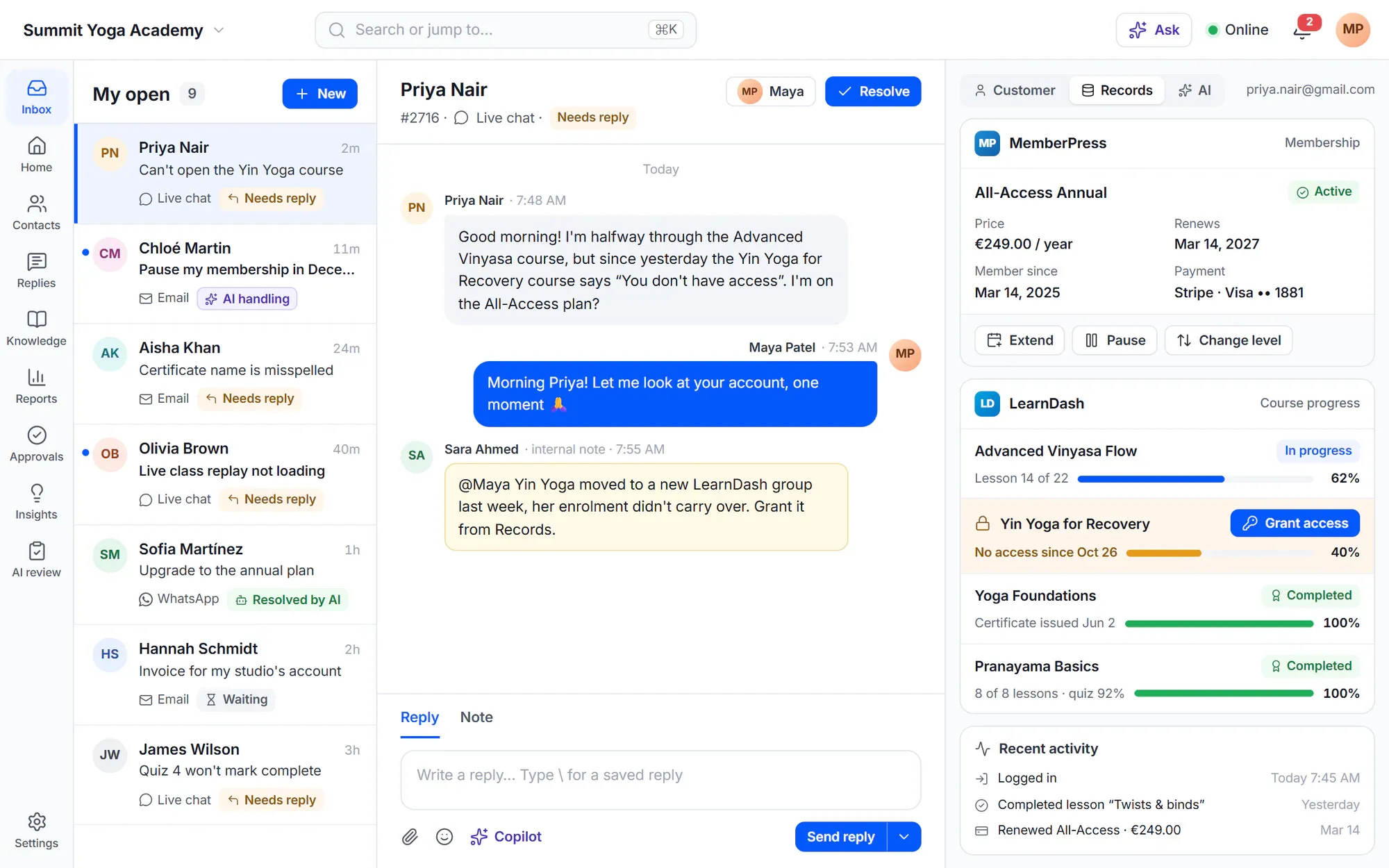
Memberships, courses and licences, found by email
When one of these plugins is active, the Records panel shows the customer’s records from it: Easy Digital Downloads orders and licences, LearnDash, LifterLMS and Tutor LMS courses with status and progress, MemberPress memberships, and WooCommerce subscriptions, bookings and memberships. Cliedesk finds them by the customer’s WordPress account and email.
- Nothing to set up and nothing copied: records are read live
- Turn off one plugin’s records in the integration settings
- Link your own posts, comments or custom records to a contact
History and activity
Past conversations, a timeline and the pages they saw
The profile lists the customer’s recent conversations from every channel, with Show all for the rest. Recent activity shows what they did, newest first: conversations started, sign-ups, logins, paid orders and refunds. The Web visit card shows the page the customer is on and the pages a returning visitor opened during a chat session.
- You only see the conversations your role allows
- No page history in private mode, with Do Not Track or Global Privacy Control, or before consent
- Up to 20 pages per visitor, kept 30 days by default
- Developers add their own events, such as trial_started, in PHP or WP-CLI
A light CRM inside your help desk
Keep customer data tidy and useful
-
Organizations
Contacts join an organization by email domain. Add parent organizations, tags for members’ new conversations, and see open conversations, satisfaction and top topics.
-
Segments and lists
Save any filter as a segment that updates on its own, or keep a fixed list. Presets include VIP, New customers and At-risk subscribers. Views, rules and the chat widget can use them.
-
Duplicate merge
Possible duplicates shows each pair with the reason. Preview the merge, pick the values to keep, and undo it for 30 days.
-
CSV import
Import contacts or organizations from CSV. Cliedesk guesses each column, checks the file and shows the rows with errors before anything is imported.
-
Custom records
Add your own record types, such as warranties, contracts or devices, with their own fields and access. Records link to contacts and conversations.
-
Contact owners
Give a customer an owner. The owner is told when the customer writes in, and can hear when they visit pages you choose, such as /checkout.
-
Cards your way
Admins choose what the customer and organization cards show, per role. Each agent can fold, hide and reorder sections, and the layout follows them to every device.
-
Details in replies
Saved replies and macros can use {contact.first_name | "there"}, contact fields and the organization name. A reply with a missing value is not sent until you fix it.
-
AI customer summary
About this customer (AI) shows up to 3 lines: who they are, their value, open issues, mood and the last outcome. It is written again after each conversation closes.
How profiles fill themselves
No data entry to get started
- 1
Someone writes in
Cliedesk creates the contact on its own when someone writes in, on any channel. Agents can add more email addresses and phone numbers to the same contact.
- 2
Their WordPress account is linked
When the customer registers or logs in with the same email, Cliedesk links their WordPress user. Optionally, it creates a customer account on first contact or first order.
- 3
Your plugins add the rest
WooCommerce orders, memberships, courses and licences show up from the plugins you already run, read live. WooCommerce billing companies can become organizations.
- 4
Your team keeps it clean
Merge duplicates, fix bounced emails and phone numbers with Clean up data, and add notes, tags and fields as you work.
WordPress-native
Your customers already live in WordPress
Cliedesk does not keep a second copy of your store. Customer metrics and plugin records are read from WordPress and your plugins when you open the profile, and all support data stays in your WordPress database. Cliedesk sends nothing to a Cliedesk service.
Security and privacy- No limits on contacts in the free plugin
- Export contacts to CSV with the columns you choose
- Marketing consent from MailPoet or FluentCRM shows read-only on the profile
In the free plugin: customer profiles with orders, past conversations, activity and pages viewed, the Records panel, organizations, segments, duplicate merge, CSV import, data cleanup and custom records. Cliedesk Pro adds: the AI customer summary, order actions in the side panel, AI help to find duplicates, propose segments and clean up data, and bulk import through the Public API.
Compare plansFrequently asked questions
Can’t find your answer? Search the docs or ask us.
Search the docs →Get support →Do I need WooCommerce for customer profiles?
No. Profiles work on any WordPress site, with past conversations, activity, preferences, fields, organizations and records from your other plugins. With WooCommerce, the profile also shows lifetime value, orders, average order and the last order.
Does Cliedesk copy my WooCommerce customers into its own tables?
No. WooCommerce metrics and the records from other plugins are read live, so the numbers match WooCommerce and nothing has to be synced. Cliedesk keeps its own contact for each person who writes in and links it to their WordPress user by email.
Which plugins show up in the Records panel?
Easy Digital Downloads orders and licences, LearnDash, LifterLMS and Tutor LMS courses, MemberPress memberships, and WooCommerce orders, subscriptions, bookings and memberships. There is nothing to set up, and you can turn off any one of them. For other data, add your own custom record types.
Does Cliedesk track which pages visitors view?
Only for returning visitors with a chat session, and never in private mode, with Do Not Track or Global Privacy Control, or before consent when consent mode is on. Cliedesk keeps at most 20 pages per visitor and removes pages older than 30 days by default. You can turn it off.
Can I bring in my existing customer list?
Yes. Import contacts and organizations from a CSV file. Cliedesk checks the file first and shows how many contacts it will create and update. Rows match existing contacts by email or phone, and large files can also be imported with WP-CLI.
Who on my team can see customer data?
Everyone with the View customers permission sees profiles; changing them needs Edit customers. Merging, exporting and importing have their own permissions, and admins set who can see each field and each custom record type.
See the whole customer next to every conversation.
Install the free plugin. Profiles fill in from your conversations, WordPress users and WooCommerce orders on their own.