Your models, your rules
Your AI, your keys, your rules.
Bring your own AI key: connect the AI provider you choose — or a model on your own server — and pay that provider for what you use. Set budgets, test before customers see anything, trace every answer, and turn AI off with one switch.
AI features are part of Cliedesk Pro and run on your own AI provider key.
Your model
Bring your own key — or keep AI on your server
Providers
The provider you choose, with your own key
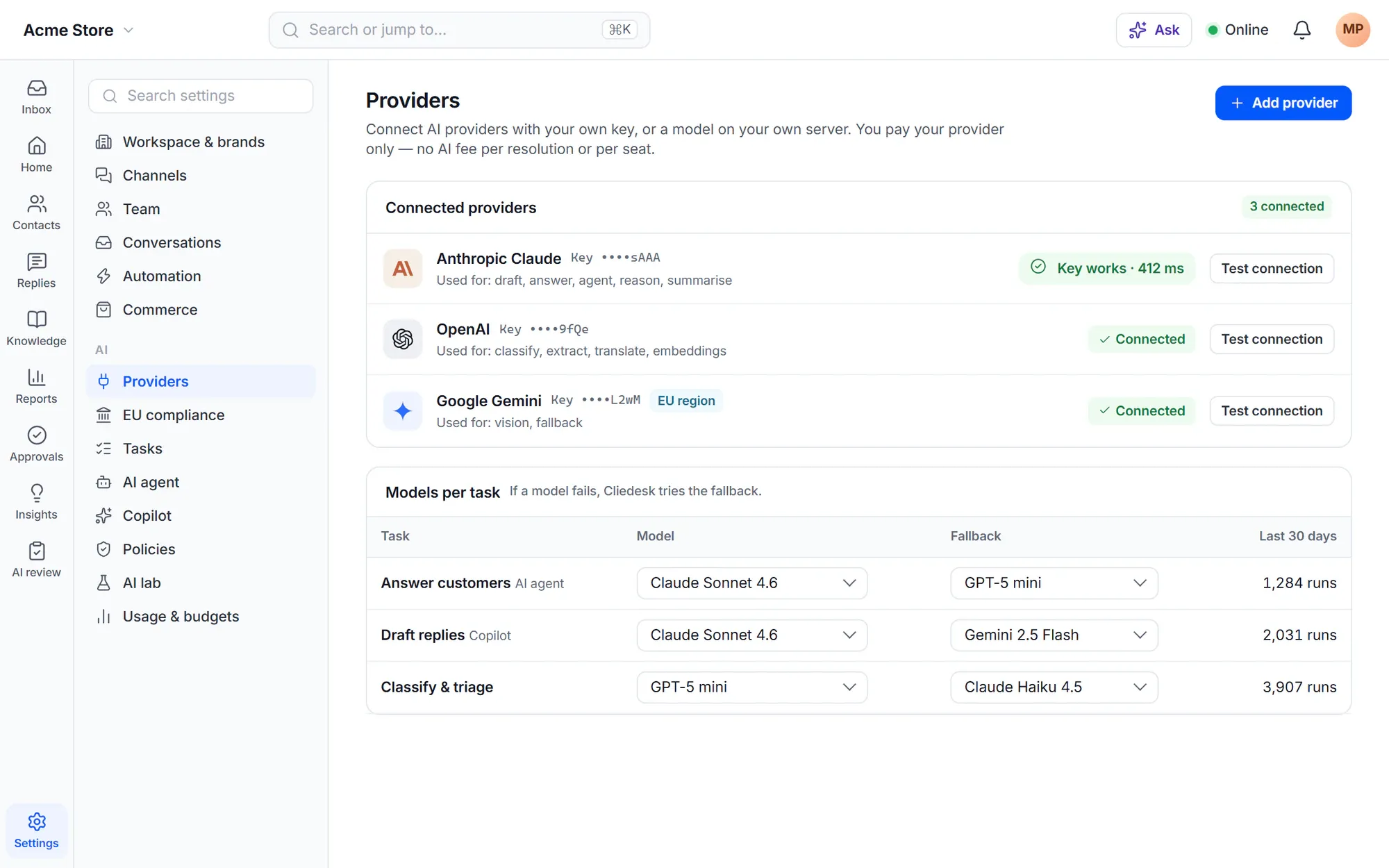
Connect OpenAI, Anthropic Claude, Google Gemini, Mistral, OpenRouter, Azure OpenAI, AWS Bedrock, Google Vertex, or a local model (Ollama, LM Studio, vLLM). Keys are stored encrypted and never shown again. Check a key before you save it.
- Choose a model per task — a fast one for sorting, a stronger one for answers — with up to 2 fallbacks
- Compare up to 3 models side by side on answers, grades, speed and cost
- No AI processing happens until an admin accepts the processing notice for that provider
Local and EU
No cloud AI, or EU-only AI
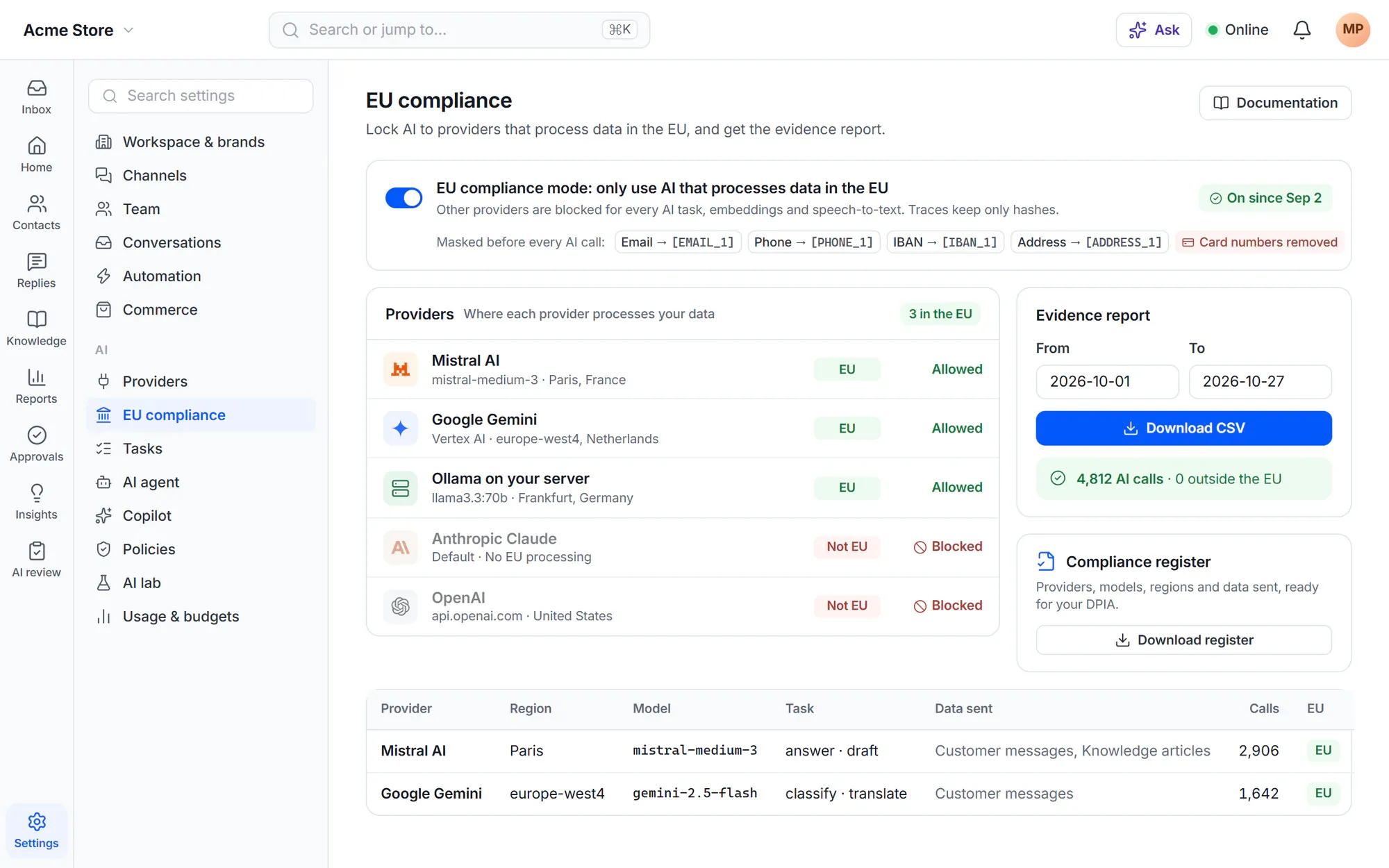
Run a model on your own server and turn on No cloud AI to call only local models. Or switch on EU compliance mode: only providers and models that process data in the EU can answer, and an evidence report lists every AI call by provider, region and task.
- Email addresses, phone numbers, IBANs and street addresses are replaced with placeholders before AI calls
- Card numbers are removed before anything reaches the AI
- A compliance register of providers, models, regions and data, ready for a DPIA
Cost
AI cost you can see — and cap
Budgets, alerts and a hard cap that hands off gracefully
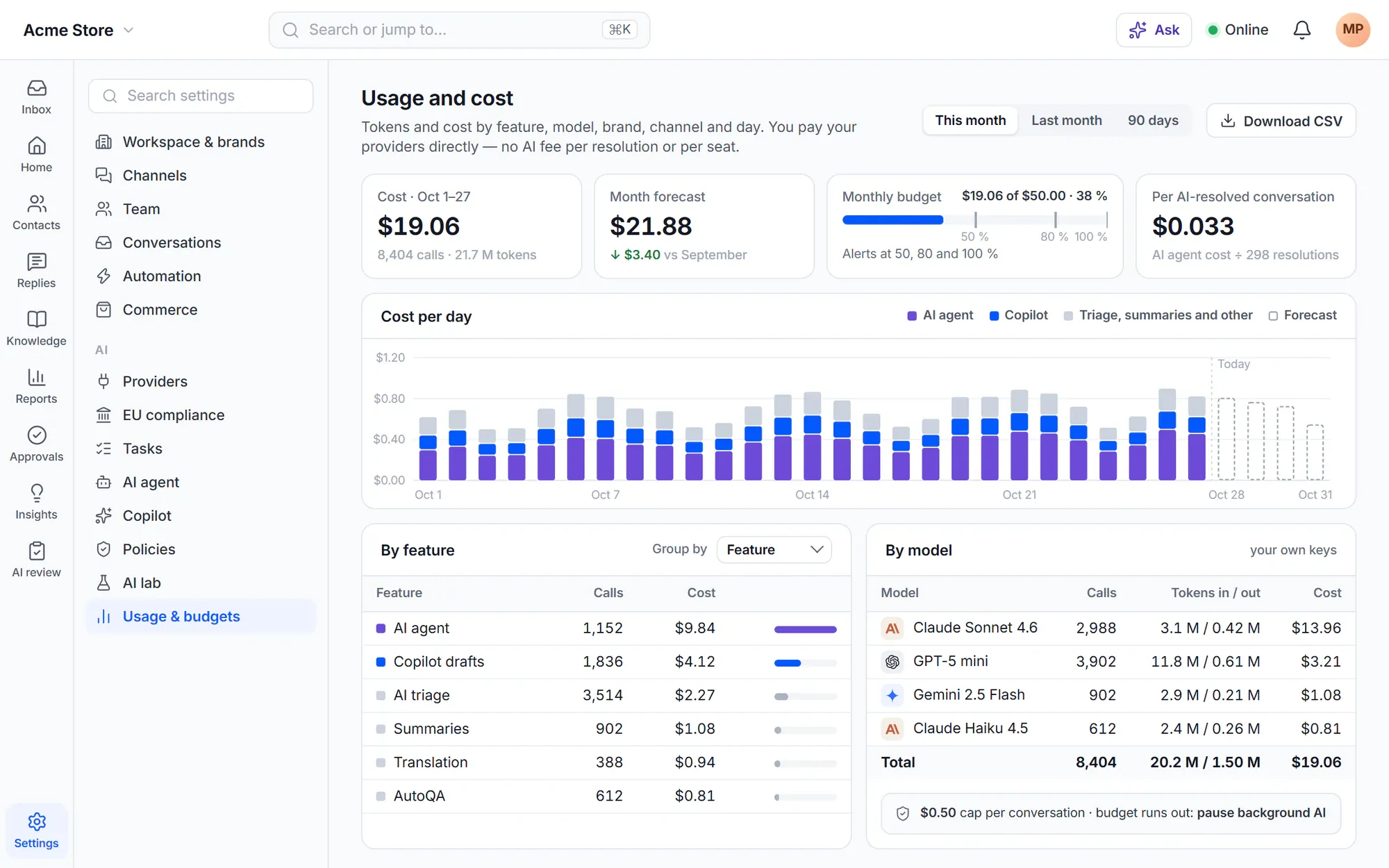
Set a monthly site budget (the setup suggests $50, and you can change it or choose no budget). Admins get alerts at 50, 80 and 100 %. At the cap, background AI pauses, triage falls back to keyword rules, the copilot works on request only, and no conversation is dropped.
- Cost by feature, model, brand, channel and day, with a monthly forecast
- A cost limit per conversation, and a rule that runs when the budget runs out
- Cliedesk charges no AI fee per resolution, per outcome or per seat
Safety you can’t switch off
Guardrails for AI that talks to your customers
-
Customer text is data, not instructions
Attempts to change the AI’s instructions are logged and can never make it run an action.
-
Guardrails checked in code
Money caps, counts per period, time windows, excluded products and required verification — checked before every action.
-
Money asks a person
Refunds, credits, coupons and reships ask for approval for every amount until you set an auto-approve limit after shadow mode.
-
Protected topics
Self-harm, threats, harm to minors and high-risk legal, medical or financial advice always go to a person.
-
Spam never reaches the AI
Spam and phishing never reach the AI agent or other AI that answers customers.
-
Answers are checked
No full card numbers, dangerous links or contact details the AI wasn’t given — otherwise a person takes over.
Test before customers see it
Prove it works on your conversations first
Test lab and shadow mode
Dry runs, test sets and shadow mode on live traffic
Preview answers as a customer would see them; actions such as refunds are dry runs. Build test sets from resolved conversations and let AI grade each answer Good, Acceptable or Poor with a fix to try. A new AI agent starts in shadow mode: it writes drafts as private notes and you see how often agents sent them unchanged.
- Staged rollout: let the AI answer a share of conversations first, for example 10 %
- Regression sets re-run when knowledge, policies or models change
- Simulate a draft policy on up to 20 recent AI conversations — nothing is sent

Traces
“Why this answer?” for every AI decision
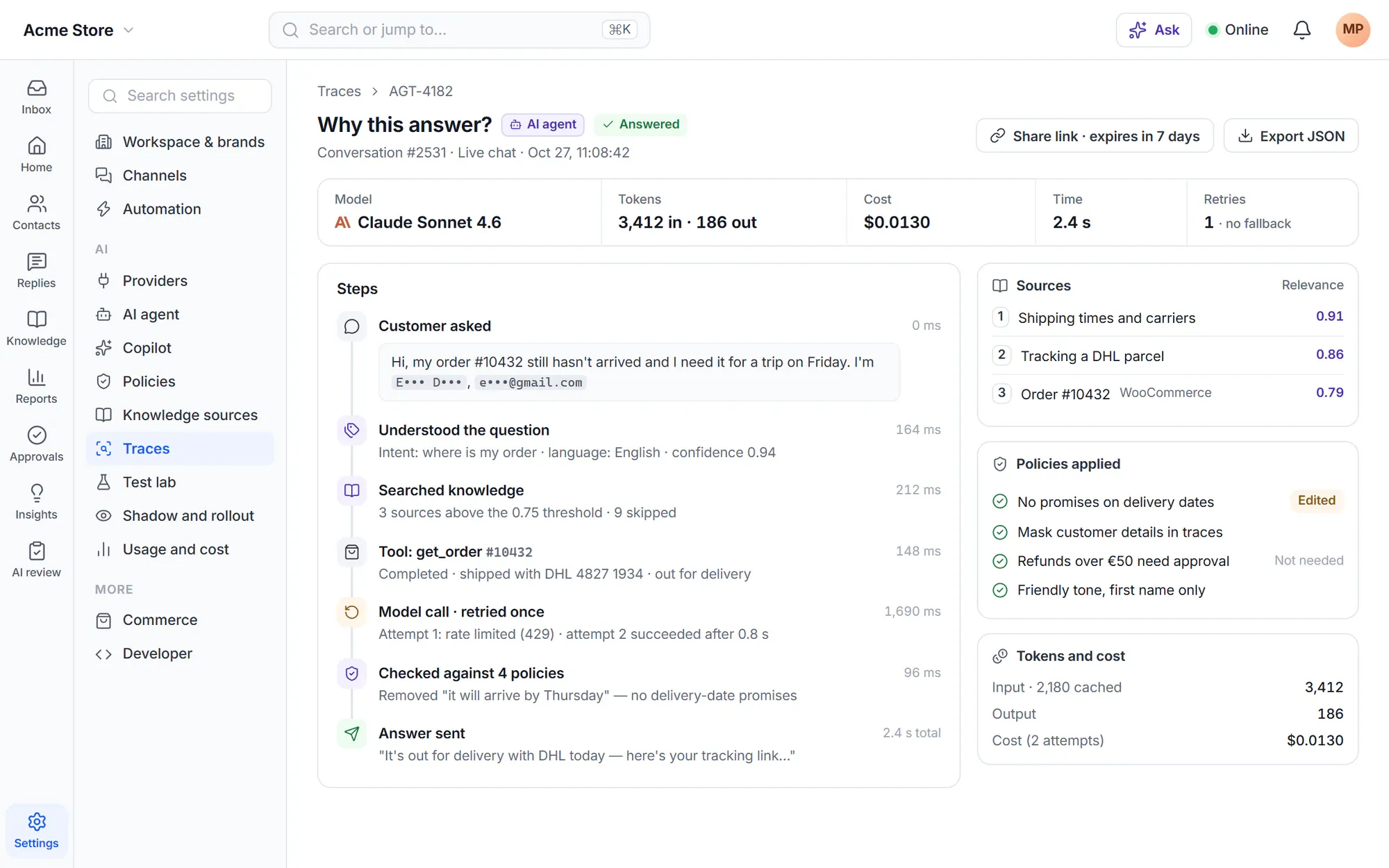
A trace shows the model, the sources, the policies used, retries and fallbacks, tokens, cost and time — with customer details masked. Share a trace with a link that expires, or export it.
Admin copilot
Change your setup by asking — and approve every change
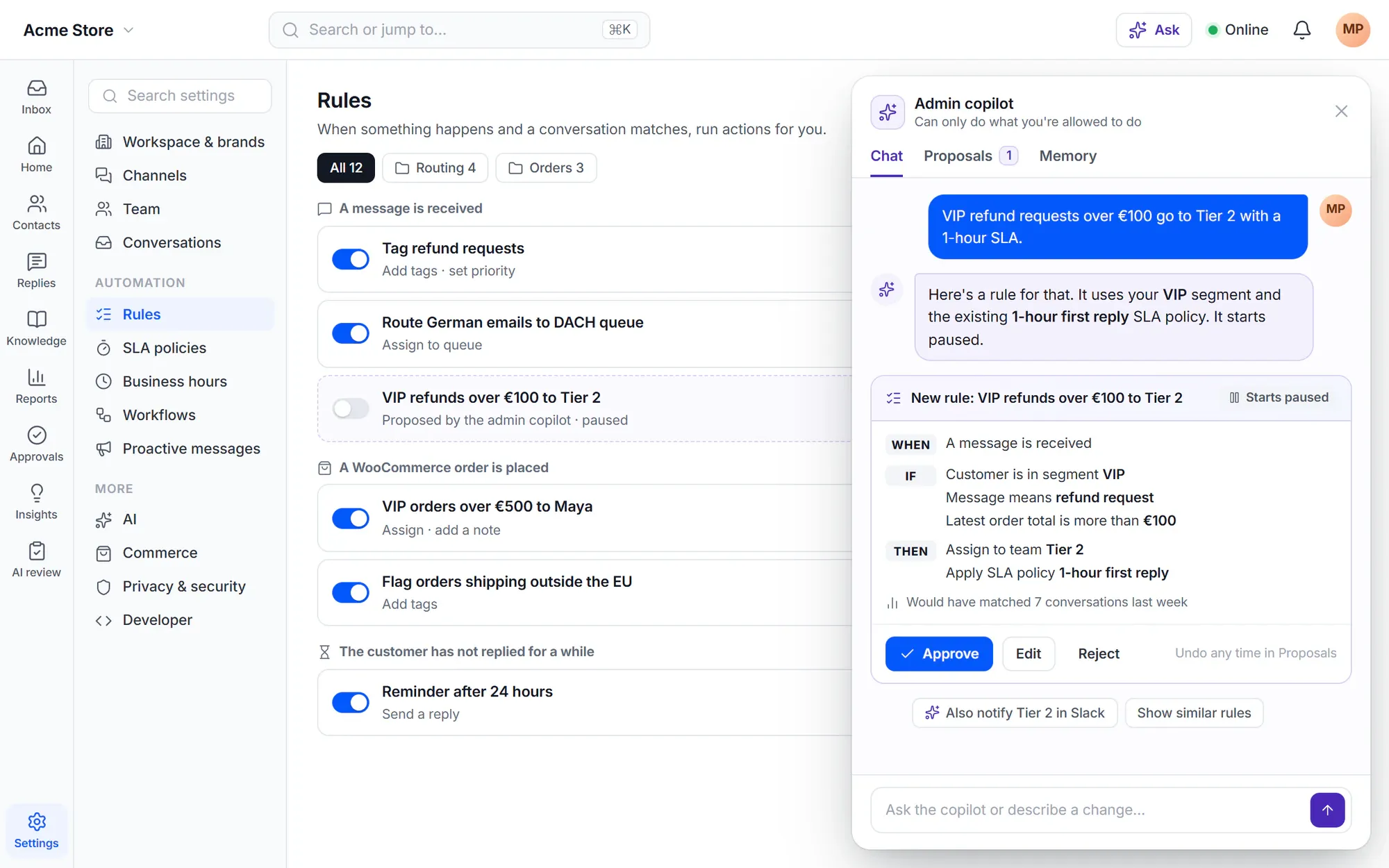
Ask in your own words: “Why did CSAT drop last week?”, “VIP refund requests over €100 go to Tier 2 with a 1-hour SLA”. The admin copilot can only do what you are allowed to do, and every change is a proposal you approve, reject or later roll back. New rules start paused.
✦ Bring your own agent
Connect Claude, ChatGPT or Copilot through MCP
MCP lets a person on your team ask their own AI assistant to find a conversation, read an order or write a note in Cliedesk. An assistant always acts as the person who connected it, the MCP server starts read-only, and changes customers see or that touch money wait for approval.
Developers and MCP- Every call is in the call log and the audit log
- Turn MCP off at once with one switch
- Optional: let anyone’s assistant search your public help articles
In the free plugin: a complete help desk without AI features. Cliedesk Pro adds: provider connections, local and EU modes, budgets, the test lab, traces, the admin copilot and MCP.
Compare plansFrequently asked questions
Can’t find your answer? Search the docs or ask us.
Search the docs →Get support →What does AI cost per conversation?
It depends on your provider’s token prices and the model you choose for each task. Cliedesk adds nothing on top. The usage dashboard shows the real cost per conversation and per feature, and you can cap the cost of a single conversation.
Is my data used to train AI models?
That depends on your provider’s terms, which the processing notice shows before any data is sent. Cliedesk masks contact details and removes card numbers before AI calls. Free Gemini keys allow Google to train on your data, so Cliedesk recommends a paid-tier key.
Can I run without any cloud AI?
Yes. Connect a local model (Ollama, LM Studio or vLLM) and turn on No cloud AI. Features the local model can’t do show “Unavailable in local mode”.
What happens when the budget is used up?
Background AI pauses, triage uses your keyword rules, and the copilot works on request only. No conversation is dropped, and you can let a rule decide what happens next.
Can an AI assistant connected through MCP change things?
Only if you allow it. The MCP server is read-only until you turn that off, an assistant never gets more rights than the person who connected it, and changes that touch money always need approval.
AI on your terms.
Add Cliedesk Pro, connect your own provider key or a local model, and set the budget and rules before anything goes live.