For agencies
Support every client from one help desk.
Cliedesk is a help desk for WordPress agencies. Group each client’s sites and products, give their customers a widget and portal in the client’s own brand, and let the client’s people work only on their own conversations. Your team keeps one inbox.
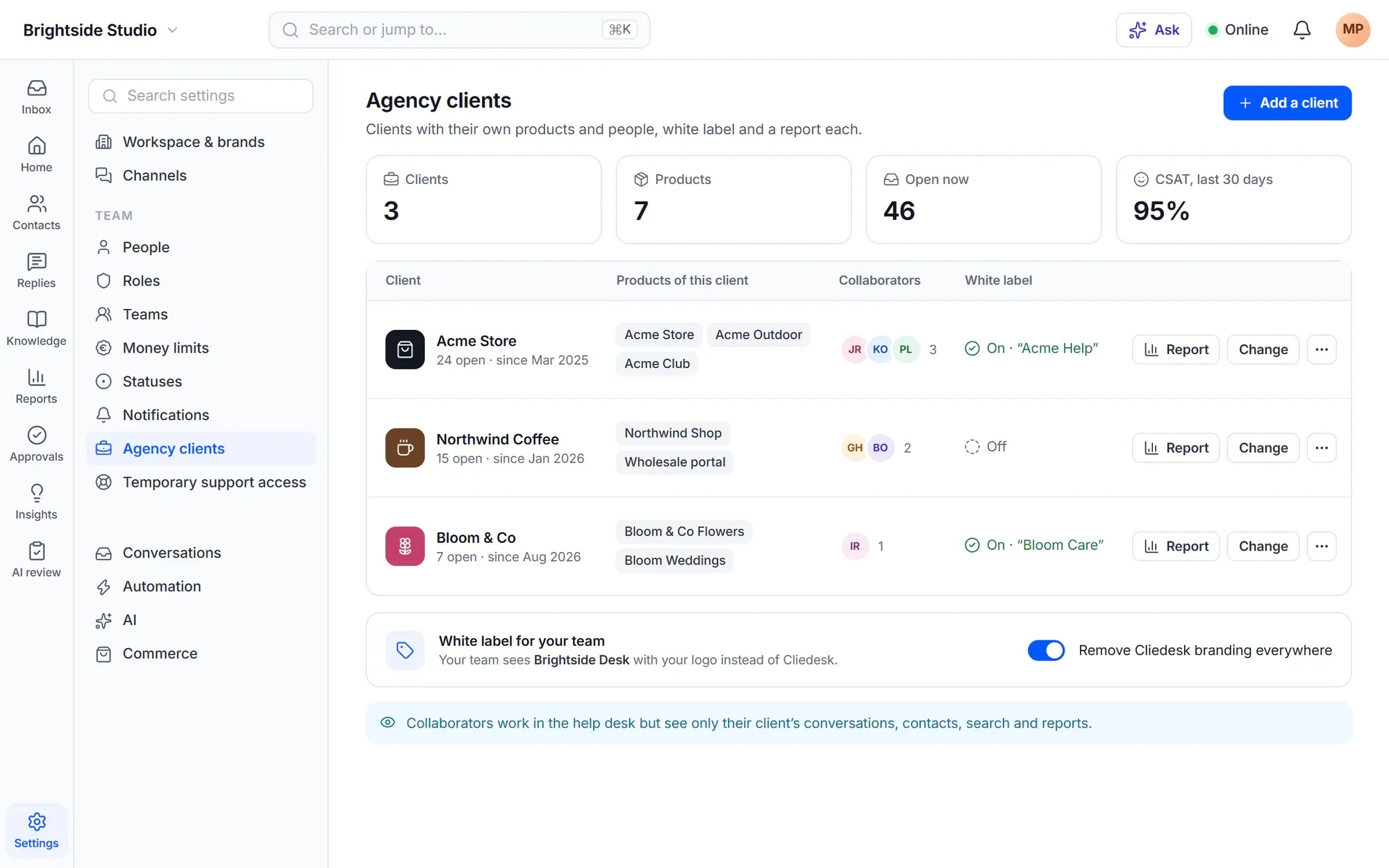
Client support shouldn’t mean one help desk per client.
- “Every client has a different inbox, login and tool to check.”
- “The client wants to see their tickets — but not anyone else’s.”
- ““Powered by” someone else’s brand on the client’s site doesn’t go down well.”
- “Every month we build the same support report by hand.”
A day with Cliedesk
One desk, many clients
- 1
Add a client
Name the client and tick its products. A product belongs to one client only.
- 2
Brand it
Turn on white label to remove Cliedesk branding from that client’s widget and portal, and show the client’s brand name instead.
- 3
Connect their site
Install the Cliedesk Connector plugin on the client’s WordPress site. Its orders and customers show beside each conversation, and the chat widget can run there.
- 4
Invite their team
Add the client’s people as collaborators. They see only that client’s conversations, contacts, search and reports.
- 5
Report back
Open the client report: new, resolved, replies, open now and CSAT for the last 30 days, in total and per product.
Built for agencies
Everything you need to run support as a service
-
Clients and products
Every client is a set of products. The inbox, views, routing and reports can be split by product.
-
White label
Per client or for every product: no Cliedesk branding in the chat widget or customer portal.
-
Client collaborators
The client’s team works in the same help desk and sees only their own products. Change the products and their access follows.
-
Client reports
A 30-day report per client. A collaborator who may read reports sees only their own client’s report.
-
Connected client sites
Connect other WordPress and WooCommerce sites: records, refunds and order emails with money limits, and search of the site’s pages.
-
Your own helpdesk name
Your team sees your name and logo instead of Cliedesk in the wp-admin menu, the app’s browser tab and the installed app.
✦ The AI angle
One AI agent, speaking for each client’s brand
The AI agent answers in each brand’s name, avatar and tone, from that product’s help center. You can let it use a connected client site’s public pages too — and every action still follows the limits and approvals you set.
Meet the AI agent- Name, avatar and tone per brand
- Answers from each client’s own knowledge
- AI on your own provider key, with no fee per resolution
In the free plugin: unlimited agents and products in one shared inbox, the chat widget, the customer portal and the help center. Cliedesk Pro adds: agency clients, white label, client collaborators and reports, connected client sites, several brands and the AI agent.
Compare plansFrequently asked questions
Can’t find your answer? Search the docs or ask us.
Search the docs →Get support →Can a client see other clients’ conversations?
No. A collaborator sees only the products of their own client: conversations, contacts, search and reports. Owners and Admins always see every product, so they cannot be collaborators.
Do I need Cliedesk on every client site?
No. Cliedesk runs on one WordPress site. Each client site gets the Cliedesk Connector plugin, which brings its orders and customers into the help desk and lets the chat widget run there.
Can I remove the Cliedesk branding?
Yes. Turn on white label per client, or remove Cliedesk branding from the chat widget and customer portal for every product. You can also show your own helpdesk name and logo to your team.
What happens when we stop working with a client?
Archive the client. Their collaborators lose access, the products are free to give to another client, and the conversations stay.
Run support for every client from one place.
Install Cliedesk on your agency site, add your first client, and connect their site.