AI agent
An AI agent that answers customers — and actually resolves their requests.
Cliedesk’s AI customer service agent for WordPress answers on every channel from your help center and the customer’s own orders, prepares refunds and order changes for your approval, and hands the conversation to a person when it should. It starts in shadow mode, so nothing reaches customers until you say so.
AI features are part of Cliedesk Pro and run on your own AI provider key.
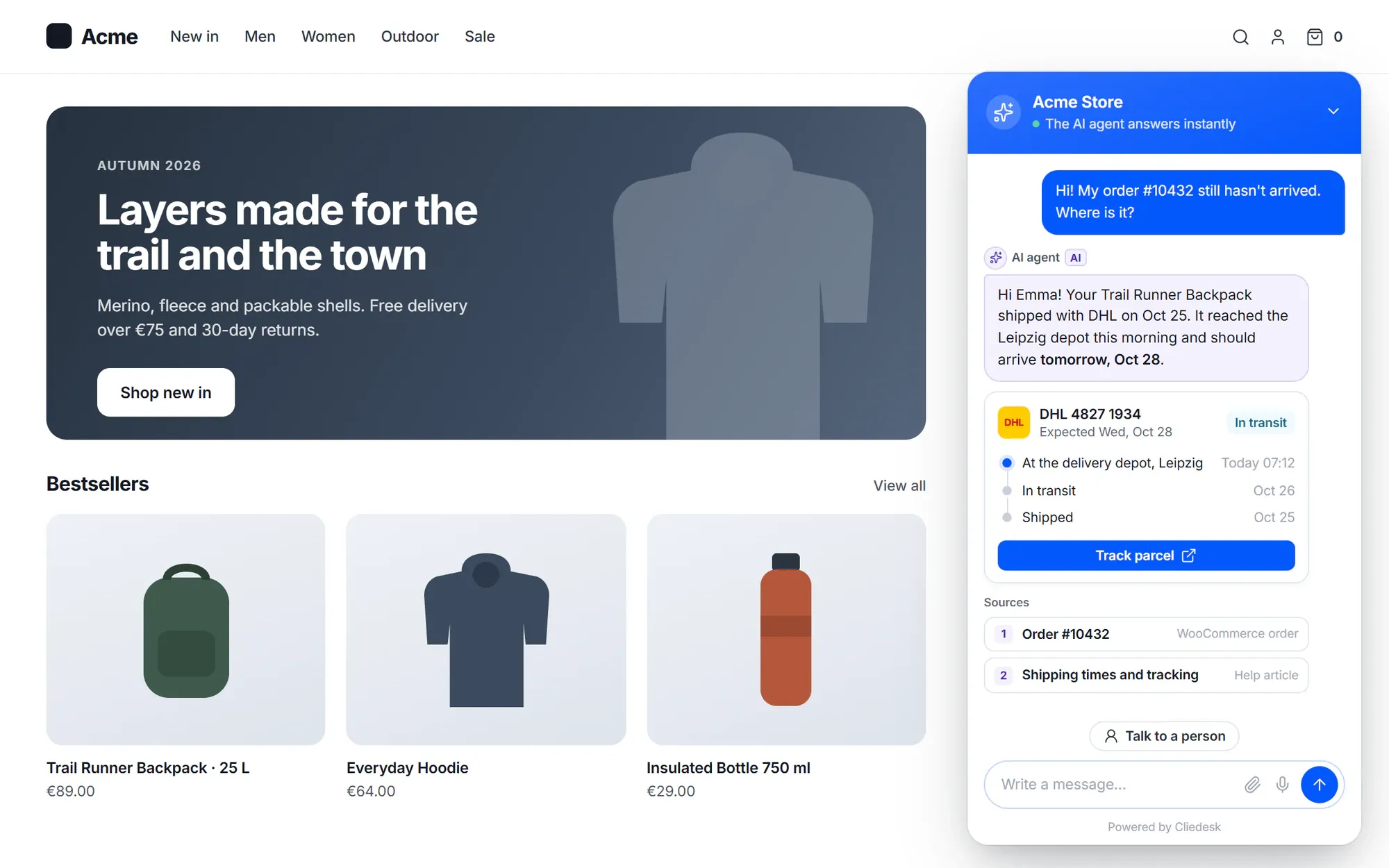
FAQ bots answer questions. Customers want things done.
- “Our chatbot can say “check your email” — it can’t actually look at the order.”
- “Every “where is my order?” still lands on a person.”
- “I don’t trust an AI to refund customers on its own.”
- “We pay per AI resolution, and nobody can tell us what counts as one.”
✦ See it work
From “it arrived broken” to a replacement — with your approval.
The agent reads the order from WooCommerce, checks your return policy, explains its reasoning and prepares the replacement. A person approves before anything happens.
My kettle arrived broken. The lid won’t close.
Action · waiting for approval
Reship item 1 of order #10432 (€0 replacement order)
Done! Your replacement kettle is on its way. You’ll get the tracking link by email.
How it works
Answers you can check, actions you control
Answers from your knowledge
Grounded in your help center and the customer’s own data
The agent finds the right help articles, reads the customer’s orders and profile, and writes an answer. Before it sends, it checks that every claim is in its sources. A weak answer is never sent: it asks one clarifying question or hands off instead.
- Public articles are linked as sources — inline in email, as source cards in chat
- Reads screenshots, photos and PDFs, and copies error codes into a field
- Finds the order the customer means (“the blue mug from last week”)
- Never reads other customers’ conversations when it answers

Actions under your rules
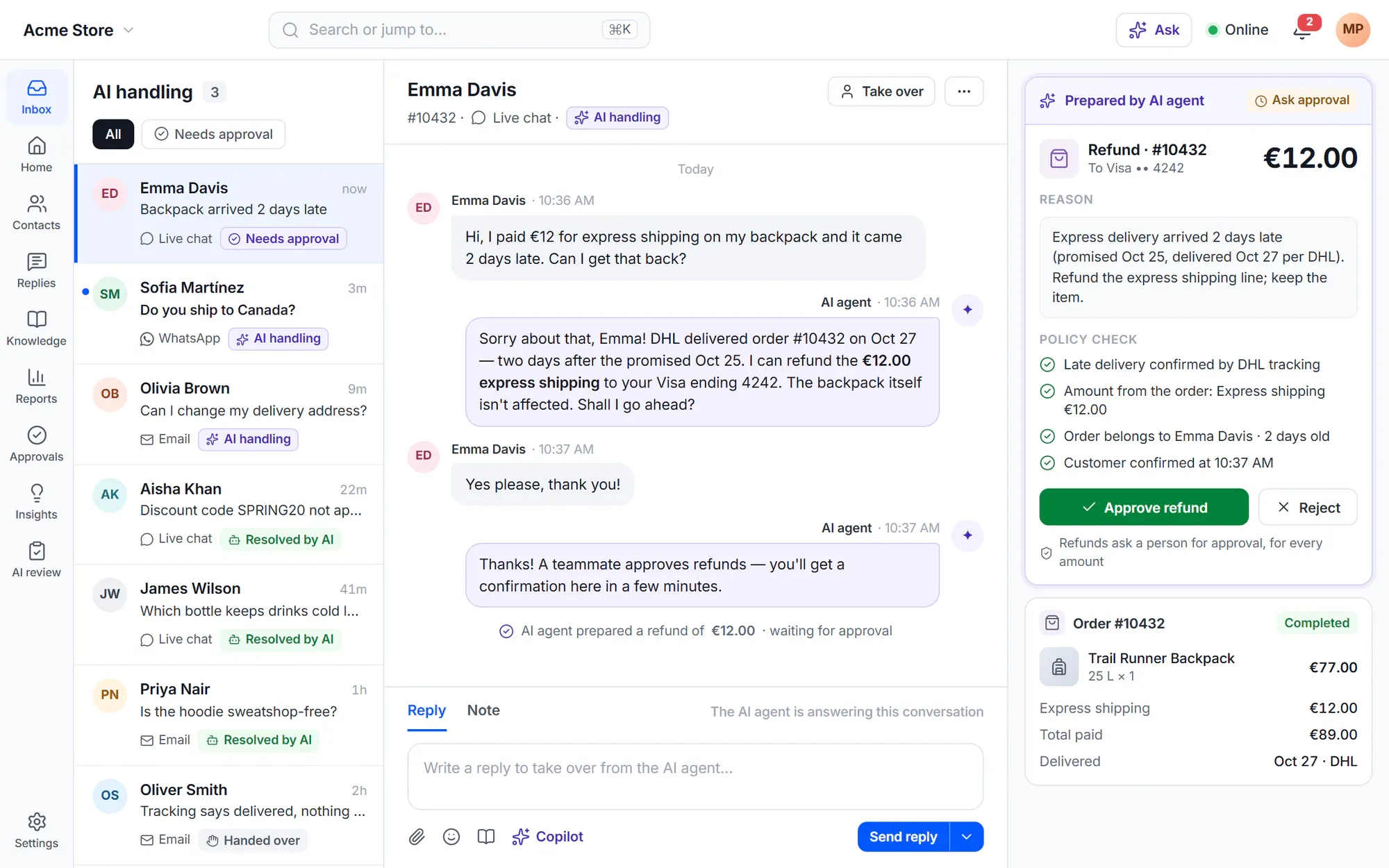
It prepares the refund. A person approves it.
For each action you choose how much the AI may do alone: Off, Suggest to the team, Ask approval or Auto. New actions start off, and refunds, credits, coupons and reships ask for approval for every amount. Auto-approve limits can only be set after the agent has run in shadow mode.
- Checks eligibility first and shows the customer what will happen and the amount
- The customer confirms cancellations, address and item changes and refunds — always
- Pinned arguments: it can never read or change another customer’s data
- Every action is recorded in plain words, with the approval and the result
Handoff
Knows when to hand over — and hands over well
Customers can always ask for a person. Frustration, loops, low confidence and your own escalation rules hand the conversation to your team with a summary, so nobody asks the customer to repeat themselves.
- Protected topics — self-harm, threats, harm to minors, high-risk legal, medical or financial advice — go to a person at once and cannot be switched off
- Exclusion rules keep the AI out, for example for VIPs or partners
- Honest wait times from your business hours and holidays
- It can consult a person and continue, without handing off

Built for real support
One agent for every channel, brand and language
-
Every channel
Live chat, email, request forms, the customer portal, WhatsApp, Messenger, Instagram, SMS, Telegram, Slack, Discord, Teams and reviews. Replies are rendered for each channel.
-
Your customers’ languages
Detects the language of each message and answers in it, with formality per language (du/Sie, tu/vous) and your glossary.
-
Playbooks
Write procedures in plain language — steps, branches, approvals. Ready templates cover where-is-my-order, damaged items, returns, cancellations and more.
-
Policies
Plain-language guidance plus hard guardrails such as amount caps and time windows, checked in code after the AI decides.
-
Your brand’s voice
Name, tone, answer length per channel, greeting and sign-off. Customers see an “AI” label by default.
-
Sales questions too
An optional Sales profile answers product questions, recommends products with reasons and can add them to the cart.
Go live safely
From setup to live in five steps
The guided setup reads your site — on a WooCommerce shop also your currency, shipping zones and return window — and drafts a business profile and starter policies for you to check.
- 1
Knowledge
Point the agent at your help center, pages, products and policies.
- 2
Behaviour
Pick a profile, tone and answer length; check the starter policies.
- 3
Actions
Choose which actions the AI may use and how much it may do alone.
- 4
Test
Ask it questions in the test lab, as any customer, with nothing sent.
- 5
Shadow, then live
It drafts on real conversations as private notes. Switch channels to live one by one.
✦ Honest results
Resolutions you can audit — and no fee per resolution
Outcomes are counted per conversation as Assisted, Contained or Confirmed, and a customer who comes back within 7 days downgrades the result. The tiers are metrics, not a bill: the AI runs on your own provider key, so you pay your provider for what you use.
Your models, your rules- No per-resolution or per-seat AI fees
- Budgets and hard caps that hand off gracefully
- Every answer traceable: sources, policies, tools and cost
In the free plugin: the chat widget, request forms, the customer portal and the help center your agent answers from. Cliedesk Pro adds: the AI agent, its actions and playbooks, on every channel, running on your own AI provider key.
Compare plansFrequently asked questions
Can’t find your answer? Search the docs or ask us.
Search the docs →Get support →Can the AI agent give refunds without me?
Not by default. Refunds, credits, coupons and reships ask for a person’s approval for every amount. You can allow automatic approval up to an amount you set, but only after the agent has run in shadow mode — and the customer still confirms cancellations, address and item changes and refunds.
What happens when it doesn’t know the answer?
It checks every claim against its sources before sending. If the answer isn’t well supported, it asks one clarifying question or hands the conversation to your team with a summary. A weak answer is never sent.
Does it work on email, not just chat?
Yes. One agent serves chat, email, forms, the portal and the messaging channels, and it formats the reply for each — for example source links inline in email and source cards in chat. Incoming email and the messaging channels are part of Cliedesk Pro.
Will customers know they are talking to an AI?
Yes, by default. Replies carry an AI label, and you choose the agent’s name and avatar per brand.
Can I use it only after hours?
Yes. Each channel is Off, Shadow, Suggest or Live, and you can schedule the agent, for example to answer only outside your business hours.
Which AI model does it use?
Yours. Connect OpenAI, Anthropic Claude, Google Gemini, Mistral, OpenRouter, Azure OpenAI, AWS Bedrock, Google Vertex or a local model, with your own key.
Let the AI handle the routine — and keep the final say.
Start in shadow mode, compare its drafts with your team’s replies, then go live channel by channel.