Bot flows & forms
The right details, before anyone replies.
Bot flows talk with the customer in fixed steps you write: buttons, questions, an order picker and an identity check. Request forms ask for what each kind of request needs. Simple questions end in the flow, and the rest reach your team with the answers already filled in.
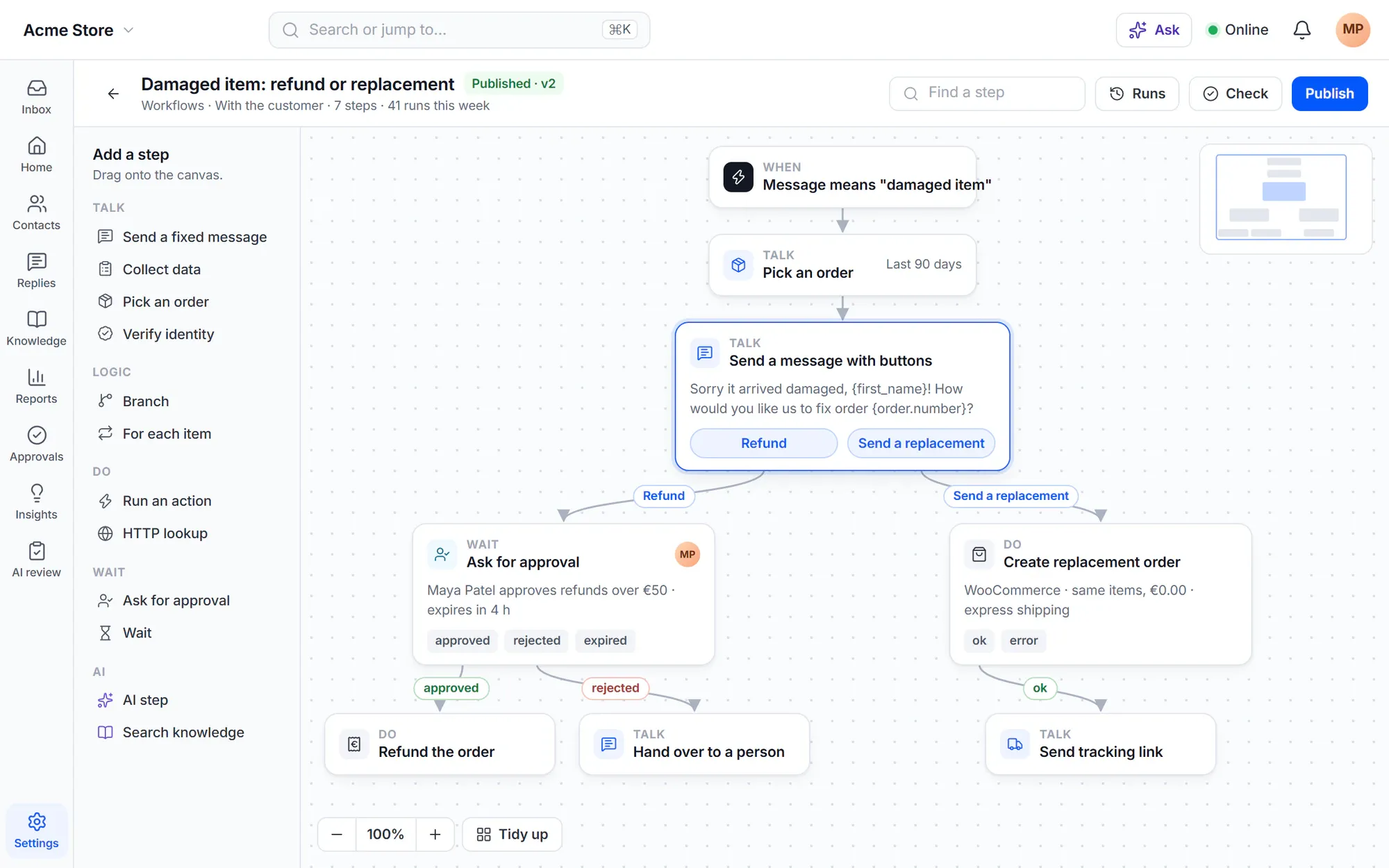
The first reply shouldn’t be “Can you send your order number?”
- “Half our first replies are questions we could have asked up front.”
- “Customers wait a day for a reply that only asks for their email address.”
- “The contact form drops the order number into one long message.”
- “Simple “where is my order?” chats tie up a person every time.”
How it works
Flows that ask, forms that fit, and a clean handover
Bot flows
Buttons and paths you design step by step
A bot flow is a workflow that runs with the customer. Send a fixed message with up to 10 buttons, give each button its own path, and choose a path by conditions. The customer sees the assistant’s name, never a person’s.
- “Customer must pick a button” hides the chat box until they choose
- Add Start over and Talk to a human buttons with one click
- Show the expected reply time from your business hours
- Fallback text per channel — SMS shows buttons as a numbered list
Data collection
Ask for exactly what your team needs
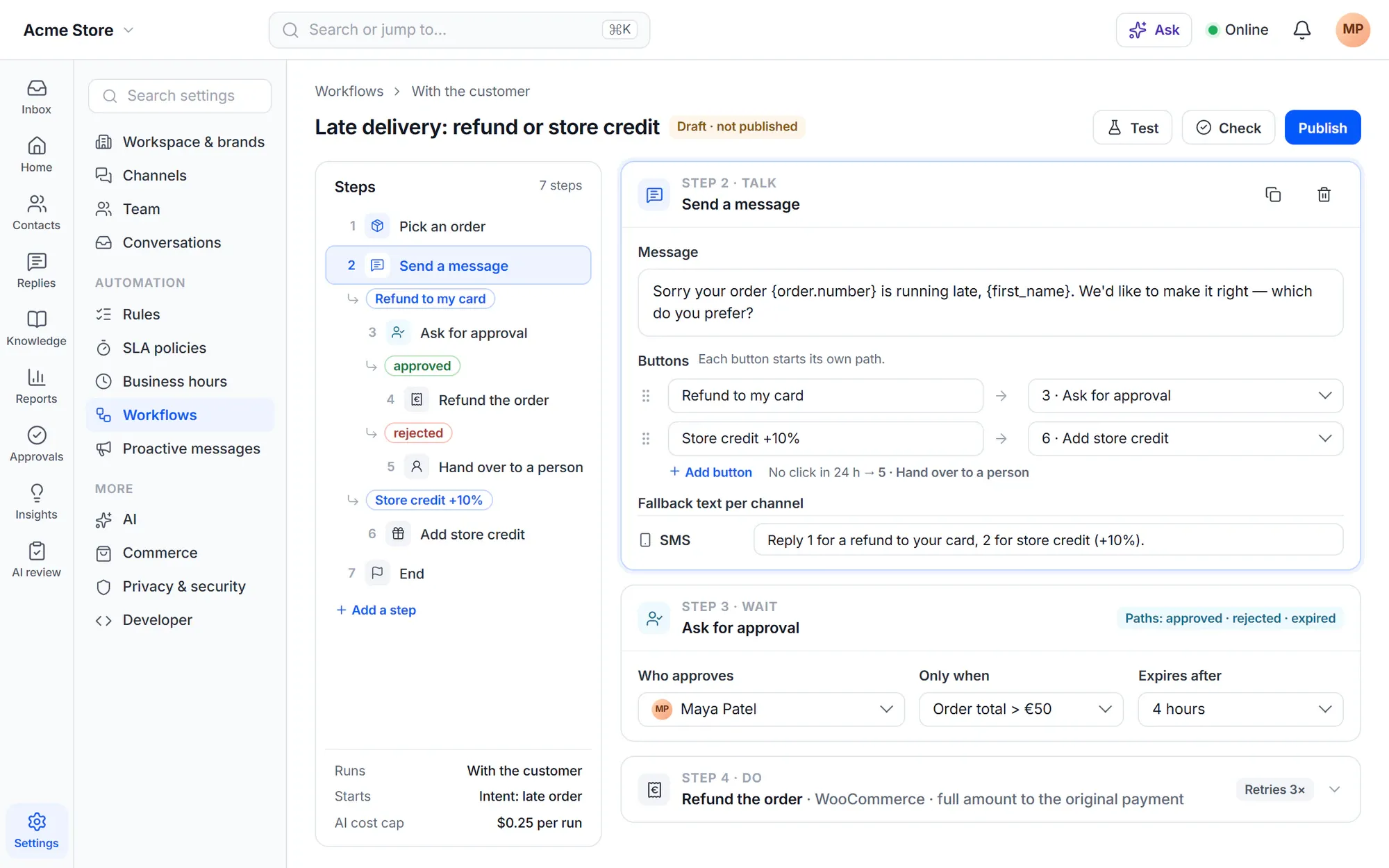
A Collect data step asks for text, email, phone, number, date, a choice from a list or files. Answers are checked, asked again when invalid and saved to conversation or contact fields. Fields you already know are skipped.
- Pick an order shows the customer’s latest WooCommerce orders as cards
- Verify identity sends a guest a 6-digit code by email; signed-in users go on at once
- Each step has paths for done, timeout and missing answers
- End by handing over to a queue or team with a priority, or by resolving

Request forms
One form per kind of request, everywhere it shows
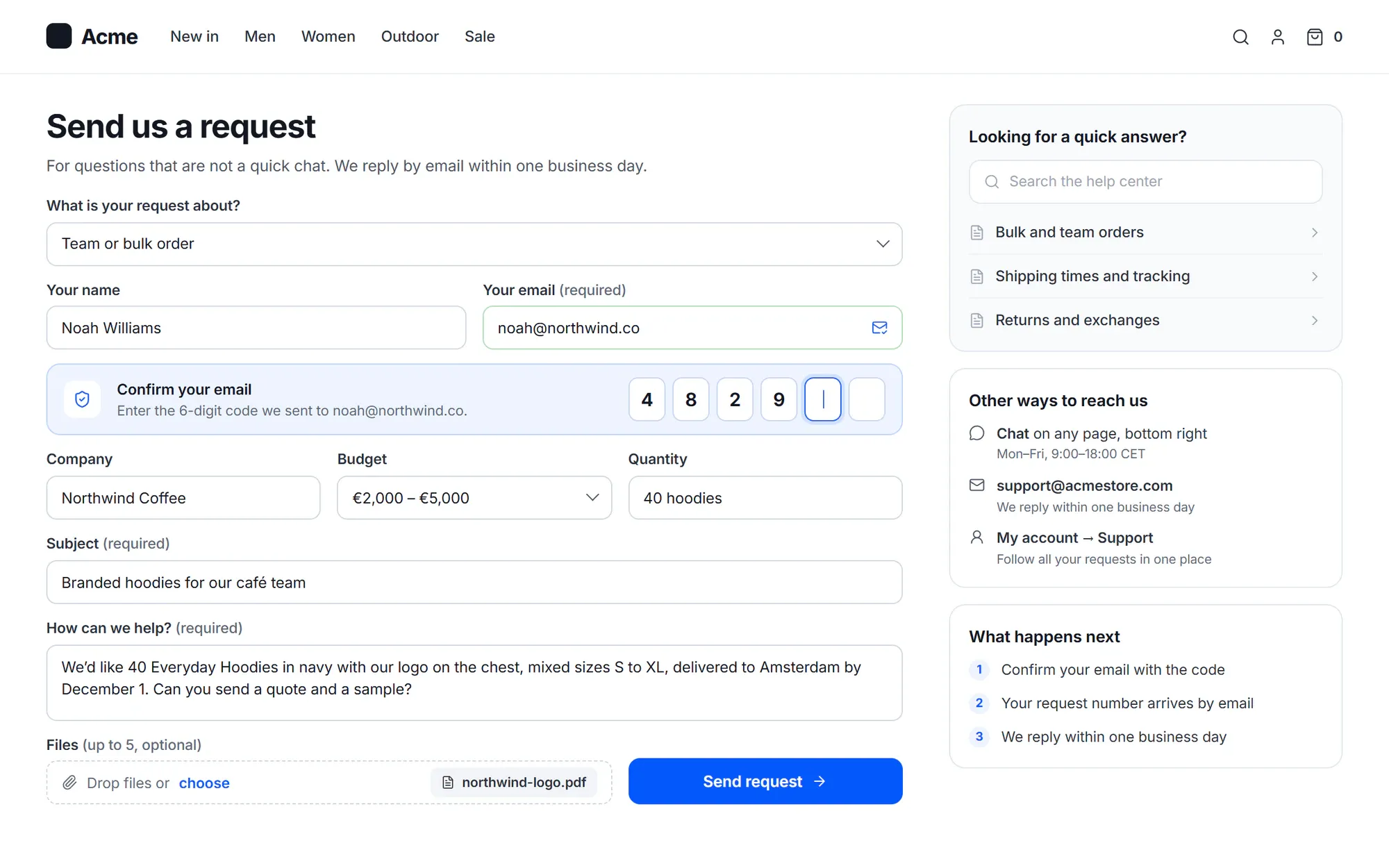
Each conversation type has one form. The request form block, the shortcode, the widget, the portal and the agent’s New conversation dialog all use it. Guests add their name and email, a subject, a message and up to 5 files.
- Send a type’s requests to one product with its slug
- A request form page of its own, such as example.com/support/request/
- The widget can open on a form for chosen pages
- The customer gets one confirmation email, and your replies link to the portal
Bot flow or AI agent?
Two ways to answer first — use one or both
A bot flow
- Sends the exact text you wrote, every time
- Buttons choose the path without AI
- Collects typed answers and checks them
- Good for known paths: damaged items, late orders, returns
- Uses AI only where you add an AI step, with a cost cap per run and per day
The AI agent
- Reads the question and answers from your knowledge
- Decides when to hand over to your team
- Before handing over, asks only for details your team doesn’t have yet
- Can wait to hand over until the customer gives an email
- Good for open questions nobody wrote a flow for
Forms
Request forms that file themselves
-
Fields per type
Text, choices and other fields per conversation type, limited to one brand if you like. Customers never see internal fields.
-
Form first in the widget
On pages you choose, the widget opens on a request form instead of the chat.
-
Embed on other sites
Show the form page in an iframe on websites you list. Every other site is refused.
-
Your form plugin
Turn Contact Form 7, WPForms, Gravity Forms, Fluent Forms and Formidable submissions into conversations, with their fields mapped to yours.
-
Bot check
With a bot check set in security settings, a form is sent only after the check passes.
-
An answer before sending
The AI agent can answer the question before the form is sent. When it doesn’t help, the visitor sends the request.
In the inbox
Your team sees what the bot is doing
- Only one customer-facing workflow runs on a conversation at a time
- Conversations held by a flow are in the Automated view, not in Unassigned, until the flow hands them over
- A handover can go to a queue or a team, with a priority and an AI summary
- When the customer goes silent for 15 minutes (you can change it), the conversation is resolved; a reply reopens it
- A stopped flow does not start again on that conversation for 24 hours
- Test runs a flow with your test answers and sends nothing to customers
In the free plugin: the request form block and shortcode with one form per conversation type, the request form page, the widget’s form-first mode and quick-reply buttons on the widget home. Cliedesk Pro adds: customer-facing bot flows with buttons, data collection, order picking and identity checks, conversations from Contact Form 7, WPForms, Gravity Forms, Fluent Forms and Formidable, AI answers before a form is sent, and AI handoff with collected details.
Compare plansFrequently asked questions
Can’t find your answer? Search the docs or ask us.
Search the docs →Get support →Is a bot flow the same as the AI agent?
No. A bot flow follows the steps you build: fixed messages, buttons and questions, with buttons choosing the path without AI. The AI agent reads the question and writes its own answer. A flow can hand a conversation to the AI agent or to your team when it ends.
Do I need to write code to build a flow?
No. Messages, buttons and branches are built in the workflow editor. Some steps, such as Collect data, take their settings as short JSON in the step. You can also describe a flow in plain words and let the AI draft it as a paused draft for you to check.
What happens on channels that can’t show buttons?
The workflow editor warns you about steps a channel can’t show, and you add fallback text per channel. SMS shows buttons as a numbered list.
Which form plugins work with Cliedesk?
Contact Form 7, WPForms, Gravity Forms, Fluent Forms and Formidable, with Cliedesk Pro. You connect a form, choose its conversation type and map its fields. The built-in request form works in every edition.
What if the customer leaves halfway through a flow?
Each waiting step has a timeout path. When the customer stays silent for 15 minutes — a time you can change — the conversation is resolved, and a later reply from the customer reopens it.
Ask once, up front, and answer faster.
Start with request forms in the free plugin, then add bot flows, form plugins and AI handoff with Cliedesk Pro.