WooCommerce
The AI help desk for WooCommerce — that can actually fix the order.
Cliedesk is a WooCommerce help desk plugin: it reads your orders live, right next to every conversation. Your team and the AI agent refund, cancel, reship and change orders from the inbox — within the money limits and approvals you set — and customers help themselves in My Account.
AI features are part of Cliedesk Pro and run on your own AI provider key.

Your help desk can see the order. It just can’t do anything with it.
- “Every refund means opening WooCommerce in another tab and copying the order number back.”
- “Our help desk’s WooCommerce app is a read-only sidebar.”
- “The AI chatbot can only say “please contact support” about orders.”
- “I’m scared an agent — or an AI — refunds more than we can afford.”
Built in, not plugged in
Cliedesk runs inside your store, so there is nothing to connect
-
No API keys, no sync
When WooCommerce is active, Cliedesk finds it by itself and reads orders and customers live. Nothing is imported, so you always see what WooCommerce has now.
-
HPOS on or off
Works with WooCommerce’s high-performance order storage on or off. Without WooCommerce, none of the commerce features load.
-
Every order, every time
Paid orders, lifetime value and average order value at the top, then every order — guest orders included — with items, payment and shipping.
-
From the order screen too
Each WooCommerce order shows its Cliedesk conversations, and “Start conversation with customer” opens a new one with the order linked.
-
Order data in rules
Order status, total, items, shipping country, coupon, tracking and customer value as conditions; order placed, refunded, delayed or payment failed as triggers.
-
Your own order fields
Show plugin meta such as a delivery slot with the order, use it in rules and saved replies, or keep it hidden for rules only.
The action matrix
Who can do what with an order
Every action shows a preview of what changes — the money, the stock and the emails — before anyone confirms. Every action adds a private note to the order and a line to the conversation timeline.
| Action | Agent | AI agent | Customer (portal) | Workflow |
|---|---|---|---|---|
| Look up orders and tracking | Yes | Yes | Yes | In conditions |
| Resend order and invoice emails | Yes | With approval | Yes | Yes |
| Add an order note | Yes | With approval | No | Yes |
| Refund | Within your money limit | With approval | With approval | With approval |
| Cancel an order | Yes | With approval | Within your rules | With approval |
| Change the shipping address | Yes | With approval | Yes | No |
| Change items | Yes | With approval | No | No |
| Coupons | Yes | With approval | No | With approval |
| Store credit and gift cards | Yes | With approval | No | No |
| Reship a replacement | With approval | With approval | With approval | With approval |
| Returns, labels and exchanges | Yes | With approval | Within your policy | No |
| Subscription changes | Yes | With approval | Yes | No |
| Move or cancel a booking | Yes | With approval | Reschedule | No |
| Memberships and courses | Yes | With approval | No | No |
| Reset download links | Yes | With approval | Yes | Yes |
| Licence resets and extensions | Yes | With approval | No | No |
-
Look up orders and tracking
- Agent
- Yes
- AI agent
- Yes
- Customer (portal)
- Yes
- Workflow
- In conditions
-
Resend order and invoice emails
- Agent
- Yes
- AI agent
- With approval
- Customer (portal)
- Yes
- Workflow
- Yes
-
Add an order note
- Agent
- Yes
- AI agent
- With approval
- Customer (portal)
- No
- Workflow
- Yes
-
Refund
- Agent
- Within your money limit
- AI agent
- With approval
- Customer (portal)
- With approval
- Workflow
- With approval
-
Cancel an order
- Agent
- Yes
- AI agent
- With approval
- Customer (portal)
- Within your rules
- Workflow
- With approval
-
Change the shipping address
- Agent
- Yes
- AI agent
- With approval
- Customer (portal)
- Yes
- Workflow
- No
-
Change items
- Agent
- Yes
- AI agent
- With approval
- Customer (portal)
- No
- Workflow
- No
-
Coupons
- Agent
- Yes
- AI agent
- With approval
- Customer (portal)
- No
- Workflow
- With approval
-
Store credit and gift cards
- Agent
- Yes
- AI agent
- With approval
- Customer (portal)
- No
- Workflow
- No
-
Reship a replacement
- Agent
- With approval
- AI agent
- With approval
- Customer (portal)
- With approval
- Workflow
- With approval
-
Returns, labels and exchanges
- Agent
- Yes
- AI agent
- With approval
- Customer (portal)
- Within your policy
- Workflow
- No
-
Subscription changes
- Agent
- Yes
- AI agent
- With approval
- Customer (portal)
- Yes
- Workflow
- No
-
Move or cancel a booking
- Agent
- Yes
- AI agent
- With approval
- Customer (portal)
- Reschedule
- Workflow
- No
-
Memberships and courses
- Agent
- Yes
- AI agent
- With approval
- Customer (portal)
- No
- Workflow
- No
-
Reset download links
- Agent
- Yes
- AI agent
- With approval
- Customer (portal)
- Yes
- Workflow
- Yes
-
Licence resets and extensions
- Agent
- Yes
- AI agent
- With approval
- Customer (portal)
- No
- Workflow
- No
AI actions that change data start off. Once you switch one on for the AI, money actions ask a person to approve every amount by default, and the customer confirms cancellations, address and item changes and refunds. The same guardrails apply to agents, the AI agent, the portal, rules and API keys.
Safe by design
Fast for customers, careful with your money
Guardrails
Guardrails that protect your margin
For every commerce action you choose who may run it alone and when a person must approve. A broken rule never fails silently: the action waits, and supervisors get an approval request with the reasons. When they approve, it runs once.
- Money limits per role — for example how much an agent may refund per action
- Order age and status windows, and how often per customer
- Fewer claims than a number in 12 months, a share of the order that must remain, a monthly budget
- Products or categories that always need approval

The AI agent
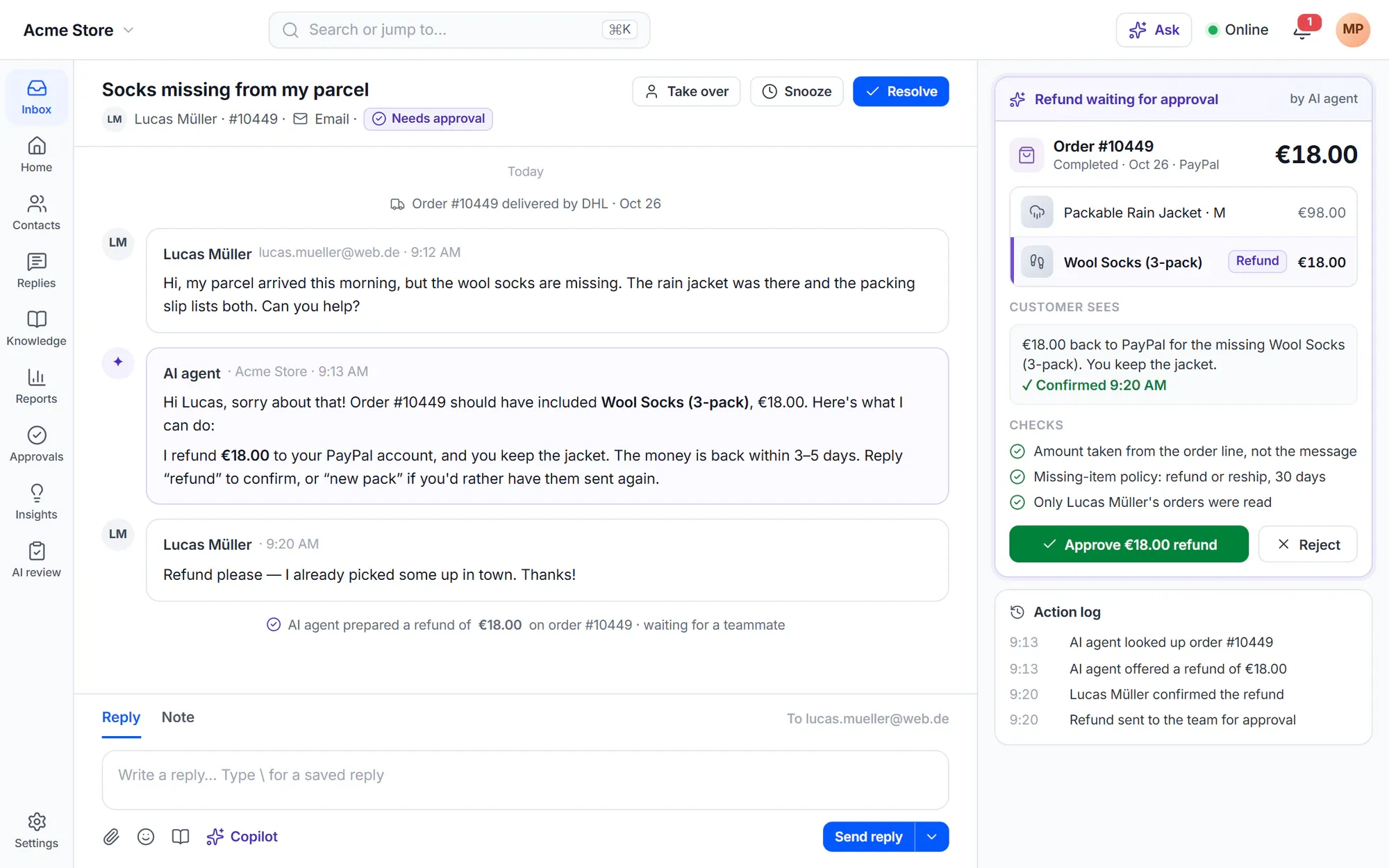
The AI prepares the refund. A person approves it.
The AI agent reads the customer’s orders, checks eligibility and your policy, and prepares the action with the amount. It can only act on the orders of the customer it is talking to. Auto-approve limits can only be set after the agent has run in shadow mode.
- Shows the customer what will happen before it asks them to confirm
- Refund amounts always come from the order, never from the customer
- Every action recorded in plain words, with the approval and the result
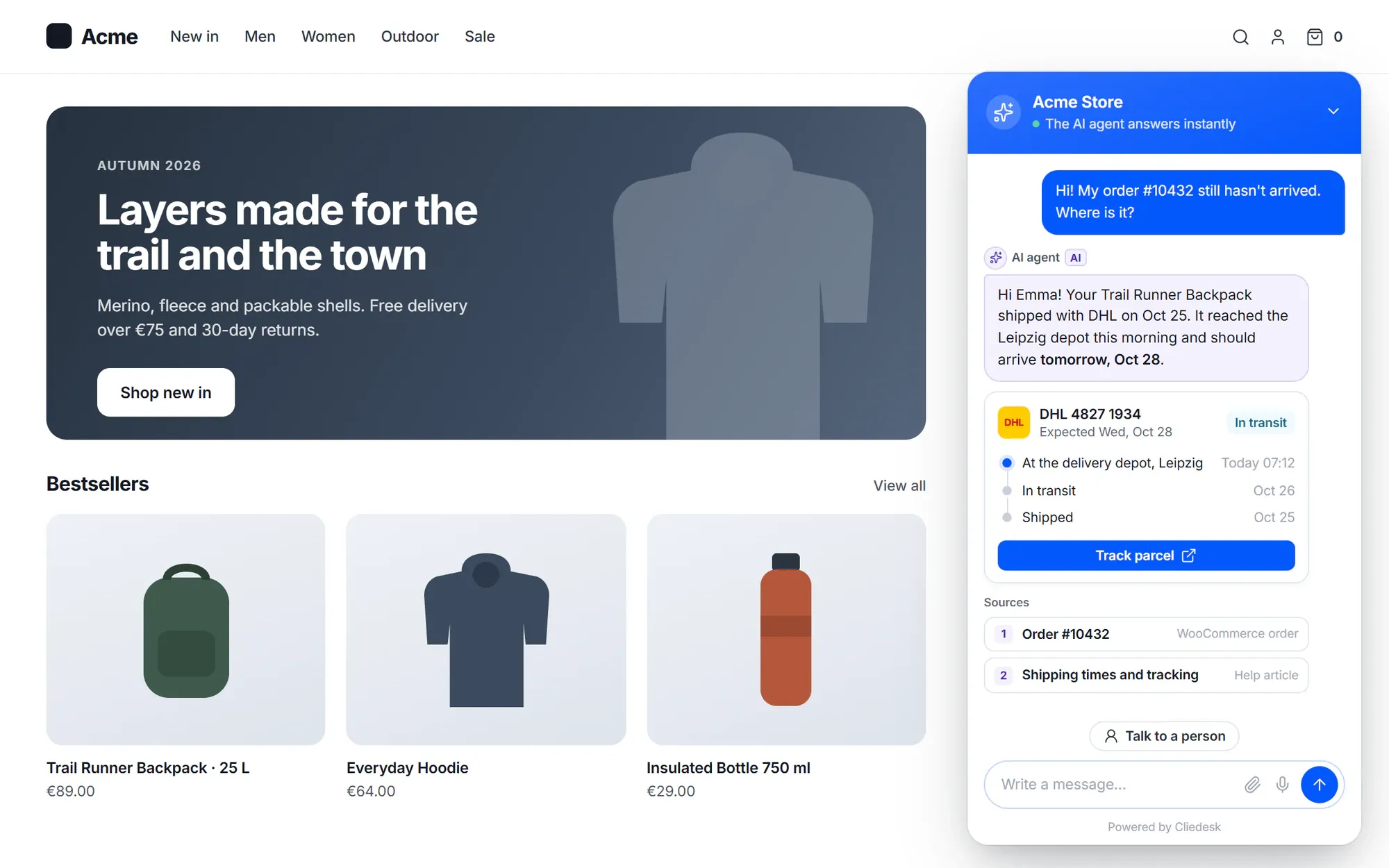
Where is my order?
“Where is my order?” answered before anyone opens the inbox
Cliedesk reads tracking from Advanced Shipment Tracking, WooCommerce Shipment Tracking, AfterShip, ShipStation and Sendcloud: the carrier, the tracking link, the last event and, when the plugin knows it, the expected delivery. Agents send it with one click, saved replies use it as tokens, and the AI agent answers with it.
- A rule starts when an order is still processing or on hold after a number of days
- Order notices tell customers about a delay — promotional wording is refused
- The portal shows a delay notice once the expected date has passed
- Ready “where is my order?” recipes for rules and the AI agent
Self-service
Customers help themselves in My Account
Customers track orders, get help with a specific order, cancel, change the address before shipping, return items, reset download links and manage subscriptions and bookings — under the same guardrails as your team. You choose which buttons show for each order status.
- Guests verify with a code sent to their email, or the order number and email
- Returns within your policy are approved at once, with a label or your instructions
- Anything outside your rules waits for your team, and the customer reads “Request sent”

✦ Policies read from your store
Your refund page becomes your refund rules
Cliedesk reads your refund and returns page, your terms and your pages about shipping and cancelling, and drafts the store rules for you. Each value shows the sentence it came from, and pages that disagree are listed. Nothing changes until you approve.
- The approved return window applies to return and refund actions
- “Explain this policy” shows agents the store rules and guardrails
- A draft, never a silent change
Beyond one-off orders
Subscriptions, bookings, memberships and licences
The Orders card shows each customer’s subscriptions, bookings, memberships and courses with buttons to change them. Every change shows what will happen and any money that moves before you confirm.
-
Subscriptions
Skip the next renewal, pause for a month, resume, or email a payment link for a failed renewal. Cancelling offers skip, pause and a retention discount first — the AI agent offers the same steps.
-
Bookings
Move a booking to a free time, or cancel it with the refund shown first, following your fee and refund rules.
-
Memberships and courses
Extend, pause or cancel a membership where its plugin can, reset course progress or remove access.
-
Downloads and licences
Reset download limits and links, and extend or deactivate licences with EDD Software Licensing or License Manager for WooCommerce.
-
Returns and exchanges
Check the return window first, send a prepaid label with Shippo or your return instructions, or exchange for another size or colour.
-
Credit and gift cards
Give store credit or a gift card with a supported plugin such as WooCommerce Smart Coupons, with an expiry date and a code.
Works with
Reads the plugins your store already runs
- WooCommerce Subscriptions
- WooCommerce Bookings
- WooCommerce Memberships
- MemberPress
- Paid Memberships Pro
- LearnDash
- LifterLMS
- Tutor LMS
- Advanced Shipment Tracking
- WooCommerce Shipment Tracking
- AfterShip
- ShipStation
- Sendcloud
- Shippo
- EDD Software Licensing
- License Manager for WooCommerce








Commerce numbers
Know what support gave — and what it earned
Every money action writes exactly one row in the commerce ledger, with the amount, the currency and who did it — a person or the AI. Reports show what support refunded, credited and discounted, the orders placed after a chat or an email reply, and how many customers write per 100 orders.
See reports- Revenue after support, net of refunds
- Refunds, credits and coupons support gave
- Contacts per 100 orders on the Overview
More than one store
Other shops, Stripe and other platforms
-
Other WooCommerce sites
Connect another WordPress or WooCommerce site with the Cliedesk Connector. Its orders and customers show next to each conversation, and its purchases update product access.
-
Stripe
See every Stripe customer’s subscriptions, invoices and payments. Refund a payment, cancel a subscription or send a billing-portal link, within your limits.
-
Other platforms
Shopify, BigCommerce, Magento, PrestaShop, WHMCS, Recharge and Chargebee connect through connector templates — not native integrations.
Switching?
Using Gorgias, Help Scout or Crisp with WooCommerce?
Most help desks were built for Shopify or for no store at all. Here is what their WooCommerce support looks like, as of October 2026.
| Help desk | WooCommerce, as of October 2026 |
|---|---|
| Gorgias | The WooCommerce integration is a read-only sidebar; the AI Agent’s order actions are for Shopify only. |
| Help Scout | No first-party WooCommerce integration; its docs point to third-party plugins. |
| Crisp | WooCommerce data and AI tools are read-only. |
| Cliedesk | Runs inside WooCommerce: agents, the AI agent, the portal and rules act on orders within your guardrails. |
-
Gorgias
- WooCommerce, as of October 2026
- The WooCommerce integration is a read-only sidebar; the AI Agent’s order actions are for Shopify only.
-
Help Scout
- WooCommerce, as of October 2026
- No first-party WooCommerce integration; its docs point to third-party plugins.
-
Crisp
- WooCommerce, as of October 2026
- WooCommerce data and AI tools are read-only.
-
Cliedesk
- WooCommerce, as of October 2026
- Runs inside WooCommerce: agents, the AI agent, the portal and rules act on orders within your guardrails.
Last checked 1 October 2026.
Sources: Gorgias: WooCommerce 101 · Help Scout: Connect WooCommerce and Help Scout · Crisp: WooCommerce integration
In the free plugin: live order context next to every conversation, order notes, tracking links, order rules and tokens, and the order hub in My Account. Cliedesk Pro adds: refunds, cancellations and every other order action for agents and the AI agent, guardrails, portal self-service, subscriptions, bookings, Stripe and connected stores.
Compare plansFrequently asked questions
Can’t find your answer? Search the docs or ask us.
Search the docs →Get support →Does it work with HPOS?
Yes. Cliedesk works with WooCommerce’s high-performance order storage on or off, and reads orders live — nothing is imported or synced.
Can the AI refund customers automatically?
Not by default. AI actions that change data start off, and when you switch refunds on, every amount asks a person to approve. You can allow automatic approval up to an amount you set, but only after the AI agent has run in shadow mode — and the customer still confirms the refund.
Which shipping plugins does it read?
Advanced Shipment Tracking, WooCommerce Shipment Tracking, AfterShip, ShipStation and Sendcloud. Cliedesk reads the tracking those plugins store; nothing is sent to a carrier.
Do customers need an account?
No. Guests verify with a one-time code sent to their email, or with the order number and the order’s email address, and then see only their own orders and requests.
Does it slow down my store?
Cliedesk only loads its WooCommerce features when WooCommerce is active, and reads orders when a conversation or the portal asks for them — there is no background sync of your orders.
What about Shopify or other platforms?
Cliedesk is built for WordPress and WooCommerce. Shopify, BigCommerce, Magento, PrestaShop, WHMCS, Recharge and Chargebee connect through connector templates, not native integrations. Other WooCommerce sites connect with the Cliedesk Connector.
Let support fix the order, not just talk about it.
Install the free plugin for live order context today, then add Cliedesk Pro when you want your team and the AI agent to act on orders.