












Cliedesk
A complete help desk, free forever.
Unlimited agents, conversations and products: shared inbox, live chat, request forms, help center, customer portal, rules and WooCommerce order context.
AI-native customer support for WordPress & WooCommerce
An AI agent that answers your customers and acts on their WooCommerce orders. A copilot that drafts every reply. A complete shared inbox, live chat, help center and customer portal. Your data stays in your database, and your AI runs on your own key.
AI features are part of Cliedesk Pro and run on your own AI provider key.

 Dormefy
 Revoye
 HaqueBDC
 Tubeup
AI in every step
The AI agent, the copilot and AI triage share the same knowledge, policies and actions as your team.
Answers on every channel from your help center and the customer’s own orders, and hands off to a person when it should.
How the AI agent worksWhere is my order #10432?
It left our warehouse yesterday and should arrive on Thursday. Here is your tracking link.
✦ AI answer · from your order data
Drafts replies, rewrites, summarises and translates. It never sends anything: your agent checks the text and clicks Send.
Meet the copilot
Topic, intent, sentiment and urgency on every message, before your rules run.
Learn moreSpike alerts, weekly trends and a Monday digest, with a short AI-written cause.
Learn moreAn AI CX score and AutoQA against your own scorecard, for people and the AI alike.
Learn more✦ Watch the AI agent work
Answers from your knowledge. Acts within your rules. Asks before anything that costs money.
My kettle arrived broken. The lid won’t close.
Action · waiting for approval
Reship item 1 of order #10432 (€0 replacement order)
Done! Your replacement kettle is on its way. You’ll get the tracking link by email.
Safe by design
Nothing reaches a customer or changes an order until your rules allow it.
Refunds, credits, coupons and reships ask for approval for every amount. Auto-approve limits come only after shadow mode.
See the controlsPrepared by the AI agent
Refund €12.00
Order #10432 · Blue kettle 1.7 L · within your 30-day window
On a new site the AI agent writes what it would answer as a private note, so your team can review it before a channel goes live.

Customers can always ask for a person, and escalation rules you write in plain words hand over.
Traces show the sources, policies, tools and cost behind each AI answer.
Monthly budgets with alerts, and one switch that turns every AI feature off.
Everything your support needs
Live chat, email, portal, help center, inbox, automation and reports share one conversation and one engine.
Chats, emails, forms and messages land in one shared inbox with views, assignment, notes and saved replies. Unlimited agents.
Explore shared inbox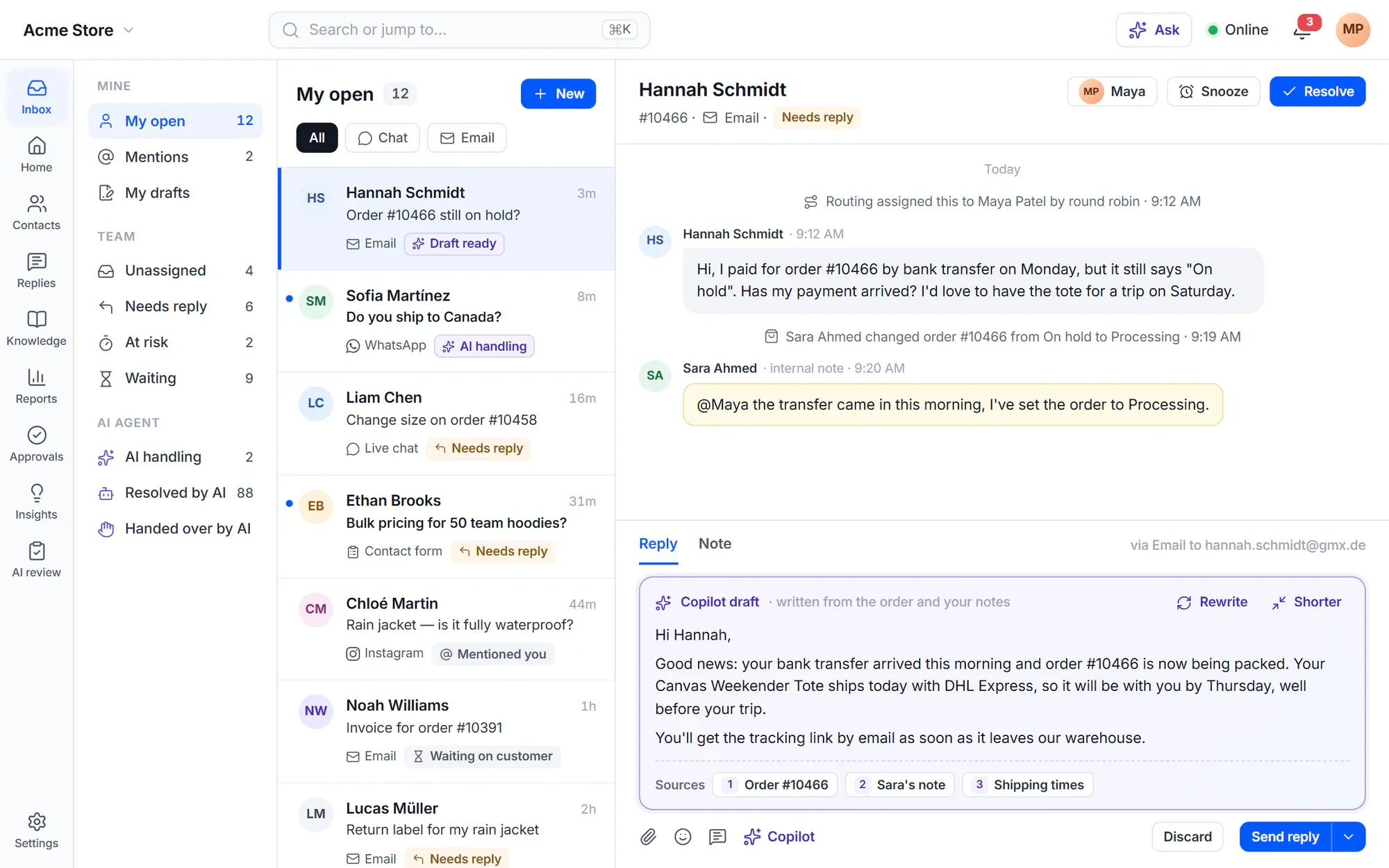
The chat widget knows who is signed in and what they ordered, takes files and voice notes, and loads in about 35 KB once the page is idle.
Explore live chat
Articles are WordPress pages on your site. With Yoast, Rank Math, SEOPress or AIOSEO active, your SEO plugin handles meta tags and schema.
Explore help center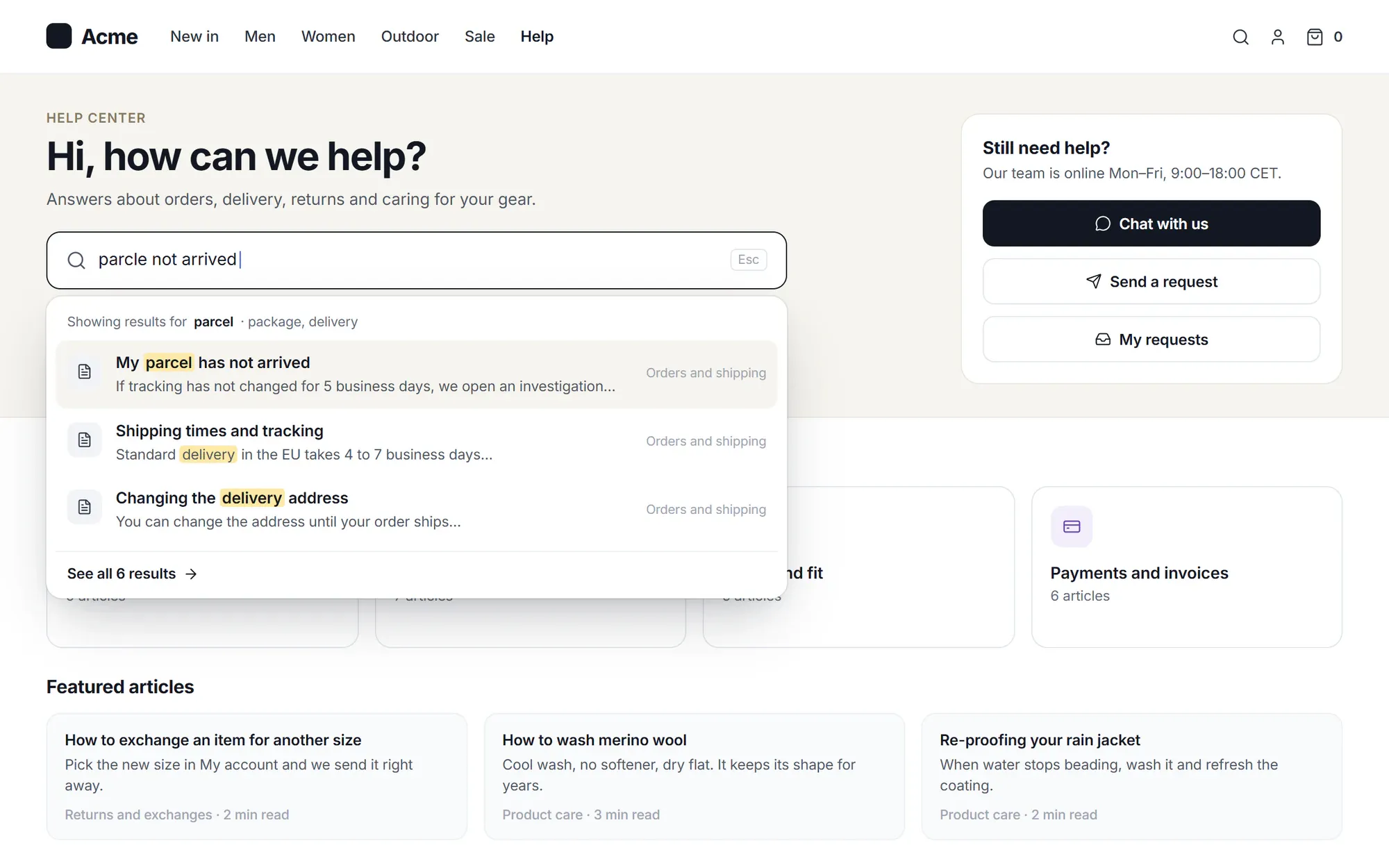
Customers follow their requests and open new ones. With WooCommerce the portal sits under My Account → Support, and every order has a Get help button.
Explore customer portal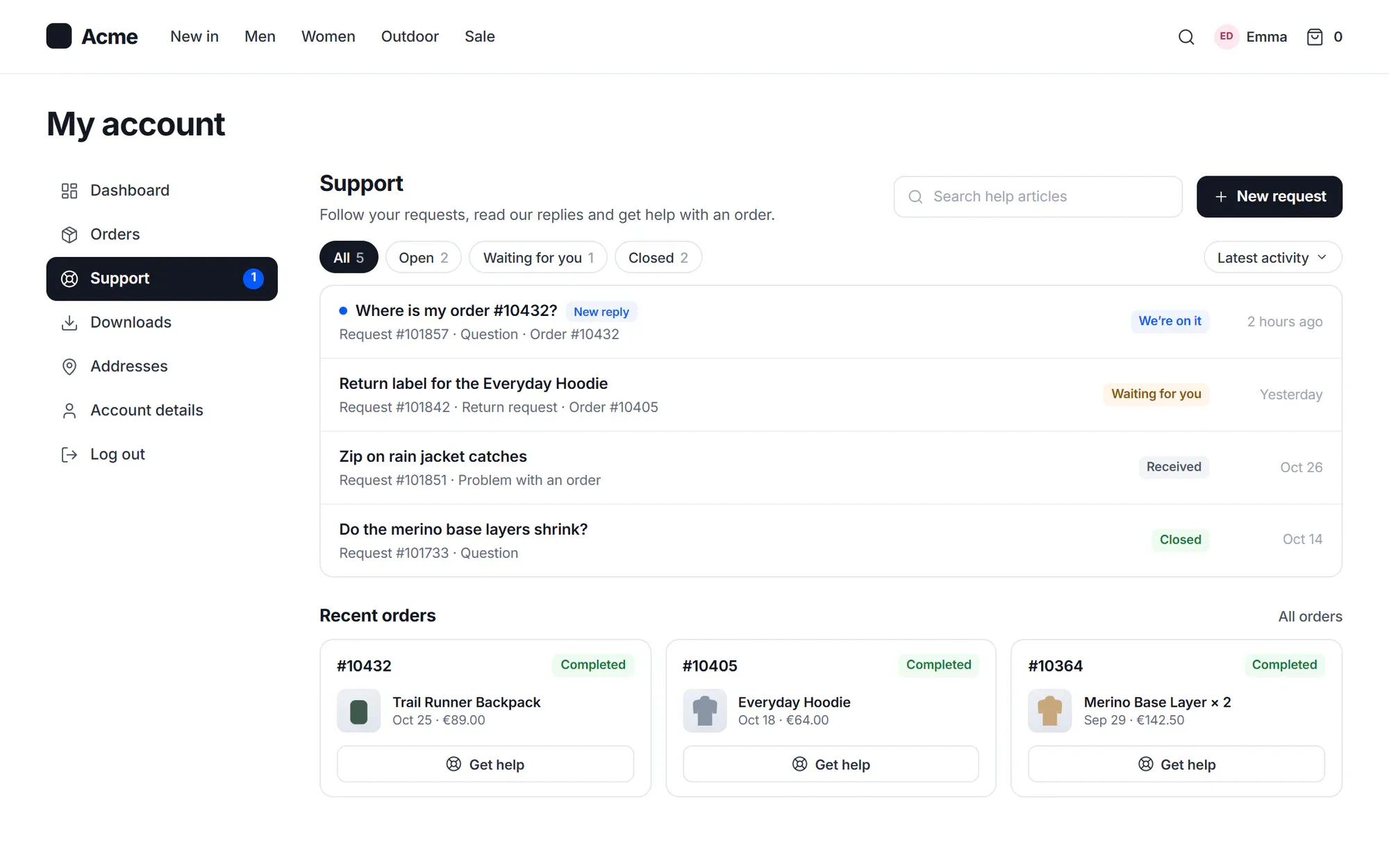
See the customer’s orders, tracking and products beside the conversation, and resend emails or reset passwords without leaving it.
Explore woocommerce
Rules sort, assign and answer for you. Multi-step workflows add waits, buttons and approvals.
Explore automation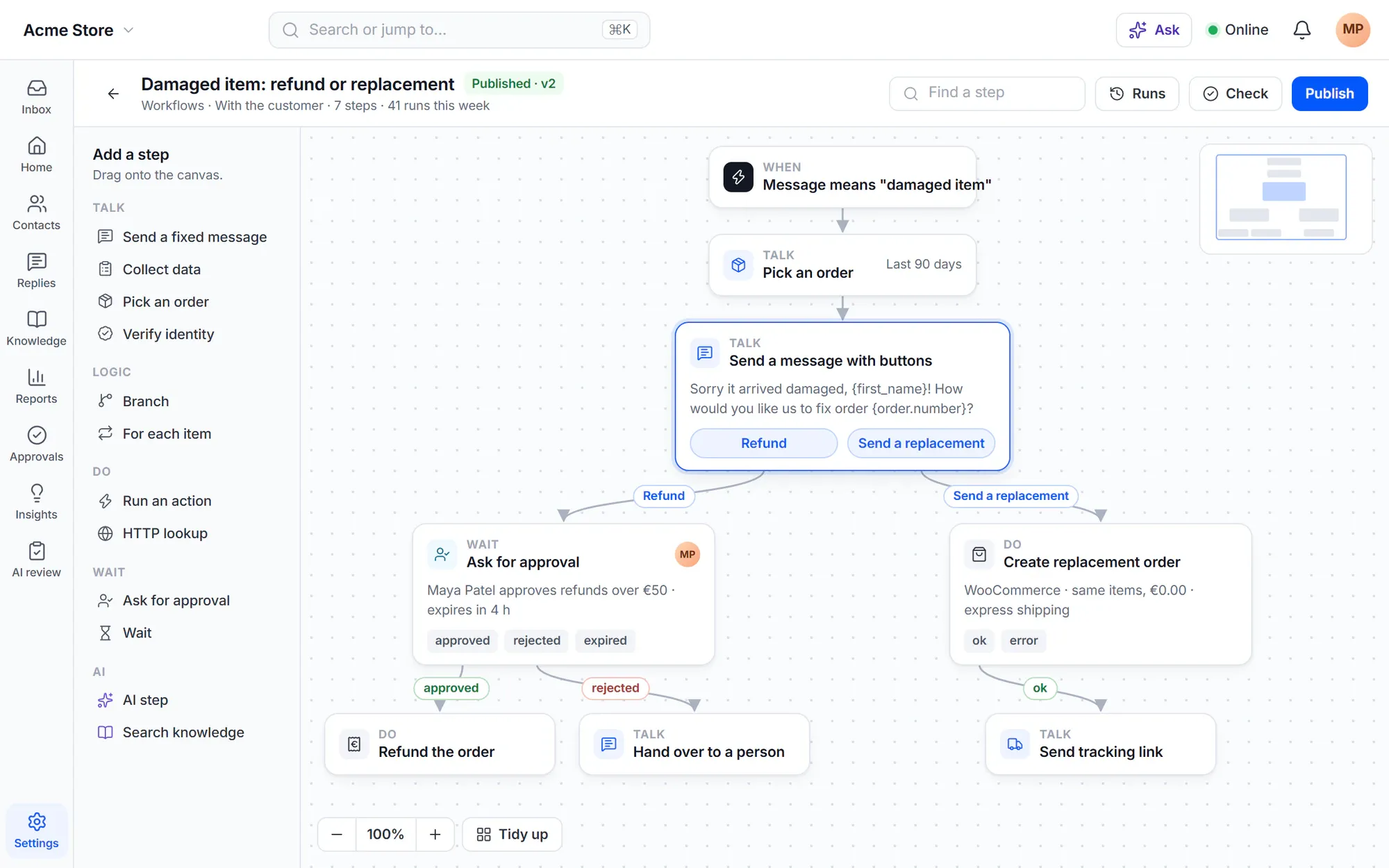
Volume, response times, satisfaction and AI results, filtered by product, channel or team.
Explore reports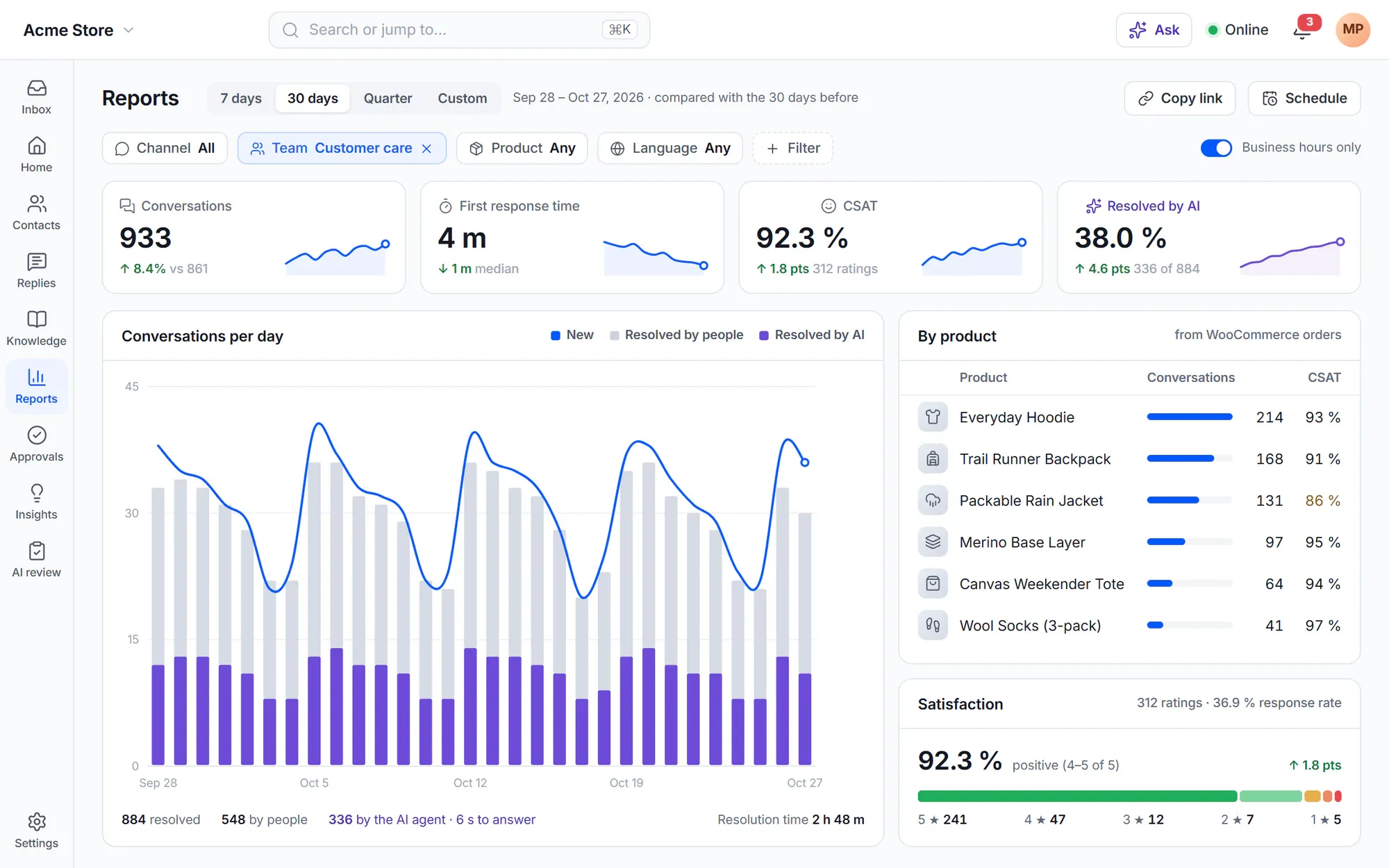
WordPress-native
Your customers, orders and pages are already there. No sync, no second login, no bridge to an outside service.
With WooCommerce, the portal is a Support tab in My Account, and every order has a Get help button.
Explore the portal
Orders, subscriptions, bookings and memberships are read from WooCommerce as they are. Nothing is copied.
WooCommerce supportMy Account · Orders
Customers are found by their WordPress account and email.
Articles are pages on your own site, with your SEO plugin.
Learn moreConversations and customers stay in your WordPress database.
Learn moreChannels
Multilingual
Your team works in its own language, and your customers get the widget, the portal and the help center in theirs.
Cliedesk Pro ships complete translations in every language listed. Translations of the free plugin come as WordPress.org language packs.
Explore the multilingual help deskAI providers
Connect a cloud provider with your own key, use your enterprise cloud, or keep AI on your own server.
You own it
Many SaaS help desks charge per agent and per AI resolution. Cliedesk charges for neither: you pay your AI provider directly for what you use.
Security and privacySolutions
Answer order questions and handle refunds and returns from the conversation.
For WooCommerce storesSupport many products and licences from one help desk, with the customer’s product access next to every conversation.
For software vendors
Know each member’s plan and courses before you reply.
Learn moreRun support for your clients, each with their own products and team.
Learn moreEvery product and store in one desk, each with its own look.
Learn moreIntegrations
Cliedesk reads your shop, membership and course plugins right inside WordPress, and connects your email, messaging channels, team tools, CRM and payments.
Plans
Every Pro plan includes every Pro feature. Plans differ only in how many sites you run Cliedesk on.
A complete help desk, free forever.
Unlimited agents, conversations and products: shared inbox, live chat, request forms, help center, customer portal, rules and WooCommerce order context.
From $49 a year.
The AI agent, copilot, triage and quality scoring, plus incoming email, more channels, workflows, SLAs, WooCommerce actions and the REST API.
Can’t find your answer? Search the docs or ask us.
Search the docs →Get support →An AI help desk is a help desk where AI works in every step of support: it sorts every message, answers customers from your own knowledge, prepares actions, drafts replies for your team and scores conversations, while people approve, coach and handle the exceptions.
Yes. The free plugin is a complete help desk: unlimited agents, conversations and products, with the shared inbox, live chat, request forms, help center, customer portal, one-step rules and WooCommerce order context. There is no trial and no locked data.
Cliedesk Pro adds AI — the AI agent, copilot, triage and quality scoring — plus incoming email, more channels, multi-step workflows, SLAs, routing, WooCommerce actions such as refunds, and the REST API, webhooks and MCP. Every Pro plan includes every Pro feature; plans differ only in the number of sites.
Yes. AI runs on your own AI provider key, or a local model, and you pay the provider for what you use. Cliedesk charges no AI fee per resolution or per seat. Budgets, alerts and hard caps keep spending predictable.
Not by default. Refunds, credits, coupons and reships ask for approval for every amount. You can allow auto-approve limits only after the AI agent has run in shadow mode, and the customer confirms refunds and order changes.
Conversations and customers stay in your WordPress database. When you use AI, the text needed for each request goes to the AI provider you chose — or nowhere, with a local model.
No. Cliedesk works on any WordPress site. With WooCommerce it also shows orders next to each conversation and adds order self-service to the customer portal.
The chat widget loads in about 35 KB (gzipped), after the page is idle. The help desk itself runs in the WordPress admin and in its own app, not on your public pages.
Start with the free help desk in minutes. Add the AI agent and copilot with Cliedesk Pro, on your own AI key.